Use your browser’s Find (Ctrl+F / ⌘F) to locate a setting. Open its row for the full explanation and limits. Source-check time is a verification timestamp, not a script publication date.
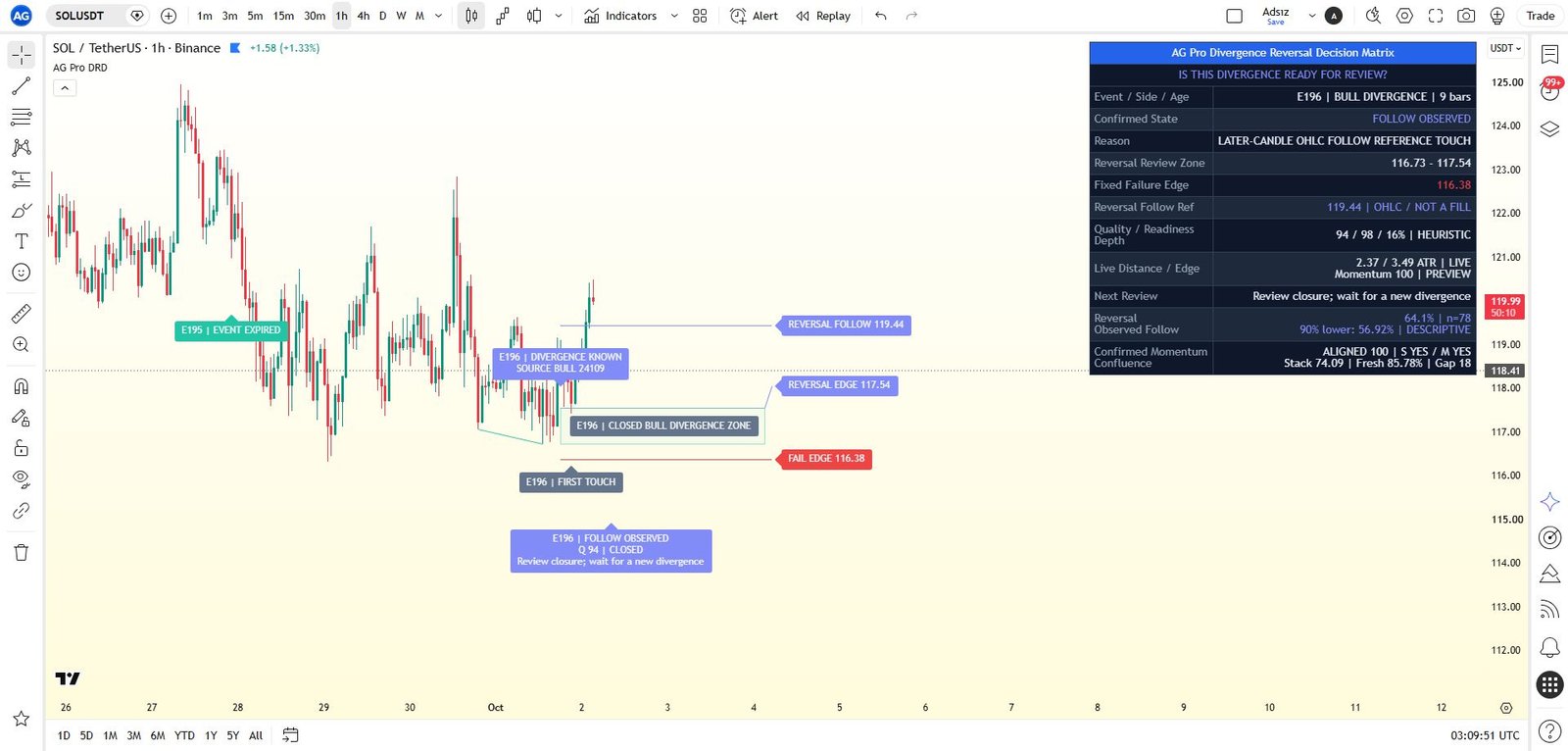
General settings
32 inputsPlanner Mode
- Input type
string- Source default
"Auto"- Available options
["Auto", "Bullish Divergences", "Bearish Divergences"]- Minimum
Not specified in source- Maximum
Not specified in source- Step
Not specified in source
What it controls
Controls which reversal side the workflow is allowed to evaluate.
Effect on the script
Auto uses the latest qualified bullish or bearish divergence context.
When to adjust it
Select a side only when the chart study is deliberately restricted to that scenario.
Interpretation and limits
Choosing a side does not validate that directional thesis or predict the next move.
Original input tooltip
Controls which reversal side the workflow is allowed to evaluate. Auto uses the latest qualified bullish or bearish divergence context.
Pivot Confirmation
- Input type
int- Source default
5- Available options
Not specified in source- Minimum
2- Maximum
14- Step
Not specified in source
What it controls
Controls the swing-confirmation window used to compare price pivots and oscillator values sampled at the same confirmed price pivots.
Effect on the script
Changes the confirmed-pivot qualification or separation requirement specified by the control.
When to adjust it
Adjust it when studying a different structural scale or the spacing allowed between compared pivots.
Interpretation and limits
Confirmed pivots require later information; a displayed historical pivot was not necessarily known at its own bar.
Original input tooltip
Controls the swing-confirmation window used to compare price pivots and oscillator values sampled at the same confirmed price pivots.
RSI Length
- Input type
int- Source default
14- Available options
Not specified in source- Minimum
5- Maximum
50- Step
Not specified in source
What it controls
Controls the primary divergence oscillator used for anchor comparison.
Effect on the script
Changes the measurement horizon used by the oscillator, trend, range, or context component named by the setting.
When to adjust it
Change it when comparing a different analytical horizon and record the configuration alongside the observations.
Interpretation and limits
Different windows produce different contexts and are not evidence of an improved future result.
Original input tooltip
Controls the primary divergence oscillator used for anchor comparison.
Stoch Length
- Input type
int- Source default
14- Available options
Not specified in source- Minimum
5- Maximum
50- Step
Not specified in source
What it controls
Controls the secondary momentum confirmation used inside the stack-strength score.
Effect on the script
Changes the measurement horizon used by the oscillator, trend, range, or context component named by the setting.
When to adjust it
Change it when comparing a different analytical horizon and record the configuration alongside the observations.
Interpretation and limits
Different windows produce different contexts and are not evidence of an improved future result.
Original input tooltip
Controls the secondary momentum confirmation used inside the stack-strength score.
Momentum Context Lookback
- Input type
int- Source default
8- Available options
Not specified in source- Minimum
3- Maximum
34- Step
Not specified in source
What it controls
Controls how recent RSI and MACD behavior is evaluated for momentum context.
Effect on the script
Changes the measurement horizon used by the oscillator, trend, range, or context component named by the setting.
When to adjust it
Change it when comparing a different analytical horizon and record the configuration alongside the observations.
Interpretation and limits
Different windows produce different contexts and are not evidence of an improved future result.
Original input tooltip
Controls how recent RSI and MACD behavior is evaluated for momentum context.
Stack Strictness
- Input type
string- Source default
"Balanced"- Available options
["Relaxed", "Balanced", "Strict"]- Minimum
Not specified in source- Maximum
Not specified in source- Step
Not specified in source
What it controls
Controls the minimum RSI improvement and secondary oscillator agreement.
Effect on the script
Relaxed permits RSI alone, Balanced requires Stochastic or MACD histogram agreement, Strict requires both.
When to adjust it
Compare requirements under a fixed symbol, timeframe, and remaining configuration.
Interpretation and limits
A more selective or stronger heuristic score is not a calibrated success probability or a guarantee of reversal or continuation.
Original input tooltip
Controls the minimum RSI improvement and secondary oscillator agreement. Relaxed permits RSI alone, Balanced requires Stochastic or MACD histogram agreement, Strict requires both.
Reversal Zone Depth
- Input type
string- Source default
"Balanced"- Available options
["Tight", "Balanced", "Wide"]- Minimum
Not specified in source- Maximum
Not specified in source- Step
Not specified in source
What it controls
Controls the depth of the reversal review zone around the active divergence pivot.
Effect on the script
Changes the width, depth, or allowed distance of the documented review area or qualification reference.
When to adjust it
Adjust it when deliberately comparing a narrower or broader structural review definition.
Interpretation and limits
A wider area or larger allowed distance does not make the context more reliable or guarantee containment.
Original input tooltip
Controls the depth of the reversal review zone around the active divergence pivot.
Failure Risk Strictness
- Input type
string- Source default
"Balanced"- Available options
["Relaxed", "Balanced", "Strict"]- Minimum
Not specified in source- Maximum
Not specified in source- Step
Not specified in source
What it controls
Controls how quickly pressure beyond the invalidation rail increases failure-risk review.
Effect on the script
Changes the threshold or sensitivity of the documented qualification or review component.
When to adjust it
Compare requirements under a fixed symbol, timeframe, and remaining configuration.
Interpretation and limits
A more selective or stronger heuristic score is not a calibrated success probability or a guarantee of reversal or continuation.
Original input tooltip
Controls how quickly pressure beyond the invalidation rail increases failure-risk review.
Same-Bar Conflict
- Input type
string- Source default
"Exclude"- Available options
["Exclude", "Invalidation First", "Target First"]- Minimum
Not specified in source- Maximum
Not specified in source- Step
Not specified in source
What it controls
Controls how a historical sample is audited when its reversal target and invalidation rail are both reached on the same bar.
Effect on the script
Exclude removes the ambiguous sample from the resolved denominator. Invalidation First and Target First are explicit OHLC assumptions, not observed intrabar ordering. Qualified reversal conflicts close the owner as uncertain.
When to adjust it
Use it for a stated ambiguity-policy comparison while keeping all other observation settings fixed.
Interpretation and limits
Qualified reversal conflicts close the owner as uncertain.
Original input tooltip
Controls how a historical sample is audited when its reversal target and invalidation rail are both reached on the same bar. Exclude removes the ambiguous sample from the resolved denominator. Invalidation First and Target First are explicit OHLC assumptions, not observed intrabar ordering. Qualified reversal conflicts close the owner as uncertain.
Minimum Label Score
- Input type
int- Source default
75- Available options
Not specified in source- Minimum
60- Maximum
95- Step
Not specified in source
What it controls
Hides historical labels below this score while keeping the current workflow, panel, and alerts active.
Effect on the script
Applies the selected minimum-score filter to the documented secondary or historical labels.
When to adjust it
Adjust it when lower-priority annotations compete with the current chart context.
Interpretation and limits
A filtered label is not a removed historical outcome. Follow the tooltip for any milestones that bypass the filter.
Original input tooltip
Hides historical labels below this score while keeping the current workflow, panel, and alerts active.
Zone Projection Bars
- Input type
int- Source default
48- Available options
Not specified in source- Minimum
18- Maximum
240- Step
Not specified in source
What it controls
Controls how far the active reversal zone and invalidation rail are projected to the right.
Effect on the script
Controls the horizontal extent or placement of the relevant chart drawing in bars.
When to adjust it
Adjust it when the available forward chart space or the intended visual review area changes.
Interpretation and limits
Drawing farther to the right does not extend event validity or establish that price will reach a reference.
Original input tooltip
Controls how far the active reversal zone and invalidation rail are projected to the right.
Visual Preset
- Input type
string- Source default
"Balanced"- Available options
["Clean", "Balanced", "Rich"]- Minimum
Not specified in source- Maximum
Not specified in source- Step
Not specified in source
What it controls
Controls chart label density.
Effect on the script
Clean keeps the active workflow calm, Balanced keeps key historical labels, and Rich allows more state labels.
When to adjust it
Use a calmer preset when annotations obscure current structure, or a richer one when reviewing the documented historical context.
Interpretation and limits
More visible labels do not mean more independent evidence, trades, or profitable opportunities.
Original input tooltip
Controls chart label density. Clean keeps the active workflow calm, Balanced keeps key historical labels, and Rich allows more state labels.
State Label Cooldown
- Input type
int- Source default
55- Available options
Not specified in source- Minimum
50- Maximum
180- Step
Not specified in source
What it controls
Controls the minimum number of bars between historical state labels.
Effect on the script
Changes the spacing or acceptance cooldown described by the control; the tooltip identifies which events it affects.
When to adjust it
Adjust only after distinguishing display-label spacing from a cooldown that changes accepted-event selection.
Interpretation and limits
A selection cooldown can change the sample. Display spacing alone must not be interpreted as better analytical performance.
Original input tooltip
Controls the minimum number of bars between historical state labels.
Label Font Size
- Input type
string- Source default
"Normal"- Available options
["Small", "Normal", "Large"]- Minimum
Not specified in source- Maximum
Not specified in source- Step
Not specified in source
What it controls
Controls visible chart label size.
Effect on the script
Controls the text-size mapping used by the relevant panel or chart-label renderer.
When to adjust it
Adjust it for the chart size and viewing distance while preserving readable boundaries and state information.
Interpretation and limits
A larger font can increase chart overlap. Text size does not change the analytical observations.
Original input tooltip
Controls visible chart label size.
Minimum Pivot Separation
- Input type
int- Source default
5- Available options
Not specified in source- Minimum
2- Maximum
100- Step
Not specified in source
What it controls
Minimum bars between the two confirmed price pivots.
Effect on the script
Oscillators are sampled at those exact price-pivot bars.
When to adjust it
Adjust it when studying a different structural scale or the spacing allowed between compared pivots.
Interpretation and limits
Confirmed pivots require later information; a displayed historical pivot was not necessarily known at its own bar.
Original input tooltip
Minimum bars between the two confirmed price pivots. Oscillators are sampled at those exact price-pivot bars.
Maximum Pivot Separation
- Input type
int- Source default
150- Available options
Not specified in source- Minimum
10- Maximum
500- Step
Not specified in source
What it controls
Rejects divergence pairs separated by more than this many bars.
Effect on the script
The larger of the minimum and maximum setting is used as the upper limit.
When to adjust it
Adjust it when studying a different structural scale or the spacing allowed between compared pivots.
Interpretation and limits
Confirmed pivots require later information; a displayed historical pivot was not necessarily known at its own bar.
Original input tooltip
Rejects divergence pairs separated by more than this many bars. The larger of the minimum and maximum setting is used as the upper limit.
Minimum Price Extension (Source ATR)
- Input type
float- Source default
0.05- Available options
Not specified in source- Minimum
0- Maximum
2- Step
0.05
What it controls
Minimum lower-low or higher-high extension relative to the second pivot ATR.
Effect on the script
Reduces near-identical price comparisons.
When to adjust it
Change it only when the specific analytical or presentation question in the tooltip changes.
Interpretation and limits
Record the configuration when comparing observations; a changed setting is not proof of a stronger future result.
Original input tooltip
Minimum lower-low or higher-high extension relative to the second pivot ATR. Reduces near-identical price comparisons.
Minimum Confirmation Momentum
- Input type
float- Source default
52- Available options
Not specified in source- Minimum
0- Maximum
100- Step
1
What it controls
Closed-candle momentum score required for initial reversal confirmation.
Effect on the script
It is a heuristic score, not a probability.
When to adjust it
Compare requirements under a fixed symbol, timeframe, and remaining configuration.
Interpretation and limits
It is a heuristic score, not a probability.
Original input tooltip
Closed-candle momentum score required for initial reversal confirmation. It is a heuristic score, not a probability.
Divergence Lifetime (Bars)
- Input type
int- Source default
200- Available options
Not specified in source- Minimum
10- Maximum
1000- Step
Not specified in source
What it controls
Hard lifetime from confirmed knowledge time.
Effect on the script
Failed, expired and resolved events cannot reactivate.
When to adjust it
Change it when studying another explicitly defined event or observation horizon.
Interpretation and limits
Failed, expired and resolved events cannot reactivate.
Original input tooltip
Hard lifetime from confirmed knowledge time. Failed, expired and resolved events cannot reactivate.
Reversal Qualification Deadline
- Input type
int- Source default
80- Available options
Not specified in source- Minimum
3- Maximum
1000- Step
Not specified in source
What it controls
A divergence must qualify a later reversal before this deadline.
Effect on the script
The hard event lifetime takes precedence.
When to adjust it
Change it when studying another explicitly defined event or observation horizon.
Interpretation and limits
A different window changes eligibility, timeouts, or completed observations. Pending and excluded cases must remain distinct from resolved results.
Original input tooltip
A divergence must qualify a later reversal before this deadline. The hard event lifetime takes precedence.
Follow Observation Window
- Input type
int- Source default
160- Available options
Not specified in source- Minimum
5- Maximum
1000- Step
Not specified in source
What it controls
Separate later-candle OHLC observations from detection close and qualified reversal close.
Effect on the script
The final eligible candle is evaluated before timeout.
When to adjust it
Change it when studying another explicitly defined event or observation horizon.
Interpretation and limits
A different window changes eligibility, timeouts, or completed observations. Pending and excluded cases must remain distinct from resolved results.
Original input tooltip
Separate later-candle OHLC observations from detection close and qualified reversal close. The final eligible candle is evaluated before timeout.
Follow Reference (Source ATR)
- Input type
float- Source default
1- Available options
Not specified in source- Minimum
0.25- Maximum
5- Step
0.25
What it controls
Fixed descriptive directional reference from each stream starting close.
Effect on the script
Not an execution target, order fill or return.
When to adjust it
Adjust it only when deliberately changing the descriptive follow-through question being measured.
Interpretation and limits
Not an execution target, order fill or return.
Original input tooltip
Fixed descriptive directional reference from each stream starting close. Not an execution target, order fill or return.
Later Reversal Closes
- Input type
int- Source default
2- Available options
Not specified in source- Minimum
1- Maximum
5- Step
Not specified in source
What it controls
Consecutive directional closes beyond the reversal zone and EMA 8 after first touch.
Effect on the script
Neither knowledge nor first touch can self-confirm.
When to adjust it
Compare requirements under a fixed symbol, timeframe, and remaining configuration.
Interpretation and limits
A more selective or stronger heuristic score is not a calibrated success probability or a guarantee of reversal or continuation.
Original input tooltip
Consecutive directional closes beyond the reversal zone and EMA 8 after first touch. Neither knowledge nor first touch can self-confirm.
Minimum Reversal Reaction (Source ATR)
- Input type
float- Source default
0.1- Available options
Not specified in source- Minimum
0- Maximum
2- Step
0.05
What it controls
Directional close movement from the first later zone-touch close, measured in fixed source ATR.
Effect on the script
Applies this parameter to the component and behavior stated in its source tooltip.
When to adjust it
Change it only when the specific analytical or presentation question in the tooltip changes.
Interpretation and limits
Record the configuration when comparing observations; a changed setting is not proof of a stronger future result.
Original input tooltip
Directional close movement from the first later zone-touch close, measured in fixed source ATR.
Reversal Reach (Source ATR)
- Input type
float- Source default
3- Available options
Not specified in source- Minimum
0.5- Maximum
10- Step
0.25
What it controls
Maximum distance from the fixed reversal edge for initial qualification.
Effect on the script
Distant events retain their deadline.
When to adjust it
Adjust it when deliberately comparing a narrower or broader structural review definition.
Interpretation and limits
A wider area or larger allowed distance does not make the context more reliable or guarantee containment.
Original input tooltip
Maximum distance from the fixed reversal edge for initial qualification. Distant events retain their deadline.
Accepted Divergence Cooldown
- Input type
int- Source default
8- Available options
Not specified in source- Minimum
0- Maximum
100- Step
Not specified in source
What it controls
Spaces accepted divergence owners.
Effect on the script
Suppressed pivot-pair identities are consumed rather than replayed.
When to adjust it
Adjust only after distinguishing display-label spacing from a cooldown that changes accepted-event selection.
Interpretation and limits
Suppressed pivot-pair identities are consumed rather than replayed.
Original input tooltip
Spaces accepted divergence owners. Suppressed pivot-pair identities are consumed rather than replayed.
Active Divergence Policy
- Input type
string- Source default
"Keep Until Terminal"- Available options
["Keep Until Terminal", "Replace on New Divergence"]- Minimum
Not specified in source- Maximum
Not specified in source- Step
Not specified in source
What it controls
Keep retains the owner until closure.
Effect on the script
Replace on New Divergence replaces it on a new divergence pair and audits pending observations as excluded. Policy affects sample selection.
When to adjust it
Change it only when deliberately comparing event-retention and replacement rules.
Interpretation and limits
Replace on New Divergence replaces it on a new divergence pair and audits pending observations as excluded.
Original input tooltip
Keep retains the owner until closure. Replace on New Divergence replaces it on a new divergence pair and audits pending observations as excluded. Policy affects sample selection.
Panel Detail
- Input type
string- Source default
"Compact"- Available options
["Compact", "Full"]- Minimum
Not specified in source- Maximum
Not specified in source- Step
Not specified in source
What it controls
Compact shows confirmed state, fixed boundaries, live distance and confluence.
Effect on the script
Full adds pivot evidence, timing and observation accounting.
When to adjust it
Use the current-state view for orientation and the available evidence/audit view when checking observation provenance and exclusions.
Interpretation and limits
A compact or hidden view does not remove the limitations of the underlying observations.
Original input tooltip
Compact shows confirmed state, fixed boundaries, live distance and confluence. Full adds pivot evidence, timing and observation accounting.
Show Panel
- Input type
bool- Source default
true- Available options
Not specified in source- Minimum
Not specified in source- Maximum
Not specified in source- Step
Not specified in source
What it controls
Shows or hides the AGPro workflow panel.
Effect on the script
The panel summarizes divergence type, stack strength, reversal zone, momentum context, failure risk, readiness, bars active, descriptive reversal observations, setup quality, state, and current review.
When to adjust it
Show the panel to inspect the state and evidence, or hide it when chart space is the immediate priority.
Interpretation and limits
Hiding the panel is a presentation choice; do not treat missing rows as missing risk.
Original input tooltip
Shows or hides the AGPro workflow panel. The panel summarizes divergence type, stack strength, reversal zone, momentum context, failure risk, readiness, bars active, descriptive reversal observations, setup quality, state, and current review.
Panel Location
- Input type
string- Source default
"Top Right"- Available options
["Top Right", "Top Left", "Bottom Right", "Bottom Left"]- Minimum
Not specified in source- Maximum
Not specified in source- Step
Not specified in source
What it controls
Selects the panel corner.
Effect on the script
Keep the panel away from the active price area for a clear chart review.
When to adjust it
Move the panel when it overlaps active candles, the current workflow zone, or reference labels.
Interpretation and limits
Panel placement changes presentation, not the detected context or observation accounting.
Original input tooltip
Selects the panel corner. Keep the panel away from the active price area for a clear chart review.
Panel Theme
- Input type
string- Source default
"Dark"- Available options
["Dark", "Light"]- Minimum
Not specified in source- Maximum
Not specified in source- Step
Not specified in source
What it controls
Selects contrasting panel backgrounds and text colors.
Effect on the script
Chart zones retain the directional AGPro palette.
When to adjust it
Choose the available theme that keeps the panel readable against the chart background.
Interpretation and limits
A theme changes appearance; it does not change event qualification or statistical evidence.
Original input tooltip
Selects contrasting panel backgrounds and text colors. Chart zones retain the directional AGPro palette.
Panel Font Size
- Input type
string- Source default
"Normal"- Available options
["Small", "Normal", "Large"]- Minimum
Not specified in source- Maximum
Not specified in source- Step
Not specified in source
What it controls
Controls panel text size.
Effect on the script
Normal is the default; Compact reduces the number of rows without reducing analytical calculations.
When to adjust it
Adjust it for the chart size and viewing distance while preserving readable boundaries and state information.
Interpretation and limits
A larger font can increase chart overlap. Text size does not change the analytical observations.
Original input tooltip
Controls panel text size. Normal is the default; Compact reduces the number of rows without reducing analytical calculations.
Keep the settings in context
Change one analytical assumption at a time and compare the same instrument, timeframe and history. A chart reference, score, observation rate or input default does not establish a trade fill, a forward probability or a guaranteed outcome.
Return to the product overview · View this script on TradingView