Use your browser’s Find (Ctrl+F / ⌘F) to locate a setting. Open its row for the full explanation and limits. Source-check time is a verification timestamp, not a script publication date.
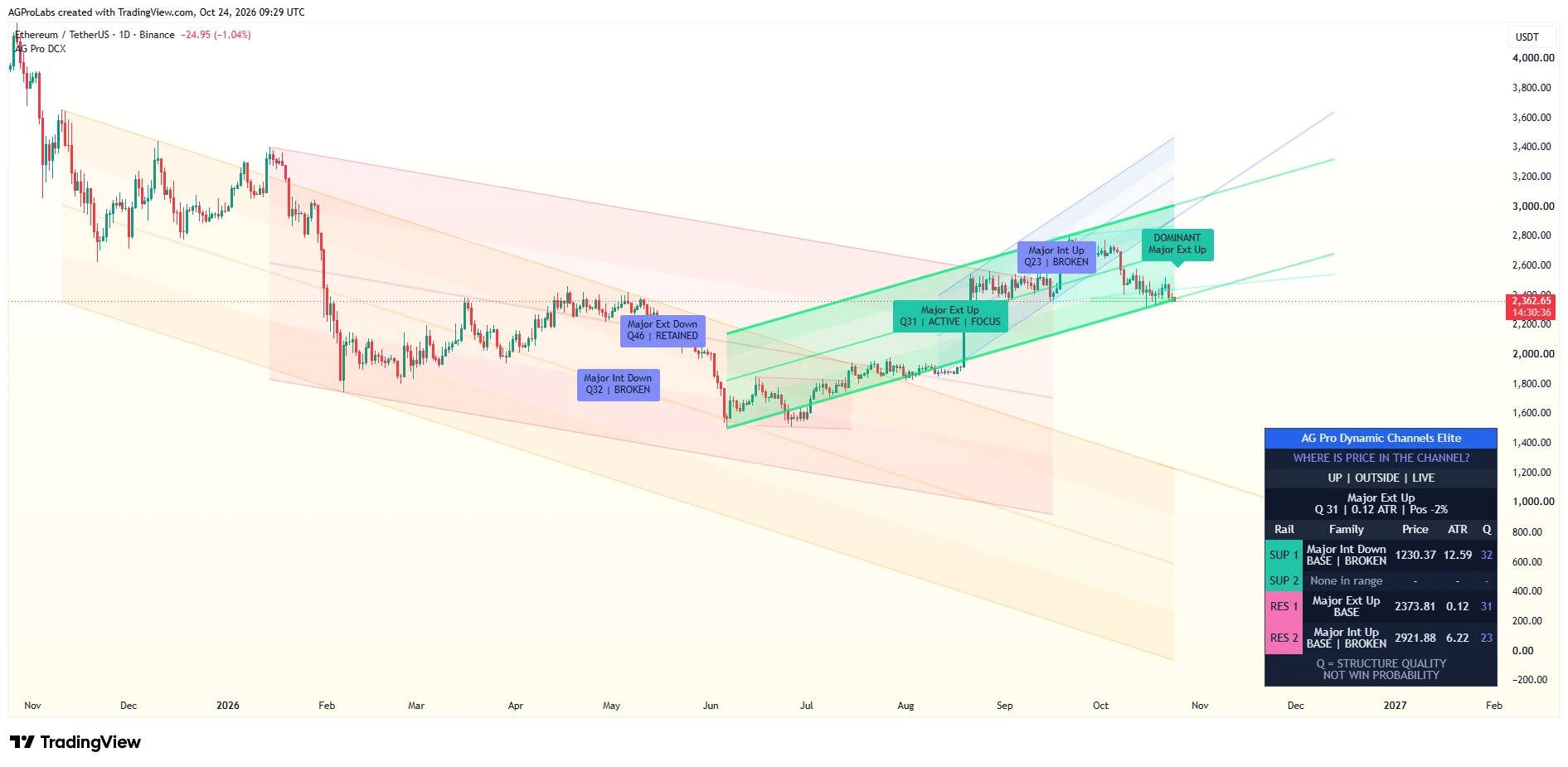

1. Pivot Engine
2 inputsPivot Lookback Period
- Input type
int- Source default
5- Available options
[]- Minimum
1- Maximum
500- Step
Not specified in source- When this input is editable
Editable- Editable input
true- Editable with the default profile
true
What it controls
Confirmed pivot lookback used by the channel engine.
Effect on the script
Sets the confirmed pivot lookback feeding channel construction.
When to adjust it
Choose it before comparing how local or broad the detected channel structure should be.
Interpretation and limits
Broader pivots confirm later; a channel is not known on the pivot’s historical origin candle.
Original input tooltip
Confirmed pivot lookback used by the channel engine. Higher values produce slower, broader structure; lower values react faster.
Max Scan Bars
- Input type
int- Source default
1200- Available options
[]- Minimum
50- Maximum
5000- Step
Not specified in source- When this input is editable
Editable- Editable input
true- Editable with the default profile
true
What it controls
Limits channel width scan for performance.
Effect on the script
Caps the historical width scan used by the channel engine.
When to adjust it
Increase it when the intended channel-width review needs a deeper available window.
Interpretation and limits
More scan history can increase processing work. The setting does not establish a measured speed improvement or predictive accuracy.
Original input tooltip
Limits channel width scan for performance. Lower = faster, higher = more accurate width.
0. Diagnostics
2 inputsShow Diagnostics
- Input type
bool- Source default
false- Available options
[]- Minimum
Not specified in source- Maximum
Not specified in source- Step
Not specified in source- When this input is editable
Editable- Editable input
true- Editable with the default profile
true
What it controls
Shows pivot/engine counters on the last bar.
Effect on the script
Shows pivot and engine counters on the latest bar.
When to adjust it
Enable it temporarily when investigating an empty or unexpected chart.
Interpretation and limits
Diagnostic counters are troubleshooting evidence, not extra trade signals.
Original input tooltip
Shows pivot/engine counters on the last bar. Helps debug if nothing is drawn.
Settings Audit (Debug)
- Input type
bool- Source default
false- Available options
[]- Minimum
Not specified in source- Maximum
Not specified in source- Step
Not specified in source- When this input is editable
Editable- Editable input
true- Editable with the default profile
true
What it controls
Shows effective (post-preset) visibility toggles + key UI states on the last bar.
Effect on the script
Shows effective post-preset visibility and key interface states on the latest bar.
When to adjust it
Enable it while checking whether a preset or an override explains a switch’s visible result.
Interpretation and limits
It reports current effective settings; it does not change channel calculations.
Original input tooltip
Shows effective (post-preset) visibility toggles + key UI states on the last bar. Helpful for verifying that Settings switches are actually taking effect.
2. Display
12 inputsTheme
- Input type
string- Source default
"Neon"- Available options
["Institutional", "Neon", "Monochrome"]- Minimum
Not specified in source- Maximum
Not specified in source- Step
Not specified in source- When this input is editable
Editable- Editable input
true- Editable with the default profile
true
What it controls
Institutional = soft pastel professional palette.
Effect on the script
Selects the channel palette independently of Visual Preset and Panel Theme.
When to adjust it
Choose Institutional, Neon or Monochrome for chart-background legibility.
Interpretation and limits
Neon is this field’s source default; Premium is the separate Visual Preset default.
Original input tooltip
Institutional = soft pastel professional palette. Neon = legacy vivid palette. Monochrome = minimal grayscale.
Major External
- Input type
bool- Source default
true- Available options
[]- Minimum
Not specified in source- Maximum
Not specified in source- Step
Not specified in source- When this input is editable
Editable- Editable input
true- Editable with the default profile
true
What it controls
Routes visibility of major external channel families.
Effect on the script
Routes visibility of major external channel families.
When to adjust it
Show them when the outer major channel backbone belongs in the review.
Interpretation and limits
Visibility does not turn channel geometry into a guaranteed support or resistance outcome.
Major Internal
- Input type
bool- Source default
true- Available options
[]- Minimum
Not specified in source- Maximum
Not specified in source- Step
Not specified in source- When this input is editable
Editable- Editable input
true- Editable with the default profile
true
What it controls
Routes visibility of major internal channel families.
Effect on the script
Routes visibility of major internal channel families.
When to adjust it
Show them when the inner major structural references aid the chart review.
Interpretation and limits
These references can disagree with other channel families and are not independent outcome guarantees.
Minor External
- Input type
bool- Source default
false- Available options
[]- Minimum
Not specified in source- Maximum
Not specified in source- Step
Not specified in source- Default meaning
Stored individual input default; effective behavior under the default Premium preset is listed separately. Panel Mode can override panel visibility.- Effective default
false- Preset-controlled
true- When this input is editable
Editable- Editable input
true- Editable with the default profile
true
What it controls
Minor External channels.
Effect on the script
Supplies minor external visibility in Manual; Rich enables it while Premium and Clean disable it.
When to adjust it
Select Manual before expecting this individual switch to control visibility.
Interpretation and limits
The stored false default is not a universal effective state across all presets.
Original input tooltip
Minor External channels. Premium and Clean hide these families; Rich shows them. Select Visual Preset = Manual to use this switch.
Minor Internal
- Input type
bool- Source default
false- Available options
[]- Minimum
Not specified in source- Maximum
Not specified in source- Step
Not specified in source- Default meaning
Stored individual input default; effective behavior under the default Premium preset is listed separately. Panel Mode can override panel visibility.- Effective default
true- Preset-controlled
true- When this input is editable
Editable- Editable input
true- Editable with the default profile
true
What it controls
Minor Internal channels.
Effect on the script
Supplies minor internal visibility in Manual; Premium and Rich enable it while Clean disables it.
When to adjust it
Use Manual when choosing this family independently of the preset.
Interpretation and limits
The stored false default is overridden to true by the default Premium preset.
Original input tooltip
Minor Internal channels. Premium and Rich show these families; Clean hides them. Select Visual Preset = Manual to use this switch.
Extend
- Input type
string- Source default
"none"- Available options
["none", "both", "right", "left"]- Minimum
Not specified in source- Maximum
Not specified in source- Step
Not specified in source- When this input is editable
Editable- Editable input
true- Editable with the default profile
true
What it controls
Sets extension direction for the channel line objects across all eight families.
Effect on the script
Sets extension direction for the channel line objects across all eight families.
When to adjust it
Choose the extension direction when existing channel rails should continue beyond their endpoints.
Interpretation and limits
Line extension and the bounded Projection (Forward) overlay are separate display controls; neither forecasts future price.
Replace Prev
- Input type
bool- Source default
true- Available options
[]- Minimum
Not specified in source- Maximum
Not specified in source- Step
Not specified in source- When this input is editable
Editable- Editable input
true- Editable with the default profile
true
What it controls
Routes the replacement policy to all channel families so previous same-family objects can be removed when a new channel is created.
Effect on the script
Routes the replacement policy to all channel families so previous same-family objects can be removed when a new channel is created.
When to adjust it
Keep replacement on for a shorter current-structure view; change it only when older same-family drawings are needed.
Interpretation and limits
Retained objects increase visible history and can add clutter; object limits still apply.
Major Px
- Input type
int- Source default
4- Available options
[]- Minimum
1- Maximum
4- Step
Not specified in source- Effective default
3- When this input is editable
Editable- Editable input
true- Editable with the default profile
true
What it controls
Sets requested major-channel line width. Active main rails are capped at 3 pixels; visible broken main rails use a lighter 1-pixel stroke.
Effect on the script
Sets requested major-channel line width. Active main rails are capped at 3 pixels; visible broken main rails use a lighter 1-pixel stroke.
When to adjust it
Adjust it when the active major backbone needs a different visual weight.
Interpretation and limits
The stored default remains 4 within the 1–4 input range, while the final renderer caps active strokes at 3. Midlines, projections and historical broken rails have their own visual weights.
Minor Px
- Input type
int- Source default
4- Available options
[]- Minimum
1- Maximum
4- Step
Not specified in source- Effective default
3- When this input is editable
Editable- Editable input
true- Editable with the default profile
true
What it controls
Sets requested minor-channel line width. Active main rails are capped at 3 pixels; visible broken main rails use a lighter 1-pixel stroke.
Effect on the script
Sets requested minor-channel line width. Active main rails are capped at 3 pixels; visible broken main rails use a lighter 1-pixel stroke.
When to adjust it
Adjust it when eligible minor structure needs a different visual weight.
Interpretation and limits
The stored default remains 4 within the 1–4 input range. It does not promise a final 4-pixel rail; focus and lifecycle hierarchy also affect presentation.
Major Style
- Input type
string- Source default
"solid"- Available options
["solid"]- Minimum
Not specified in source- Maximum
Not specified in source- Step
Not specified in source- Default meaning
Published built-in solid line-style value; no alternative stroke is offered.- When this input is editable
Editable single-option field- Editable input
true- Editable with the default profile
true
What it controls
Retains a solid stroke for major-family channel rails.
Effect on the script
Retains a solid stroke for major-family channel rails.
When to adjust it
Inspect it when checking the fixed stroke style of the published interface.
Interpretation and limits
Only Solid is offered in this release; the dropdown does not provide dashed or dotted alternatives.
Minor Style
- Input type
string- Source default
"solid"- Available options
["solid"]- Minimum
Not specified in source- Maximum
Not specified in source- Step
Not specified in source- Default meaning
Published built-in solid line-style value; no alternative stroke is offered.- When this input is editable
Editable single-option field- Editable input
true- Editable with the default profile
true
What it controls
Retains a solid stroke for minor-family channel rails.
Effect on the script
Retains a solid stroke for minor-family channel rails.
When to adjust it
Inspect it when checking consistency between major and minor strokes.
Interpretation and limits
Only Solid is offered in this release; channel-family hierarchy comes from other visual controls.
Fill
- Input type
string- Source default
"Off"- Available options
["Off", "Classic", "Gradient (Major)", "Gradient (All)"]- Minimum
Not specified in source- Maximum
Not specified in source- Step
Not specified in source- Default meaning
Stored individual input default; effective behavior under the default Premium preset is listed separately. Panel Mode can override panel visibility.- Effective default
"Gradient (Major)"- Preset-controlled
true- When this input is editable
Editable- Editable input
true- Editable with the default profile
true
What it controls
Selects fill style in Manual. Premium forces Gradient (Major), Rich Gradient (All), and Clean Off. V62.2 RC2 strengthens visible fills while retaining their visual hierarchy.
Effect on the script
Selects fill style in Manual. Premium forces Gradient (Major), Rich Gradient (All), and Clean Off. V62.2 RC2 strengthens visible fills while retaining their visual hierarchy.
When to adjust it
Use Manual before independently selecting Off, Solid or a gradient. Compare legibility with candles on the intended chart background.
Interpretation and limits
The stored Off default is overridden under default Premium. Active band transparency is bounded at 78–94 and historical fills at 88–96; visibility still depends on preset, family, state and focus. Fill contrast does not change channel geometry.
Original input tooltip
Classic = 2-band fill. Gradient = 4-band pseudo-gradient (edges -> center). Preset override: Premium uses Gradient (Major), Rich uses Gradient (All), Clean uses Off. Set Visual Preset = Manual for manual control.
2.9 Premium UX
49 inputsVisual Preset
- Input type
string- Source default
"Premium"- Available options
["Premium", "Clean", "Rich", "Manual"]- Minimum
Not specified in source- Maximum
Not specified in source- Step
Not specified in source- When this input is editable
Editable- Editable input
true- Editable with the default profile
true
What it controls
Premium = balanced paid-release visual hierarchy.
Effect on the script
Routes minor-family visibility, fill, projection, broken channels, midlines and label emphasis through a coordinated layout.
When to adjust it
Start with a preset that matches the amount of structure needed, then use Manual for independent switches.
Interpretation and limits
Panel Mode remains a separate override. Preset-driven switches can retain a value that is not currently effective.
Original input tooltip
Premium = balanced paid-release visual hierarchy. Clean = fewer visuals. Rich = maximum fills/projection/minors. Manual = follow individual toggles below.
Projection (Forward)
- Input type
bool- Source default
true- Available options
[]- Minimum
Not specified in source- Maximum
Not specified in source- Step
Not specified in source- Default meaning
Stored individual input default; effective behavior under the default Premium preset is listed separately. Panel Mode can override panel visibility.- Effective default
true- Preset-controlled
true- When this input is editable
Editable- Editable input
true- Editable with the default profile
true
What it controls
Projects visible channel structure with subtle solid rails.
Effect on the script
Selects forward structural projection in Manual; Premium and Rich force it on, Clean off.
When to adjust it
Use Manual when independently deciding whether rails should project beyond the latest bar.
Interpretation and limits
It extends existing channel geometry, not a predicted price trajectory. Visible broken channels project only the relevant rail.
Original input tooltip
Projects visible channel structure with subtle solid rails. Active channels project both edges; visible broken channels project only the price-relevant rail. Premium and Rich force projection ON, Clean forces it OFF, and Manual follows this switch.
Projection Bars
- Input type
int- Source default
50- Available options
[]- Minimum
5- Maximum
300- Step
Not specified in source- When this input is editable
Editable- Editable input
true- Editable with the default profile
true
What it controls
How many bars to project beyond the last candle.
Effect on the script
Sets the bounded number of bars used by the forward projection overlay.
When to adjust it
Adjust it for the amount of forward structural context visible at normal zoom.
Interpretation and limits
The length matters only while projection is effectively enabled; farther projection is not stronger evidence.
Original input tooltip
How many bars to project beyond the last candle.
Show Broken Channels
- Input type
bool- Source default
false- Available options
[]- Minimum
Not specified in source- Maximum
Not specified in source- Step
Not specified in source- Default meaning
Stored individual input default; effective behavior under the default Premium preset is listed separately. Panel Mode can override panel visibility.- Effective default
true- Preset-controlled
true- When this input is editable
Editable- Editable input
true- Editable with the default profile
true
What it controls
Controls whether invalidated channels remain visible with a soft fade.
Effect on the script
Selects broken-channel retention in Manual; Premium and Rich show them, Clean hides them.
When to adjust it
Use Manual when independently choosing whether invalidated channels remain visible.
Interpretation and limits
A faded broken channel is historical context, not an active channel merely because it remains drawn.
Original input tooltip
Controls whether invalidated channels remain visible with a soft fade. Premium and Rich keep them visible, Clean hides them, and Manual follows this switch.
Midline
- Input type
string- Source default
"Major Only"- Available options
["Off", "Major Only", "All"]- Minimum
Not specified in source- Maximum
Not specified in source- Step
Not specified in source- Default meaning
Stored individual input default; effective behavior under the default Premium preset is listed separately. Panel Mode can override panel visibility.- Effective default
"Major Only"- Preset-controlled
true- When this input is editable
Editable- Editable input
true- Editable with the default profile
true
What it controls
Controls channel midlines.
Effect on the script
Selects midline visibility in Manual; Premium/Clean retain major midlines and Rich shows all.
When to adjust it
Use Manual to choose Off, Major Only or All independently.
Interpretation and limits
This changes reference drawings rather than rebuilding the channel from a different pivot model.
Original input tooltip
Controls channel midlines. Off hides all midlines, Major Only keeps them on major families, and All shows them on every visible family. Premium and Clean use Major Only, Rich uses All, and Manual follows this switch.
Nearest Levels Panel
- Input type
bool- Source default
true- Available options
[]- Minimum
Not specified in source- Maximum
Not specified in source- Step
Not specified in source- Default meaning
Stored individual input default; effective behavior under the default Premium preset is listed separately. Panel Mode can override panel visibility.- Effective default
true- Preset-controlled
true- When this input is editable
Editable- Editable input
true- Editable with the default profile
true
What it controls
Supplies panel visibility only when Panel Mode is Preset and Visual Preset is Manual. The panel considers both BASE and OUTER rails from eligible effectively visible current channel contexts.
Effect on the script
Supplies panel visibility only when Panel Mode is Preset and Visual Preset is Manual. The panel considers both BASE and OUTER rails from eligible effectively visible current channel contexts.
When to adjust it
Use this switch with Manual plus Panel Mode Preset when following individual visibility settings.
Interpretation and limits
Default Panel Mode On overrides this switch and preset visibility. Hidden or filtered geometry and retained replacement-invalid drawings are excluded; an empty side does not prove the market has no support or resistance.
Original input tooltip
Lists the nearest visible positive-price channel rails on each side of price. Both the base and outer rail are considered. This switch applies when Panel Mode = Preset and Visual Preset = Manual; Panel Mode On/Off is the explicit master override.
Panel Mode
- Input type
string- Source default
"On"- Available options
["Preset", "On", "Off"]- Minimum
Not specified in source- Maximum
Not specified in source- Step
Not specified in source- When this input is editable
Editable- Editable input
true- Editable with the default profile
true
What it controls
Master panel visibility.
Effect on the script
Applies the final panel visibility override: On always shows, Off hides, Preset follows the visual-preset route.
When to adjust it
Use it when the nearest-level panel should remain visible regardless of the selected visual preset.
Interpretation and limits
The default On means Clean does not hide the panel unless this override is changed.
Original input tooltip
Master panel visibility. On always shows the panel; Off hides it. Preset follows Premium/Rich on, Clean off, and the Nearest Levels Panel switch in Manual.
Position
- Input type
string- Source default
"Top Right"- Available options
["Bottom Right", "Top Right", "Top Left", "Bottom Left"]- Minimum
Not specified in source- Maximum
Not specified in source- Step
Not specified in source- When this input is editable
Editable- Editable input
true- Editable with the default profile
true
What it controls
Fixed table corner for the Nearest Levels panel.
Effect on the script
Sets the nearest-level panel’s fixed chart corner.
When to adjust it
Move it when the table covers useful candles or another interface element.
Interpretation and limits
It does not change which levels qualify for panel inclusion.
Original input tooltip
Fixed table corner for the Nearest Levels panel.
Panel Theme
- Input type
string- Source default
"AGPro Dark"- Available options
["AGPro Dark", "Blue Steel", "Monochrome"]- Minimum
Not specified in source- Maximum
Not specified in source- Step
Not specified in source- When this input is editable
Editable- Editable input
true- Editable with the default profile
true
What it controls
Controls the panel color system only.
Effect on the script
Selects the table color system independently of the channel palette.
When to adjust it
Choose a legible panel palette for the chart background.
Interpretation and limits
Changing this field does not change the channel Theme or structural state.
Original input tooltip
Controls the panel color system only. AGPro Dark is the default premium publication theme.
Panel Detail
Current context versus retrospective observations
- Input type
string- Source default
"Overview"- Available options
["Overview", "Observations"]- Minimum
Not specified in source- Maximum
Not specified in source- Step
Not specified in source- When this input is editable
Editable- Editable input
true- Editable with the default profile
true
What it controls
Chooses the compact Overview panel or the extended Observations view. Overview prioritizes current channel context and nearest eligible support/resistance rails; Observations also shows pooled and selected-family one-anchor-ATR follow-through observations.
Effect on the script
Chooses the compact Overview panel or the extended Observations view. Overview prioritizes current channel context and nearest eligible support/resistance rails; Observations also shows pooled and selected-family one-anchor-ATR follow-through observations.
When to adjust it
Begin with Overview for routine chart review. Select Observations when deliberately inspecting retrospective samples, their counts and pending, timeout or cancelled states.
Interpretation and limits
The pooled families can observe overlapping market moves. These are descriptive historical observations, not independent trades, a strategy win rate, a forward probability or a profitability test.
Original input tooltip
Overview prioritizes current channel context and the nearest visible support/resistance rails. Observations also displays pooled and selected-family one-ATR follow-through samples. These retrospective overlapping samples are not trade results or forward win probabilities.
Dominant Focus
- Input type
string- Source default
"Balanced"- Available options
["Off", "Balanced", "Strong"]- Minimum
Not specified in source- Maximum
Not specified in source- Step
Not specified in source- When this input is editable
Editable- Editable input
true- Editable with the default profile
true
What it controls
Visual hierarchy mode.
Effect on the script
Prioritizes active, stronger and nearer visible channels while fading weaker or distant structures.
When to adjust it
Choose Balanced or Strong when overlapping structures compete for visual attention.
Interpretation and limits
Visual priority is a display hierarchy, not a probability that the highlighted structure will hold.
Original input tooltip
Visual hierarchy mode. Channels that are active, structurally stronger, and closer to price are emphasized; weaker or distant channels are softly faded.
Range ATR
- Input type
float- Source default
3.0- Available options
[]- Minimum
0.5- Maximum
10.0- Step
0.25- When this input is editable
Editable- Editable input
true- Editable with the default profile
true
What it controls
Price relevance window used by Dominant Focus.
Effect on the script
Sets the ATR-normalized price-relevance window used by Dominant Focus.
When to adjust it
Reduce it when the visual spotlight should concentrate more tightly around current price.
Interpretation and limits
It changes emphasis rather than the existence or reliability of a channel.
Original input tooltip
Price relevance window used by Dominant Focus. Lower = more aggressive spotlighting.
Keep Major Backbone
- Input type
bool- Source default
true- Available options
[]- Minimum
Not specified in source- Maximum
Not specified in source- Step
Not specified in source- When this input is editable
Editable- Editable input
true- Editable with the default profile
true
What it controls
Major channels retain more visual weight even when they are farther from price.
Effect on the script
Retains more major-channel visual weight when those structures are farther from current price.
When to adjust it
Keep it on when the major backbone should remain easy to see during focus filtering.
Interpretation and limits
Retained prominence does not make a distant major boundary immediately relevant.
Original input tooltip
Major channels retain more visual weight even when they are farther from price.
Badge
- Input type
bool- Source default
true- Available options
[]- Minimum
Not specified in source- Maximum
Not specified in source- Step
Not specified in source- When this input is editable
Editable- Editable input
true- Editable with the default profile
true
What it controls
Adds a Focus tag to labels when a channel is visually prioritized.
Effect on the script
Adds a Focus tag to labels of visually prioritized channel structures.
When to adjust it
Enable it when the focus hierarchy should be identified in text as well as opacity.
Interpretation and limits
The tag describes display priority, separate from a breakout or reaction event.
Original input tooltip
Adds a Focus tag to labels when a channel is visually prioritized.
Confirmed Break / Retest Alerts
- Input type
bool- Source default
false- Available options
[]- Minimum
Not specified in source- Maximum
Not specified in source- Step
Not specified in source- When this input is editable
Editable- Editable input
true- Editable with the default profile
true
What it controls
Optional completed-candle structural event notifications, independent of legacy family alert switches.
Effect on the script
Enables the optional completed-candle channel break/retest event branch independently of legacy family switches.
When to adjust it
Enable it when confirmed structural-event attention markers are needed.
Interpretation and limits
A TradingView alert must still be configured. This branch is not controlled by the 16 legacy family On/Off switches.
Original input tooltip
Optional completed-candle structural event notifications, independent of legacy family alert switches. Events identify channel context; they are not order instructions.
Dominant Badge
- Input type
bool- Source default
true- Available options
[]- Minimum
Not specified in source- Maximum
Not specified in source- Step
Not specified in source- When this input is editable
Editable- Editable input
true- Editable with the default profile
true
What it controls
Shows a compact badge for the highest-priority visible structure near current price.
Effect on the script
Shows the compact badge for the highest-priority visible nearby structure.
When to adjust it
Enable it when one concise structural reference helps orient the fuller channel chart.
Interpretation and limits
The selected dominant structure is a rule-based priority choice, not guaranteed support or resistance.
Original input tooltip
Shows a compact badge for the highest-priority visible structure near current price.
Offset ATR
- Input type
float- Source default
0.34- Available options
[]- Minimum
0.05- Maximum
1.0- Step
0.01- Effective minimum gap (ATR)
0.75- When this input is editable
Editable- Editable input
true- Editable with the default profile
true
What it controls
Dominant badge spacing beyond the latest five candles.
Effect on the script
Contributes vertical dominant-badge spacing outside the latest five candles, with a minimum 0.75 ATR gap.
When to adjust it
Adjust it when the badge needs more room around nearby candles.
Interpretation and limits
The stored default 0.34 ATR does not remove the effective minimum 0.75 ATR clearance.
Original input tooltip
Dominant badge spacing beyond the latest five candles. A minimum 0.75 ATR gap keeps text clear of candle bodies and wicks.
Badge X Offset
- Input type
int- Source default
1- Available options
[]- Minimum
0- Maximum
12- Step
Not specified in source- When this input is editable
Editable- Editable input
true- Editable with the default profile
true
What it controls
Horizontal offset of the Dominant badge in bars.
Effect on the script
Sets horizontal badge displacement from the latest candle in chart bars.
When to adjust it
Adjust it for chart zoom and available space to the right of price.
Interpretation and limits
It changes label placement, not a channel projection horizon.
Original input tooltip
Horizontal offset of the Dominant badge in bars. This helps keep the badge readable across different zoom levels, chart themes, and publication screenshots.
Touch Halo
- Input type
bool- Source default
true- Available options
[]- Minimum
Not specified in source- Maximum
Not specified in source- Step
Not specified in source- When this input is editable
Editable- Editable input
true- Editable with the default profile
true
What it controls
Highlights the nearest active channel boundary when price approaches it.
Effect on the script
Enables the highlight band near the closest active channel boundary when the proximity condition is met.
When to adjust it
Use it when near-boundary context should stand out visually.
Interpretation and limits
A halo denotes proximity, not a confirmed reaction or an instruction to enter.
Original input tooltip
Highlights the nearest active channel boundary when price approaches it.
Band ATR
- Input type
float- Source default
0.12- Available options
[]- Minimum
0.03- Maximum
0.5- Step
0.01- When this input is editable
Editable- Editable input
true- Editable with the default profile
true
What it controls
Thickness of the halo band in ATR units.
Effect on the script
Sets halo-band thickness in ATR units.
When to adjust it
Adjust it when the highlighted boundary is too subtle or obscures price.
Interpretation and limits
Band thickness is visual and does not widen the underlying channel.
Original input tooltip
Thickness of the halo band in ATR units.
Trigger ATR
- Input type
float- Source default
0.6- Available options
[]- Minimum
0.1- Maximum
2.0- Step
0.05- When this input is editable
Editable- Editable input
true- Editable with the default profile
true
What it controls
Halo appears when price is within this ATR distance of the nearest channel boundary.
Effect on the script
Sets the maximum ATR distance from the nearest active boundary at which the halo appears.
When to adjust it
Reduce it when highlighting should occur only closer to a boundary.
Interpretation and limits
A wider trigger highlights more distant price; it does not increase confirmation.
Original input tooltip
Halo appears when price is within this ATR distance of the nearest channel boundary.
Bars
- Input type
int- Source default
26- Available options
[]- Minimum
6- Maximum
200- Step
Not specified in source- When this input is editable
Editable- Editable input
true- Editable with the default profile
true
What it controls
How far left the halo extends on the chart.
Effect on the script
Sets how far the halo band extends leftward on the chart.
When to adjust it
Adjust it to show a shorter or longer nearby structural highlight.
Interpretation and limits
It is a drawing length, not a historical confirmation requirement.
Original input tooltip
How far left the halo extends on the chart.
Auto De-Clutter (Hide Overlaps)
- Input type
bool- Source default
true- Available options
[]- Minimum
Not specified in source- Maximum
Not specified in source- Step
Not specified in source- When this input is editable
Editable- Editable input
true- Editable with the default profile
true
What it controls
Hides lower-priority overlapping channels to keep the chart clean.
Effect on the script
Suppresses lower-priority overlapping visible channels according to the overlap threshold.
When to adjust it
Use it when overlapping rails reduce chart readability.
Interpretation and limits
If De-Clutter Affects Alerts is on, hidden channels are also excluded from alerts.
Original input tooltip
Hides lower-priority overlapping channels to keep the chart clean.
De-Clutter Affects Alerts
- Input type
bool- Source default
true- Available options
[]- Minimum
Not specified in source- Maximum
Not specified in source- Step
Not specified in source- When this input is editable
Editable- Editable input
true- Editable with the default profile
true
What it controls
If ON, channels hidden by de-clutter will NOT fire alerts.
Effect on the script
Makes the de-clutter visibility result part of alert eligibility when enabled.
When to adjust it
Turn it on when notifications should follow the visible channel selection; turn it off when hidden overlaps should remain eligible.
Interpretation and limits
This is an analytical notification gate, not a purely cosmetic switch.
Original input tooltip
If ON, channels hidden by de-clutter will NOT fire alerts.
Broken Fade Alpha
- Input type
int- Source default
76- Available options
[]- Minimum
50- Maximum
100- Step
Not specified in source- When this input is editable
Editable- Editable input
true- Editable with the default profile
true
What it controls
When 'Show Broken Channels' is ON, Broken channels are faded using this transparency alpha.
Effect on the script
Adds fading to visible invalidated channels before final balanced line-opacity limits are applied.
When to adjust it
Adjust it when retained broken structures need less prominence than active structures.
Interpretation and limits
Transparency is subsequently bounded for rail legibility; entering 100 does not guarantee every final visible broken rail disappears.
Original input tooltip
When 'Show Broken Channels' is ON, Broken channels are faded using this transparency alpha. 0=solid, 100=invisible.
Auto-Hide (bars)
- Input type
int- Source default
0- Available options
[]- Minimum
0- Maximum
500- Step
Not specified in source- When this input is editable
Editable- Editable input
true- Editable with the default profile
true
What it controls
If >0, Broken channels will be hidden after N bars since break.
Effect on the script
Hides retained broken channels after the configured number of bars from the break.
When to adjust it
Use a nonzero value when older invalidated structures should leave the display automatically.
Interpretation and limits
Zero disables only timed hiding; other visibility and de-clutter rules still apply.
Original input tooltip
If >0, Broken channels will be hidden after N bars since break. 0 = disabled.
Q-Based Opacity
- Input type
bool- Source default
true- Available options
[]- Minimum
Not specified in source- Maximum
Not specified in source- Step
Not specified in source- When this input is editable
Editable- Editable input
true- Editable with the default profile
true
What it controls
Fades weaker channels (lower Q) and emphasizes high-quality channels (higher Q).
Effect on the script
Maps available channel quality into relative fading before the final visual limits.
When to adjust it
Enable it when quality differences should influence chart emphasis.
Interpretation and limits
Q is a structural score, not a win probability; final line opacity is capped separately from fills.
Original input tooltip
Fades weaker channels (lower Q) and emphasizes high-quality channels (higher Q).
Min Alpha
- Input type
int- Source default
0- Available options
[]- Minimum
0- Maximum
90- Step
Not specified in source- When this input is editable
Editable- Editable input
true- Editable with the default profile
true
What it controls
Transparency used at Q=100 (0=solid).
Effect on the script
Sets the high-Q end of the input transparency interpolation.
When to adjust it
Adjust it with Max Alpha when defining contrast between stronger and weaker channel scores.
Interpretation and limits
Final rail-opacity bounds still apply; zero is a requested interpolation endpoint, not a guarantee of opaque final strokes.
Original input tooltip
Transparency used at Q=100 (0=solid).
Max Alpha
- Input type
int- Source default
42- Available options
[]- Minimum
10- Maximum
100- Step
Not specified in source- When this input is editable
Editable- Editable input
true- Editable with the default profile
true
What it controls
Transparency used at Q=0 (100=invisible).
Effect on the script
Sets the low-Q end of the input transparency interpolation.
When to adjust it
Adjust it with Min Alpha to control the quality-fade spread.
Interpretation and limits
Other focus and broken-state fading plus final rail limits can modify the visible result.
Original input tooltip
Transparency used at Q=0 (100=invisible).
Line Cap Alpha
- Input type
int- Source default
34- Available options
[]- Minimum
10- Maximum
90- Step
Not specified in source- When this input is editable
Editable- Editable input
true- Editable with the default profile
true
What it controls
Quality fade control within the balanced visual limits.
Effect on the script
Controls quality fading within the balanced rail-opacity envelope.
When to adjust it
Adjust it when quality-driven line fading is too subtle or too strong.
Interpretation and limits
Active rails retain 58–82% opacity and broken rails 36–50%; fill transparency is independent.
Original input tooltip
Quality fade control within the balanced visual limits. Active rails retain 58-82% opacity; broken rails retain 36-50%. Fill transparency is controlled independently.
Compact Labels
- Input type
bool- Source default
true- Available options
[]- Minimum
Not specified in source- Maximum
Not specified in source- Step
Not specified in source- When this input is editable
Editable- Editable input
true- Editable with the default profile
true
What it controls
Uses short family names such as Major Ext Up. Available Q and enabled state details occupy a second line, while full family and rail context remain in hover text.
Effect on the script
Uses short family names such as Major Ext Up. Available Q and enabled state details occupy a second line, while full family and rail context remain in hover text.
When to adjust it
Enable it when a concise centered badge is easier to read at the current zoom.
Interpretation and limits
Short names retain family identity. Centered badges can still overlap at some chart scales; adjust visibility or zoom rather than interpreting overlap as additional evidence.
Original input tooltip
Uses short readable family names such as Major Ext Up. Quality and enabled state details occupy a second line. Full channel names and rail context remain available on hover.
Major Only
Nearest Levels Panel sources
- Input type
bool- Source default
true- Available options
[]- Minimum
Not specified in source- Maximum
Not specified in source- Step
Not specified in source- When this input is editable
Editable- Editable input
true- Editable with the default profile
true
What it controls
Restricts nearest-level candidates to eligible visible major-channel contexts. Both their BASE and OUTER rails are considered and candidates on the same side are deduplicated while preserving family/rail identity.
Effect on the script
Restricts nearest-level candidates to eligible visible major-channel contexts. Both their BASE and OUTER rails are considered and candidates on the same side are deduplicated while preserving family/rail identity.
When to adjust it
Disable it when eligible effectively visible minor-channel references also belong in the panel review.
Interpretation and limits
Family visibility, valid current geometry and the distance limit still apply. Retained replacement-invalid drawings are historical context and are excluded from current-level selection.
Original input tooltip
Panel sources: Major channels only (recommended).
Panel Max Delta ATR
- Input type
float- Source default
24.0- Available options
[]- Minimum
0.0- Maximum
250.0- Step
0.5- When this input is editable
Editable- Editable input
true- Editable with the default profile
true
What it controls
Filters eligible visible panel rails beyond the maximum current-ATR-normalized distance from price.
Effect on the script
Filters eligible visible panel rails beyond the maximum current-ATR-normalized distance from price.
When to adjust it
Set it when far-away structural rails should be omitted from the nearest-level table.
Interpretation and limits
Zero disables only the distance filter. An empty side means no eligible displayed rail in range; it does not mean the market has no support or resistance.
Original input tooltip
Maximum distance from price for a visible channel rail, measured in current ATR units. 0 disables this distance filter. An empty side means no eligible displayed rail in range, not that the market has no support or resistance.
ATR Len
- Input type
int- Source default
14- Available options
[]- Minimum
1- Maximum
Not specified in source- Step
Not specified in source- When this input is editable
Editable- Editable input
true- Editable with the default profile
true
What it controls
Sets the shared ATR period used for normalized distance, overlap and related visual calculations.
Effect on the script
Sets the shared ATR period used for normalized distance, overlap and related visual calculations.
When to adjust it
Adjust it deliberately when changing the range baseline used by the channel interface.
Interpretation and limits
It has broader use than the group’s de-clutter label alone suggests; it is not only a font or spacing choice.
Thr (ATR)
- Input type
float- Source default
0.35- Available options
[]- Minimum
0.05- Maximum
Not specified in source- Step
0.05- When this input is editable
Editable- Editable input
true- Editable with the default profile
true
What it controls
Overlap threshold in ATR units.
Effect on the script
Sets the ATR-normalized overlap threshold used to hide lower-priority channel drawings.
When to adjust it
Increase it when overlapping structures should be reduced more aggressively.
Interpretation and limits
Alert eligibility can also change when De-Clutter Affects Alerts is enabled.
Original input tooltip
Overlap threshold in ATR units. Higher = fewer lines on chart.
Channel Labels
- Input type
bool- Source default
true- Available options
[]- Minimum
Not specified in source- Maximum
Not specified in source- Step
Not specified in source- Default meaning
Stored individual input default; effective behavior under the default Premium preset is listed separately. Panel Mode can override panel visibility.- Effective default
true- Preset-controlled
true- When this input is editable
Editable- Editable input
true- Editable with the default profile
true
What it controls
Show / hide channel name labels on chart. Preset override: Premium and Rich force labels ON.
Effect on the script
Controls channel-label visibility in Manual or Clean; Premium and Rich force labels on.
When to adjust it
Use Manual when independently controlling whether channel names are shown.
Interpretation and limits
The stored switch does not override forced label visibility in Premium or Rich.
Original input tooltip
Show / hide channel name labels on chart. Preset override: Premium and Rich force labels ON. Set Visual Preset = Manual to control manually.
Major Only
Channel label family coverage
- Input type
bool- Source default
true- Available options
[]- Minimum
Not specified in source- Maximum
Not specified in source- Step
Not specified in source- Default meaning
Stored individual input default; effective behavior under the default Premium preset is listed separately. Panel Mode can override panel visibility.- Effective default
true- Preset-controlled
true- When this input is editable
Editable- Editable input
true- Editable with the default profile
true
What it controls
If ON, labels are shown only for Major channels (cleaner chart). Preset override: Premium and Clean force MajorOnly=ON.
Effect on the script
Limits labels to major families in Manual; Premium and Clean force major-only labels while Rich includes minor labels.
When to adjust it
Use Manual to choose independent family coverage for labels.
Interpretation and limits
This controls label coverage rather than the visibility of every channel rail.
Original input tooltip
If ON, labels are shown only for Major channels (cleaner chart). Preset override: Premium and Clean force MajorOnly=ON. Rich forces MajorOnly=OFF. Set Visual Preset = Manual to control manually.
Label Font Size
- Input type
string- Source default
"Normal"- Available options
["Auto", "Tiny", "Small", "Normal", "Large", "Huge"]- Minimum
Not specified in source- Maximum
Not specified in source- Step
Not specified in source- When this input is editable
Editable- Editable input
true- Editable with the default profile
true
What it controls
Channel label font size.
Effect on the script
Maps the selected size to channel label text.
When to adjust it
Adjust it when reading badges at normal zoom on the intended display.
Interpretation and limits
Larger labels can require more space without adding structural confirmation.
Original input tooltip
Channel label font size.
Panel Font Size
- Input type
string- Source default
"Normal"- Available options
["Auto", "Tiny", "Small", "Normal", "Large", "Huge"]- Minimum
Not specified in source- Maximum
Not specified in source- Step
Not specified in source- When this input is editable
Editable- Editable input
true- Editable with the default profile
true
What it controls
Panel font size.
Effect on the script
Maps the selected size to nearest-level panel text.
When to adjust it
Adjust it for dashboard legibility on the intended screen.
Interpretation and limits
Font size changes layout and can increase table footprint.
Original input tooltip
Panel font size.
State
- Input type
bool- Source default
true- Available options
[]- Minimum
Not specified in source- Maximum
Not specified in source- Step
Not specified in source- When this input is editable
Editable- Editable input
true- Editable with the default profile
true
What it controls
Adds explicit ACTIVE, BROKEN or RETAINED lifecycle text to channel badges when enabled.
Effect on the script
Adds explicit ACTIVE, BROKEN or RETAINED lifecycle text to channel badges when enabled.
When to adjust it
Keep it on when current valid structure must be distinguished from broken or replacement-invalid historical drawings.
Interpretation and limits
RETAINED means the latest replacement pivot pair is not eligible. The preserved drawing is excluded from current panel selection, and any shown Q is the last available family score rather than a new current assessment.
Original input tooltip
Adds a small state tag to channel labels: Active vs Broken (base invalidated).
Delta ATR
- Input type
bool- Source default
false- Available options
[]- Minimum
Not specified in source- Maximum
Not specified in source- Step
Not specified in source- When this input is editable
Editable- Editable input
true- Editable with the default profile
true
What it controls
Adds ATR-normalized distance to a channel boundary on eligible current-family badges when enabled.
Effect on the script
Adds ATR-normalized distance to a channel boundary on eligible current-family badges when enabled.
When to adjust it
Enable it when distance should be readable beside the structure without opening the panel.
Interpretation and limits
A retained replacement-invalid drawing does not receive a fabricated current distance or focus state. ATR distance is location context, not a target, stop or expected return.
Original input tooltip
Adds distance-to-nearest-boundary in ATR units (dATR) to channel labels.
Channel Quality Score
- Input type
bool- Source default
true- Available options
[]- Minimum
Not specified in source- Maximum
Not specified in source- Step
Not specified in source- When this input is editable
Editable- Editable input
true- Editable with the default profile
true
What it controls
Computes a 0-100 quality score per channel using touch frequency, recency, age, width vs ATR, slope, and base-line violations.
Effect on the script
Enables the rule-based channel quality calculation using touches, recency, age, width, slope and violations.
When to adjust it
Enable it when Q-based labels, filtering or alert evidence are part of the review.
Interpretation and limits
A 0–100 structural score is not a calibrated probability of a profitable outcome.
Original input tooltip
Computes a 0-100 quality score per channel using touch frequency, recency, age, width vs ATR, slope, and base-line violations.
Label
- Input type
bool- Source default
true- Available options
[]- Minimum
Not specified in source- Maximum
Not specified in source- Step
Not specified in source- When this input is editable
Editable- Editable input
true- Editable with the default profile
true
What it controls
Show Q-score on channel labels (e.g., Q82).
Effect on the script
Includes available Q values in channel label text.
When to adjust it
Show it when structural-quality context should accompany channel names.
Interpretation and limits
The score must be available; hiding it does not establish a different channel state.
Original input tooltip
Show Q-score on channel labels (e.g., Q82).
Alerts
- Input type
bool- Source default
true- Available options
[]- Minimum
Not specified in source- Maximum
Not specified in source- Step
Not specified in source- When this input is editable
Editable- Editable input
true- Editable with the default profile
true
What it controls
Include Q-score in alert text and JSON payload (field: q).
Effect on the script
Includes available Q values in text/JSON notifications when quality calculation is enabled.
When to adjust it
Enable it when notifications need the same quality context as the chart.
Interpretation and limits
Including a score in a message does not impose Min Q for Alerts by itself.
Original input tooltip
Include Q-score in alert text and JSON payload (field: q).
Min Q for Alerts
- Input type
int- Source default
0- Available options
[]- Minimum
0- Maximum
100- Step
Not specified in source- When this input is editable
Editable- Editable input
true- Editable with the default profile
true
What it controls
If > 0, alerts fire only when channel quality >= this threshold.
Effect on the script
Adds a minimum available channel-quality requirement to notification eligibility when nonzero.
When to adjust it
Raise it when the alert shortlist should omit lower-Q structural events.
Interpretation and limits
Zero removes this score threshold only; event, visibility, confirmation and cooldown gates remain.
Original input tooltip
If > 0, alerts fire only when channel quality >= this threshold.
Lookback
- Input type
int- Source default
300- Available options
[]- Minimum
50- Maximum
1500- Step
Not specified in source- When this input is editable
Editable- Editable input
true- Editable with the default profile
true
What it controls
How many bars to evaluate for touches/violations.
Effect on the script
Sets the history used when evaluating channel touches and violations for quality.
When to adjust it
Adjust it when defining the documented quality-evaluation horizon.
Interpretation and limits
A longer evaluation window adds historical evidence, not certainty about future reactions.
Original input tooltip
How many bars to evaluate for touches/violations.
Tol (ATR)
- Input type
float- Source default
0.15- Available options
[]- Minimum
0.05- Maximum
0.8- Step
0.05- When this input is editable
Editable- Editable input
true- Editable with the default profile
true
What it controls
Touch/breach tolerance in ATR units.
Effect on the script
Sets ATR tolerance for quality touch/breach classification.
When to adjust it
Adjust it when defining how close price must come to a boundary to count in quality evidence.
Interpretation and limits
A wider tolerance changes the score’s evidence definition and can admit less precise contacts.
Original input tooltip
Touch/breach tolerance in ATR units.
Q-Score Mode
- Input type
string- Source default
"Balanced"- Available options
["Conservative", "Balanced", "Aggressive"]- Minimum
Not specified in source- Maximum
Not specified in source- Step
Not specified in source- When this input is editable
Editable- Editable input
true- Editable with the default profile
true
What it controls
Conservative = stricter (favors mature, clean channels).
Effect on the script
Chooses the structural maturity/response emphasis used by quality scoring.
When to adjust it
Compare Conservative, Balanced or Aggressive using a consistent chart and review horizon.
Interpretation and limits
Aggressive adapts to newer channels; it is not an optimized performance claim.
Original input tooltip
Conservative = stricter (favors mature, clean channels). Balanced = default. Aggressive = faster adapts to newer channels.
Min Q for Draw
- Input type
int- Source default
0- Available options
[]- Minimum
0- Maximum
100- Step
Not specified in source- When this input is editable
Editable- Editable input
true- Editable with the default profile
true
What it controls
If > 0, channels with Q-score below this value will be hidden (visual filter).
Effect on the script
Suppresses channel drawings below the selected Q threshold when nonzero.
When to adjust it
Raise it when low-Q visual structures should be omitted.
Interpretation and limits
It is distinct from Min Q for Alerts; visual filtering should not be mistaken for a separate probability screen.
Original input tooltip
If > 0, channels with Q-score below this value will be hidden (visual filter).
4. Alerts
26 inputsAlert Name
- Input type
string- Source default
"AG Pro Dynamic Channels Elite"- Available options
[]- Minimum
Not specified in source- Maximum
Not specified in source- Step
Not specified in source- When this input is editable
Editable- Editable input
true- Editable with the default profile
true
What it controls
Used as the header in alert messages.
Effect on the script
Sets the heading text included in alert messages.
When to adjust it
Use a recognizable name when monitoring multiple configured alerts.
Interpretation and limits
Renaming a message does not change the underlying event.
Original input tooltip
Used as the header in alert messages.
Message Frequency
- Input type
string- Source default
"Once Per Bar Close"- Available options
["All", "Once Per Bar", "Once Per Bar Close"]- Minimum
Not specified in source- Maximum
Not specified in source- Step
Not specified in source- When this input is editable
Editable- Editable input
true- Editable with the default profile
true
What it controls
All = every tick update (noisy). Once Per Bar = intrabar. Once Per Bar Close = confirmed (recommended).
Effect on the script
Selects the alert call frequency: all updates, once per bar, or once per bar close.
When to adjust it
Use completed-bar frequency for a close-based monitoring workflow.
Interpretation and limits
Intrabar modes can observe a live candle that later changes. Confirm Mode supplies a separate detection gate.
Original input tooltip
All = every tick update (noisy). Once Per Bar = intrabar. Once Per Bar Close = confirmed (recommended).
Time Zone (IANA)
- Input type
string- Source default
"Europe/Istanbul"- Available options
[]- Minimum
Not specified in source- Maximum
Not specified in source- Step
Not specified in source- When this input is editable
Editable- Editable input
true- Editable with the default profile
true
What it controls
Examples: Etc/UTC, Europe/Istanbul, America/New_York.
Effect on the script
Formats alert timestamp text using the entered IANA time-zone identifier.
When to adjust it
Set it when message timestamps should match the intended review time zone.
Interpretation and limits
It changes timestamp presentation, not the exchange session or candle calculation.
Original input tooltip
Examples: Etc/UTC, Europe/Istanbul, America/New_York
Payload Mode
- Input type
string- Source default
"Text"- Available options
["Text", "JSON"]- Minimum
Not specified in source- Maximum
Not specified in source- Step
Not specified in source- When this input is editable
Editable- Editable input
true- Editable with the default profile
true
What it controls
Text = human-readable message. JSON = single-line webhook payload.
Effect on the script
Chooses human-readable text or a single-line JSON message format.
When to adjust it
Use JSON only when a compatible receiving workflow needs structured fields.
Interpretation and limits
Formatting a webhook payload does not configure or authorize automated trading.
Original input tooltip
Text = human-readable message. JSON = single-line webhook payload.
Alert Detail
- Input type
string- Source default
"Basic"- Available options
["Basic", "Full"]- Minimum
Not specified in source- Maximum
Not specified in source- Step
Not specified in source- When this input is editable
Editable- Editable input
true- Editable with the default profile
true
What it controls
Selects Basic or Full text detail. Full adds structural BASE, OUTER and MID references plus Q3/Q1 levels when available.
Effect on the script
Selects Basic or Full text detail. Full adds structural BASE, OUTER and MID references plus Q3/Q1 levels when available.
When to adjust it
Use Full when a receiving review workflow needs the channel references behind an event, and recreate the TradingView alert after changing relevant script settings.
Interpretation and limits
These references are channel geometry, not entry orders or trade targets. JSON v2 retains legacy entry/tp/sl/proximal/distal aliases for compatibility, mapping to base/outer/mid/q3/q1; existing key names are not a new execution plan.
Original input tooltip
Basic = compact message. Full = adds structural Base/Outer/Mid and Q3/Q1 levels when available. These are channel geometry, not entry orders or trade targets. JSON v2 keeps the legacy entry/tp/sl/proximal/distal aliases for compatibility; they map to base/outer/mid/q3/q1.
Include Channel Id
- Input type
bool- Source default
true- Available options
[]- Minimum
Not specified in source- Maximum
Not specified in source- Step
Not specified in source- When this input is editable
Editable- Editable input
true- Editable with the default profile
true
What it controls
Adds channel family (Major/Minor, External/Internal, Up/Down) to Text/JSON payload.
Effect on the script
Includes channel-family identity in the notification.
When to adjust it
Keep it on when several major/minor and internal/external event families are monitored.
Interpretation and limits
A family identifier distinguishes context; it is not an additional confirmation layer.
Original input tooltip
Adds channel family (Major/Minor, External/Internal, Up/Down) to Text/JSON payload.
Confirm Mode
- Input type
string- Source default
"Close"- Available options
["Auto", "Intrabar", "Close"]- Minimum
Not specified in source- Maximum
Not specified in source- Step
Not specified in source- When this input is editable
Editable- Editable input
true- Editable with the default profile
true
What it controls
Auto = uses Message Frequency (recommended).
Effect on the script
Gates detection on live or completed candles; Auto derives that choice from Message Frequency.
When to adjust it
Choose Close for completed-bar detection or Auto for matching frequency-based behavior.
Interpretation and limits
Intrabar events may change before the candle closes; Message Frequency still controls delivery cadence.
Original input tooltip
Auto = uses Message Frequency (recommended). Intrabar = allow live-bar detection. Close = only confirmed-bar alerts.
Trigger Buffer
- Input type
string- Source default
"ATR"- Available options
["Off", "ATR", "Ticks"]- Minimum
Not specified in source- Maximum
Not specified in source- Step
Not specified in source- When this input is editable
Editable- Editable input
true- Editable with the default profile
true
What it controls
Adds a buffer to avoid micro-wick spam.
Effect on the script
Selects no trigger buffer, ATR(14)-scaled buffer or minimum-tick-scaled buffer for legacy event checks.
When to adjust it
Choose the unit before changing the adjacent unlabeled buffer-size field.
Interpretation and limits
A buffer reduces very small boundary crossings but does not guarantee a meaningful breakout.
Original input tooltip
Adds a buffer to avoid micro-wick spam. Off = no buffer. ATR = buffer = ATR(14) x value. Ticks = buffer = mintick x value.
Trigger buffer value (unlabeled numeric field)
Unlabeled numeric field immediately beside Trigger Buffer
- Input type
float- Source default
0.25- Available options
[]- Minimum
0.0- Maximum
Not specified in source- Step
0.05- When this input is editable
Editable- Editable input
true- Editable with the default profile
true
What it controls
Sets the multiplier used by the selected ATR or minimum-tick trigger-buffer mode. The alert JSON buffer_value retains unitless decimal precision rather than chart tick-price formatting.
Effect on the script
Sets the multiplier used by the selected ATR or minimum-tick trigger-buffer mode. The alert JSON buffer_value retains unitless decimal precision rather than chart tick-price formatting.
When to adjust it
Adjust it together with Trigger Buffer when defining the size of ignored micro-crossings.
Interpretation and limits
The same number represents different distances in ATR and Ticks modes. Off ignores the multiplier; buffer size is not a stop distance or proof of a meaningful breakout.
Original input tooltip
Buffer size. Example: 0.25 ATR or 5 ticks.
Cooldown (bars)
- Input type
int- Source default
8- Available options
[]- Minimum
0- Maximum
Not specified in source- Step
Not specified in source- When this input is editable
Editable- Editable input
true- Editable with the default profile
true
What it controls
Prevents repeated alerts from the same channel family for N bars.
Effect on the script
Suppresses repeated notifications from the same channel family for the chosen bar count.
When to adjust it
Increase it when repeated family events produce too many attention markers.
Interpretation and limits
Zero disables the cooldown, not confirmation or event qualification; it does not pause channel analysis.
Original input tooltip
Prevents repeated alerts from the same channel family for N bars. 0 = off.
Major External Up | Breakout
- Input type
string- Source default
"Off"- Available options
["Off", "On"]- Minimum
Not specified in source- Maximum
Not specified in source- Step
Not specified in source- When this input is editable
Editable- Editable input
true- Editable with the default profile
true
What it controls
Bearish B/O: candle CLOSE breaks below the BASE line of an Up channel (channel invalidated).
Effect on the script
Allows the major external up-channel breakout event: a bearish close below the base of an up channel.
When to adjust it
Turn it on only when this particular major external breakout family belongs in the notification set.
Interpretation and limits
The source default is Off. Confirmation, trigger buffer, cooldown, quality and applicable visibility gates still matter. The separate Confirmed Break / Retest branch is independently enabled.
Original input tooltip
Bearish B/O: candle CLOSE breaks below the BASE line of an Up channel (channel invalidated).
Reaction
major external up-channel reaction event
- Input type
string- Source default
"Off"- Available options
["Off", "On"]- Minimum
Not specified in source- Maximum
Not specified in source- Step
Not specified in source- When this input is editable
Editable- Editable input
true- Editable with the default profile
true
What it controls
Bullish reaction: wick pierces below BASE, then CLOSE returns above BASE (base rejection).
Effect on the script
Allows the major external up-channel reaction event: a bullish base rejection with a wick below and close back above.
When to adjust it
Turn it on only when this particular major external reaction family belongs in the notification set.
Interpretation and limits
The source default is Off. Confirmation, trigger buffer, cooldown, quality and applicable visibility gates still matter. The separate Confirmed Break / Retest branch is independently enabled.
Original input tooltip
Bullish reaction: wick pierces below BASE, then CLOSE returns above BASE (base rejection).
Major External Down | Breakout
- Input type
string- Source default
"Off"- Available options
["Off", "On"]- Minimum
Not specified in source- Maximum
Not specified in source- Step
Not specified in source- When this input is editable
Editable- Editable input
true- Editable with the default profile
true
What it controls
Bullish B/O: candle CLOSE breaks above the BASE line of a Down channel (channel invalidated).
Effect on the script
Allows the major external down-channel breakout event: a bullish close above the base of a down channel.
When to adjust it
Turn it on only when this particular major external breakout family belongs in the notification set.
Interpretation and limits
The source default is Off. Confirmation, trigger buffer, cooldown, quality and applicable visibility gates still matter. The separate Confirmed Break / Retest branch is independently enabled.
Original input tooltip
Bullish B/O: candle CLOSE breaks above the BASE line of a Down channel (channel invalidated).
Reaction
major external down-channel reaction event
- Input type
string- Source default
"Off"- Available options
["Off", "On"]- Minimum
Not specified in source- Maximum
Not specified in source- Step
Not specified in source- When this input is editable
Editable- Editable input
true- Editable with the default profile
true
What it controls
Bearish reaction: wick pierces above BASE, then CLOSE returns below BASE (base rejection).
Effect on the script
Allows the major external down-channel reaction event: a bearish base rejection with a wick above and close back below.
When to adjust it
Turn it on only when this particular major external reaction family belongs in the notification set.
Interpretation and limits
The source default is Off. Confirmation, trigger buffer, cooldown, quality and applicable visibility gates still matter. The separate Confirmed Break / Retest branch is independently enabled.
Original input tooltip
Bearish reaction: wick pierces above BASE, then CLOSE returns below BASE (base rejection).
Major Internal Up | Breakout
- Input type
string- Source default
"Off"- Available options
["Off", "On"]- Minimum
Not specified in source- Maximum
Not specified in source- Step
Not specified in source- When this input is editable
Editable- Editable input
true- Editable with the default profile
true
What it controls
Bearish B/O: CLOSE below BASE on an Up channel (channel invalidated).
Effect on the script
Allows the major internal up-channel breakout event: a bearish close below the base of an up channel.
When to adjust it
Turn it on only when this particular major internal breakout family belongs in the notification set.
Interpretation and limits
The source default is Off. Confirmation, trigger buffer, cooldown, quality and applicable visibility gates still matter. The separate Confirmed Break / Retest branch is independently enabled.
Original input tooltip
Bearish B/O: CLOSE below BASE on an Up channel (channel invalidated).
Reaction
major internal up-channel reaction event
- Input type
string- Source default
"Off"- Available options
["Off", "On"]- Minimum
Not specified in source- Maximum
Not specified in source- Step
Not specified in source- When this input is editable
Editable- Editable input
true- Editable with the default profile
true
What it controls
Bullish reaction: base rejection on an Up channel (touch below, close back above).
Effect on the script
Allows the major internal up-channel reaction event: a bullish base rejection with a wick below and close back above.
When to adjust it
Turn it on only when this particular major internal reaction family belongs in the notification set.
Interpretation and limits
The source default is Off. Confirmation, trigger buffer, cooldown, quality and applicable visibility gates still matter. The separate Confirmed Break / Retest branch is independently enabled.
Original input tooltip
Bullish reaction: base rejection on an Up channel (touch below, close back above).
Major Internal Down | Breakout
- Input type
string- Source default
"Off"- Available options
["Off", "On"]- Minimum
Not specified in source- Maximum
Not specified in source- Step
Not specified in source- When this input is editable
Editable- Editable input
true- Editable with the default profile
true
What it controls
Bullish B/O: CLOSE above BASE on a Down channel (channel invalidated).
Effect on the script
Allows the major internal down-channel breakout event: a bullish close above the base of a down channel.
When to adjust it
Turn it on only when this particular major internal breakout family belongs in the notification set.
Interpretation and limits
The source default is Off. Confirmation, trigger buffer, cooldown, quality and applicable visibility gates still matter. The separate Confirmed Break / Retest branch is independently enabled.
Original input tooltip
Bullish B/O: CLOSE above BASE on a Down channel (channel invalidated).
Reaction
major internal down-channel reaction event
- Input type
string- Source default
"Off"- Available options
["Off", "On"]- Minimum
Not specified in source- Maximum
Not specified in source- Step
Not specified in source- When this input is editable
Editable- Editable input
true- Editable with the default profile
true
What it controls
Bearish reaction: base rejection on a Down channel (touch above, close back below).
Effect on the script
Allows the major internal down-channel reaction event: a bearish base rejection with a wick above and close back below.
When to adjust it
Turn it on only when this particular major internal reaction family belongs in the notification set.
Interpretation and limits
The source default is Off. Confirmation, trigger buffer, cooldown, quality and applicable visibility gates still matter. The separate Confirmed Break / Retest branch is independently enabled.
Original input tooltip
Bearish reaction: base rejection on a Down channel (touch above, close back below).
Minor External Up | Breakout
- Input type
string- Source default
"Off"- Available options
["Off", "On"]- Minimum
Not specified in source- Maximum
Not specified in source- Step
Not specified in source- When this input is editable
Editable- Editable input
true- Editable with the default profile
true
What it controls
Bearish B/O: CLOSE below BASE on an Up channel (channel invalidated).
Effect on the script
Allows the minor external up-channel breakout event: a bearish close below the base of an up channel.
When to adjust it
Turn it on only when this particular minor external breakout family belongs in the notification set.
Interpretation and limits
The source default is Off. Confirmation, trigger buffer, cooldown, quality and applicable visibility gates still matter. The separate Confirmed Break / Retest branch is independently enabled.
Original input tooltip
Bearish B/O: CLOSE below BASE on an Up channel (channel invalidated).
Reaction
minor external up-channel reaction event
- Input type
string- Source default
"Off"- Available options
["Off", "On"]- Minimum
Not specified in source- Maximum
Not specified in source- Step
Not specified in source- When this input is editable
Editable- Editable input
true- Editable with the default profile
true
What it controls
Bullish reaction: base rejection on an Up channel (touch below, close back above).
Effect on the script
Allows the minor external up-channel reaction event: a bullish base rejection with a wick below and close back above.
When to adjust it
Turn it on only when this particular minor external reaction family belongs in the notification set.
Interpretation and limits
The source default is Off. Confirmation, trigger buffer, cooldown, quality and applicable visibility gates still matter. The separate Confirmed Break / Retest branch is independently enabled.
Original input tooltip
Bullish reaction: base rejection on an Up channel (touch below, close back above).
Minor External Down | Breakout
- Input type
string- Source default
"Off"- Available options
["Off", "On"]- Minimum
Not specified in source- Maximum
Not specified in source- Step
Not specified in source- When this input is editable
Editable- Editable input
true- Editable with the default profile
true
What it controls
Bullish B/O: CLOSE above BASE on a Down channel (channel invalidated).
Effect on the script
Allows the minor external down-channel breakout event: a bullish close above the base of a down channel.
When to adjust it
Turn it on only when this particular minor external breakout family belongs in the notification set.
Interpretation and limits
The source default is Off. Confirmation, trigger buffer, cooldown, quality and applicable visibility gates still matter. The separate Confirmed Break / Retest branch is independently enabled.
Original input tooltip
Bullish B/O: CLOSE above BASE on a Down channel (channel invalidated).
Reaction
minor external down-channel reaction event
- Input type
string- Source default
"Off"- Available options
["Off", "On"]- Minimum
Not specified in source- Maximum
Not specified in source- Step
Not specified in source- When this input is editable
Editable- Editable input
true- Editable with the default profile
true
What it controls
Bearish reaction: base rejection on a Down channel (touch above, close back below).
Effect on the script
Allows the minor external down-channel reaction event: a bearish base rejection with a wick above and close back below.
When to adjust it
Turn it on only when this particular minor external reaction family belongs in the notification set.
Interpretation and limits
The source default is Off. Confirmation, trigger buffer, cooldown, quality and applicable visibility gates still matter. The separate Confirmed Break / Retest branch is independently enabled.
Original input tooltip
Bearish reaction: base rejection on a Down channel (touch above, close back below).
Minor Internal Up | Breakout
- Input type
string- Source default
"Off"- Available options
["Off", "On"]- Minimum
Not specified in source- Maximum
Not specified in source- Step
Not specified in source- When this input is editable
Editable- Editable input
true- Editable with the default profile
true
What it controls
Bearish B/O: CLOSE below BASE on an Up channel (channel invalidated).
Effect on the script
Allows the minor internal up-channel breakout event: a bearish close below the base of an up channel.
When to adjust it
Turn it on only when this particular minor internal breakout family belongs in the notification set.
Interpretation and limits
The source default is Off. Confirmation, trigger buffer, cooldown, quality and applicable visibility gates still matter. The separate Confirmed Break / Retest branch is independently enabled.
Original input tooltip
Bearish B/O: CLOSE below BASE on an Up channel (channel invalidated).
Reaction
minor internal up-channel reaction event
- Input type
string- Source default
"Off"- Available options
["Off", "On"]- Minimum
Not specified in source- Maximum
Not specified in source- Step
Not specified in source- When this input is editable
Editable- Editable input
true- Editable with the default profile
true
What it controls
Bullish reaction: base rejection on an Up channel (touch below, close back above).
Effect on the script
Allows the minor internal up-channel reaction event: a bullish base rejection with a wick below and close back above.
When to adjust it
Turn it on only when this particular minor internal reaction family belongs in the notification set.
Interpretation and limits
The source default is Off. Confirmation, trigger buffer, cooldown, quality and applicable visibility gates still matter. The separate Confirmed Break / Retest branch is independently enabled.
Original input tooltip
Bullish reaction: base rejection on an Up channel (touch below, close back above).
Minor Internal Down | Breakout
- Input type
string- Source default
"Off"- Available options
["Off", "On"]- Minimum
Not specified in source- Maximum
Not specified in source- Step
Not specified in source- When this input is editable
Editable- Editable input
true- Editable with the default profile
true
What it controls
Bullish B/O: CLOSE above BASE on a Down channel (channel invalidated).
Effect on the script
Allows the minor internal down-channel breakout event: a bullish close above the base of a down channel.
When to adjust it
Turn it on only when this particular minor internal breakout family belongs in the notification set.
Interpretation and limits
The source default is Off. Confirmation, trigger buffer, cooldown, quality and applicable visibility gates still matter. The separate Confirmed Break / Retest branch is independently enabled.
Original input tooltip
Bullish B/O: CLOSE above BASE on a Down channel (channel invalidated).
Reaction
minor internal down-channel reaction event
- Input type
string- Source default
"Off"- Available options
["Off", "On"]- Minimum
Not specified in source- Maximum
Not specified in source- Step
Not specified in source- When this input is editable
Editable- Editable input
true- Editable with the default profile
true
What it controls
Bearish reaction: base rejection on a Down channel (touch above, close back below).
Effect on the script
Allows the minor internal down-channel reaction event: a bearish base rejection with a wick above and close back below.
When to adjust it
Turn it on only when this particular minor internal reaction family belongs in the notification set.
Interpretation and limits
The source default is Off. Confirmation, trigger buffer, cooldown, quality and applicable visibility gates still matter. The separate Confirmed Break / Retest branch is independently enabled.
Original input tooltip
Bearish reaction: base rejection on a Down channel (touch above, close back below).
Keep the settings in context
Change one analytical assumption at a time and compare the same instrument, timeframe and history. A chart reference, score, observation rate or input default does not establish a trade fill, a forward probability or a guaranteed outcome.
Return to the product overview · View this script on TradingView