Use your browser’s Find (Ctrl+F / ⌘F) to locate a setting. Open its row for the full explanation and limits. Source-check time is a verification timestamp, not a script publication date.
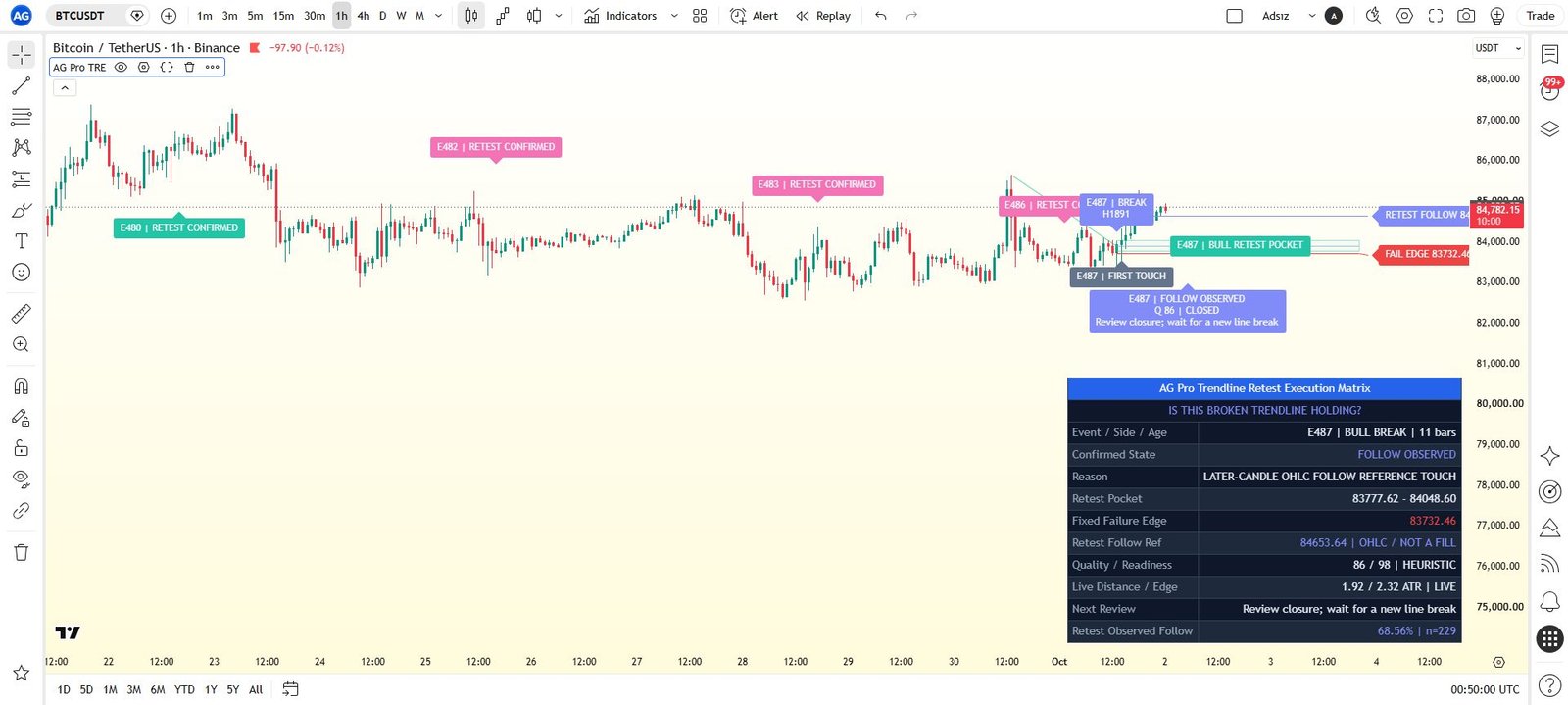
General settings
25 inputsMatrix Mode
- Input type
string- Source default
"Auto"- Available options
["Auto", "Bullish Break Only", "Bearish Break Only"]- Minimum
Not specified in source- Maximum
Not specified in source- Step
Not specified in source
What it controls
Controls whether the matrix evaluates both retest directions, bullish breaks only, or bearish breaks only.
Effect on the script
This selects which documented analytical mode, source or directional context the workflow evaluates.
When to adjust it
Choose the mode that corresponds to your actual analysis before inspecting historical examples.
Interpretation and limits
A selected direction or model is a configuration choice, not evidence that price must follow it.
Original input tooltip
Controls whether the matrix evaluates both retest directions, bullish breaks only, or bearish breaks only.
Trendline Pivot Strength
- Input type
int- Source default
4- Available options
Not specified in source- Minimum
2- Maximum
12- Step
Not specified in source
What it controls
Controls the swing points used to build the active trendline context.
Effect on the script
This changes the swing or structural reference used by the documented detection or risk-reference calculation.
When to adjust it
Match the swing scale to the structure you intend to inspect, then review the resulting anchors and confirmation timing.
Interpretation and limits
Confirmed pivots require subsequent bars. Different settings create different structure and can change later events and observations.
Original input tooltip
Controls the swing points used to build the active trendline context.
Quality Lookback
- Input type
int- Source default
50- Available options
Not specified in source- Minimum
20- Maximum
300- Step
Not specified in source
What it controls
Controls prior completed-bar body and range baselines. The break candle is excluded from its own baseline.
Effect on the script
This changes the observation window or sensitivity of the named calculation feeding the workflow.
When to adjust it
Match the calculation horizon to the analytical question and keep it recorded when comparing results.
Interpretation and limits
Changing the window changes the historical context and can alter warm-up, states and observations. It does not validate a future edge.
Original input tooltip
Controls prior completed-bar body and range baselines. The break candle is excluded from its own baseline.
Break Sensitivity
- Input type
string- Source default
"Balanced"- Available options
["Relaxed", "Balanced", "Strict"]- Minimum
Not specified in source- Maximum
Not specified in source- Step
Not specified in source
What it controls
Controls how strict the trendline break qualification should be.
Effect on the script
This changes how demanding the named qualification, pressure or pattern-fit assessment is.
When to adjust it
Define the selectivity appropriate to the specific structural or flow question before comparing examples.
Interpretation and limits
A more permissive setting can admit marginal context; stricter qualification can delay or exclude events. Neither guarantees better outcomes.
Original input tooltip
Controls how strict the trendline break qualification should be.
Retest Pocket Width
- Input type
string- Source default
"Balanced"- Available options
["Tight", "Balanced", "Wide"]- Minimum
Not specified in source- Maximum
Not specified in source- Step
Not specified in source
What it controls
Controls how wide the post-break retest pocket is around the broken trendline.
Effect on the script
This supplies the documented value to the associated analytical component.
When to adjust it
Change it when intentionally defining a different analytical assumption, keeping the other settings stable for comparison.
Interpretation and limits
A different configuration changes the model being reviewed; it does not promise a better trading outcome.
Original input tooltip
Controls how wide the post-break retest pocket is around the broken trendline.
Failure Strictness
- Input type
string- Source default
"Balanced"- Available options
["Relaxed", "Balanced", "Strict"]- Minimum
Not specified in source- Maximum
Not specified in source- Step
Not specified in source
What it controls
Controls how quickly failed-retest pressure increases beyond the pocket boundary.
Effect on the script
This changes how demanding the named qualification, pressure or pattern-fit assessment is.
When to adjust it
Define the selectivity appropriate to the specific structural or flow question before comparing examples.
Interpretation and limits
A more permissive setting can admit marginal context; stricter qualification can delay or exclude events. Neither guarantees better outcomes.
Original input tooltip
Controls how quickly failed-retest pressure increases beyond the pocket boundary.
Pocket Reach (ATR)
- Input type
float- Source default
3.0- Available options
Not specified in source- Minimum
1.0- Maximum
8.0- Step
0.5
What it controls
Controls how many anchor-ATRs price may sit away from the retest pocket before the matrix switches to a distant standby state instead of an active retest wait.
Effect on the script
This changes the documented volatility, risk-distance or location reference used by the analytical workflow.
When to adjust it
Set the relevant risk or distance assumption as part of a coherent plan, then inspect the resulting geometry.
Interpretation and limits
A chart reference is not an account-risk limit, a live stop or a guarantee of execution. Gaps and changing volatility can exceed the reference.
Original input tooltip
Controls how many anchor-ATRs price may sit away from the retest pocket before the matrix switches to a distant standby state instead of an active retest wait.
Minimum Label Score
- Input type
int- Source default
75- Available options
Not specified in source- Minimum
60- Maximum
95- Step
Not specified in source
What it controls
Hides historical chart labels below this score while keeping the active workflow, panel, and alerts active.
Effect on the script
This filters the labels drawn on the chart; the internal workflow, dashboard and alert logic remain active.
When to adjust it
Change it when the active reference is hard to inspect or when historical annotations compete with current price action.
Interpretation and limits
A missing lower-score label does not mean that its analytical context or alert conditions have been disabled.
Original input tooltip
Hides historical chart labels below this score while keeping the active workflow, panel, and alerts active.
Pocket Projection Bars
- Input type
int- Source default
44- Available options
Not specified in source- Minimum
12- Maximum
220- Step
Not specified in source
What it controls
Controls how far the active retest pocket is projected to the right.
Effect on the script
This controls the visibility, placement, extent or retained history of the documented visual element. It is part of the chart presentation layer.
When to adjust it
Change it when the active reference is hard to inspect or when historical annotations compete with current price action.
Interpretation and limits
Reducing visible history or hiding an element does not improve the underlying observations. A visual projection is not a price forecast.
Original input tooltip
Controls how far the active retest pocket is projected to the right.
Visual Preset
- Input type
string- Source default
"Balanced"- Available options
["Clean", "Balanced", "Rich"]- Minimum
Not specified in source- Maximum
Not specified in source- Step
Not specified in source
What it controls
Controls chart annotation density. Balanced is the default publication style.
Effect on the script
This controls the visibility, placement, extent or retained history of the documented visual element. It is part of the chart presentation layer.
When to adjust it
Change it when the active reference is hard to inspect or when historical annotations compete with current price action.
Interpretation and limits
Reducing visible history or hiding an element does not improve the underlying observations. A visual projection is not a price forecast.
Original input tooltip
Controls chart annotation density. Balanced is the default publication style.
State Label Cooldown
- Input type
int- Source default
55- Available options
Not specified in source- Minimum
50- Maximum
180- Step
Not specified in source
What it controls
Controls the minimum number of bars between historical state labels.
Effect on the script
This controls the visibility, placement, extent or retained history of the documented visual element. It is part of the chart presentation layer.
When to adjust it
Change it when the active reference is hard to inspect or when historical annotations compete with current price action.
Interpretation and limits
Reducing visible history or hiding an element does not improve the underlying observations. A visual projection is not a price forecast.
Original input tooltip
Controls the minimum number of bars between historical state labels.
Label Font Size
- Input type
string- Source default
"Normal"- Available options
["Small", "Normal", "Large"]- Minimum
Not specified in source- Maximum
Not specified in source- Step
Not specified in source
What it controls
Controls visible chart label size.
Effect on the script
This changes presentation and legibility of the relevant chart element, rather than the underlying analytical model.
When to adjust it
Change it when the chart background, screen size or other overlays make the current presentation difficult to read.
Interpretation and limits
A visual preference does not strengthen the measured setup or alter its uncertainty.
Original input tooltip
Controls visible chart label size.
Trendline Maximum Pivot Age (Bars)
- Input type
int- Source default
800- Available options
Not specified in source- Minimum
50- Maximum
1000- Step
Not specified in source
What it controls
Both confirmed pivots must remain within this horizon. New geometry cannot create an activation-candle break; comparisons use the same already-known line.
Effect on the script
This sets the documented age, waiting period or forward observation deadline used by the event lifecycle.
When to adjust it
Match the review horizon to the question being studied and keep the deadline explicit in historical comparisons.
Interpretation and limits
Changing a deadline changes which observations resolve, expire or remain eligible. A timed model observation is not a broker trade.
Original input tooltip
Both confirmed pivots must remain within this horizon. New geometry cannot create an activation-candle break; comparisons use the same already-known line.
Event Lifetime (Bars)
- Input type
int- Source default
200- Available options
Not specified in source- Minimum
10- Maximum
1000- Step
Not specified in source
What it controls
Hard completed-bar lifetime from an accepted break. Terminal owners never reactivate.
Effect on the script
This sets the documented age, waiting period or forward observation deadline used by the event lifecycle.
When to adjust it
Match the review horizon to the question being studied and keep the deadline explicit in historical comparisons.
Interpretation and limits
Changing a deadline changes which observations resolve, expire or remain eligible. A timed model observation is not a broker trade.
Original input tooltip
Hard completed-bar lifetime from an accepted break. Terminal owners never reactivate.
Follow Observation Window (Bars)
- Input type
int- Source default
120- Available options
Not specified in source- Minimum
5- Maximum
1000- Step
Not specified in source
What it controls
Later bars for each observation. Break follow starts after the break close; retest follow starts after later retest confirmation. Event lifetime independently caps both.
Effect on the script
This sets the documented age, waiting period or forward observation deadline used by the event lifecycle.
When to adjust it
Match the review horizon to the question being studied and keep the deadline explicit in historical comparisons.
Interpretation and limits
Changing a deadline changes which observations resolve, expire or remain eligible. A timed model observation is not a broker trade.
Original input tooltip
Later bars for each observation. Break follow starts after the break close; retest follow starts after later retest confirmation. Event lifetime independently caps both.
Follow Reference (Anchor ATR)
- Input type
float- Source default
1.0- Available options
Not specified in source- Minimum
0.25- Maximum
5.0- Step
0.25
What it controls
Descriptive OHLC reference from the relevant confirmation close using fixed break ATR. Not a target, fill or return.
Effect on the script
This changes the documented volatility, risk-distance or location reference used by the analytical workflow.
When to adjust it
Set the relevant risk or distance assumption as part of a coherent plan, then inspect the resulting geometry.
Interpretation and limits
A chart reference is not an account-risk limit, a live stop or a guarantee of execution. Gaps and changing volatility can exceed the reference.
Original input tooltip
Descriptive OHLC reference from the relevant confirmation close using fixed break ATR. Not a target, fill or return.
Later Retest Holding Closes
- Input type
int- Source default
2- Available options
Not specified in source- Minimum
1- Maximum
5- Step
Not specified in source
What it controls
Consecutive later closes beyond the pocket midpoint with minimum reaction from first touch. Neither the break nor first touch can confirm the retest.
Effect on the script
This sets a later completed-candle requirement used to qualify a retest after its first touch.
When to adjust it
Define the amount of subsequent holding or directional reaction your retest study should require.
Interpretation and limits
The initial break or first touch cannot certify its own later holding. Qualification does not guarantee continuation.
Original input tooltip
Consecutive later closes beyond the pocket midpoint with minimum reaction from first touch. Neither the break nor first touch can confirm the retest.
Minimum Retest Reaction (Anchor ATR)
- Input type
float- Source default
0.1- Available options
Not specified in source- Minimum
0.0- Maximum
2.0- Step
0.05
What it controls
Minimum later displacement from first-touch close. Quality, readiness, distance and failure-edge gates remain mandatory.
Effect on the script
This sets a later completed-candle requirement used to qualify a retest after its first touch.
When to adjust it
Define the amount of subsequent holding or directional reaction your retest study should require.
Interpretation and limits
The initial break or first touch cannot certify its own later holding. Qualification does not guarantee continuation.
Original input tooltip
Minimum later displacement from first-touch close. Quality, readiness, distance and failure-edge gates remain mandatory.
Accepted Break Cooldown (Bars)
- Input type
int- Source default
8- Available options
Not specified in source- Minimum
0- Maximum
100- Step
Not specified in source
What it controls
Spacing between accepted owners. Suppressed line-generation crossings are audited and never replayed as fresh breaks.
Effect on the script
This controls the documented persistence, spacing or re-arming requirement for an analytical state or event.
When to adjust it
Choose the stability or spacing requirement before assessing repeated events.
Interpretation and limits
Greater persistence or spacing can delay or suppress events. It does not remove uncertainty or make a retained state permanently valid.
Original input tooltip
Spacing between accepted owners. Suppressed line-generation crossings are audited and never replayed as fresh breaks.
Active Event Policy
- Input type
string- Source default
"Keep Until Terminal"- Available options
["Keep Until Terminal", "Replace on New Break"]- Minimum
Not specified in source- Maximum
Not specified in source- Step
Not specified in source
What it controls
Keep preserves the owner until closure. Replace explicitly closes it; pending observations are excluded and counted. Policy affects sample selection.
Effect on the script
This selects how a new qualified context interacts with an already active owner or plan.
When to adjust it
Decide in advance whether the current context should survive until terminal closure or be superseded by a new qualified candidate.
Interpretation and limits
Replacing a context changes the selected observation history and can exclude pending observations. It is not merely a visual preference.
Original input tooltip
Keep preserves the owner until closure. Replace explicitly closes it; pending observations are excluded and counted. Policy affects sample selection.
Panel Detail
- Input type
string- Source default
"Compact"- Available options
["Compact", "Full"]- Minimum
Not specified in source- Maximum
Not specified in source- Step
Not specified in source
What it controls
Compact prioritizes closed state and fixed references. Full adds line identity, confirmation progress, separate break/retest observations and audits. Calculations are identical.
Effect on the script
This selects which part of the existing analytical readout is visible in the dashboard. It does not create a different event engine.
When to adjust it
Use a compact or overview page for routine reading and the detailed pages when inspecting assumptions, observations or exclusions.
Interpretation and limits
Information hidden by a page choice can still matter. Check the evidence and model assumptions before relying on a headline score.
Original input tooltip
Compact prioritizes closed state and fixed references. Full adds line identity, confirmation progress, separate break/retest observations and audits. Calculations are identical.
Show Panel
- Input type
bool- Source default
true- Available options
Not specified in source- Minimum
Not specified in source- Maximum
Not specified in source- Step
Not specified in source
What it controls
Shows or hides the AGPro workflow panel. The panel distinguishes closed owner state from live distance and separates break follow from qualified retest follow.
Effect on the script
This controls the visibility, placement, extent or retained history of the documented visual element. It is part of the chart presentation layer.
When to adjust it
Change it when the active reference is hard to inspect or when historical annotations compete with current price action.
Interpretation and limits
Reducing visible history or hiding an element does not improve the underlying observations. A visual projection is not a price forecast.
Original input tooltip
Shows or hides the AGPro workflow panel. The panel distinguishes closed owner state from live distance and separates break follow from qualified retest follow.
Panel Location
- Input type
string- Source default
"Top Right"- Available options
["Top Right", "Top Left", "Bottom Right", "Bottom Left"]- Minimum
Not specified in source- Maximum
Not specified in source- Step
Not specified in source
What it controls
Sets panel location within the current controls.
Effect on the script
This changes presentation and legibility of the relevant chart element, rather than the underlying analytical model.
When to adjust it
Change it when the chart background, screen size or other overlays make the current presentation difficult to read.
Interpretation and limits
A visual preference does not strengthen the measured setup or alter its uncertainty.
Panel Theme
- Input type
string- Source default
"Dark"- Available options
["Dark", "Light"]- Minimum
Not specified in source- Maximum
Not specified in source- Step
Not specified in source
What it controls
Sets panel theme within the current controls.
Effect on the script
This changes presentation and legibility of the relevant chart element, rather than the underlying analytical model.
When to adjust it
Change it when the chart background, screen size or other overlays make the current presentation difficult to read.
Interpretation and limits
A visual preference does not strengthen the measured setup or alter its uncertainty.
Panel Font Size
- Input type
string- Source default
"Normal"- Available options
["Small", "Normal", "Large"]- Minimum
Not specified in source- Maximum
Not specified in source- Step
Not specified in source
What it controls
Sets panel font size within the current controls.
Effect on the script
This changes presentation and legibility of the relevant chart element, rather than the underlying analytical model.
When to adjust it
Change it when the chart background, screen size or other overlays make the current presentation difficult to read.
Interpretation and limits
A visual preference does not strengthen the measured setup or alter its uncertainty.
Keep the settings in context
Change one analytical assumption at a time and compare the same instrument, timeframe and history. A chart reference, score, observation rate or input default does not establish a trade fill, a forward probability or a guaranteed outcome.
Return to the product overview · View this script on TradingView