Use your browser’s Find (Ctrl+F / ⌘F) to locate a setting. Open its row for the full explanation and limits. Source-check time is a verification timestamp, not a script publication date.
General settings
20 inputsRequire Later-Candle Reversal
- Input type
bool- Source default
true- Available options
Not specified in source- Minimum
Not specified in source- Maximum
Not specified in source- Step
Not specified in source
What it controls
ON requires a completed reversal candle after the first completed flow-window touch. OFF permits a same-candle touch and reclaim after the source candle. Both require a directional body, midpoint reclaim, minimum readiness and acceptable boundary pressure. A climax alone is not a confirmed reversal.
Effect on the script
This changes the timing required between the first completed touch and the qualifying reaction or reversal. Other directional, score and boundary gates still apply.
When to adjust it
Choose the timing rule before reviewing examples, according to whether a separate later completed candle is part of your method.
Interpretation and limits
Turning the requirement off does not turn a raw touch or source event into automatic confirmation.
Original input tooltip
ON requires a completed reversal candle after the first completed flow-window touch. OFF permits a same-candle touch and reclaim after the source candle. Both require a directional body, midpoint reclaim, minimum readiness and acceptable boundary pressure. A climax alone is not a confirmed reversal.
Stable Live Display
- Input type
bool- Source default
true- Available options
Not specified in source- Minimum
Not specified in source- Maximum
Not specified in source- Step
Not specified in source
What it controls
ON holds the last completed workflow state, reason and scores during developing candles. OFF previews analytics. Source events, touch memory, reversal confirmation, invalidation and observations always commit only at candle close. Explicitly marked price distances remain live.
Effect on the script
This controls whether developing-bar analytics preview live or retain the last completed-candle presentation. The event and observation engine still commits on completed candles.
When to adjust it
Change it when you deliberately want to compare a developing-bar preview with a stable completed-candle display.
Interpretation and limits
A preview is provisional. Turning the preview off does not freeze explicitly live price-distance readouts.
Original input tooltip
ON holds the last completed workflow state, reason and scores during developing candles. OFF previews analytics. Source events, touch memory, reversal confirmation, invalidation and observations always commit only at candle close. Explicitly marked price distances remain live.
Flow Freshness Limit (Bars)
- Input type
int- Source default
120- Available options
Not specified in source- Minimum
10- Maximum
2000- Step
Not specified in source
What it controls
An event older than this limit cannot produce a new reversal confirmation. Historical confirmations remain recorded with their age. A qualified new climax starts a fresh event.
Effect on the script
This sets the documented age, waiting period or forward observation deadline used by the event lifecycle.
When to adjust it
Match the review horizon to the question being studied and keep the deadline explicit in historical comparisons.
Interpretation and limits
Changing a deadline changes which observations resolve, expire or remain eligible. A timed model observation is not a broker trade.
Original input tooltip
An event older than this limit cannot produce a new reversal confirmation. Historical confirmations remain recorded with their age. A qualified new climax starts a fresh event.
Flow Mode
- Input type
string- Source default
"Auto"- Available options
["Auto", "Bullish Only", "Bearish Only"]- Minimum
Not specified in source- Maximum
Not specified in source- Step
Not specified in source
What it controls
Controls which reversal side the workflow is allowed to evaluate. Auto uses the most recent qualified bullish or bearish volume-flow context.
Effect on the script
This selects which documented analytical mode, source or directional context the workflow evaluates.
When to adjust it
Choose the mode that corresponds to your actual analysis before inspecting historical examples.
Interpretation and limits
A selected direction or model is a configuration choice, not evidence that price must follow it.
Original input tooltip
Controls which reversal side the workflow is allowed to evaluate. Auto uses the most recent qualified bullish or bearish volume-flow context.
Lookback
- Input type
int- Source default
50- Available options
Not specified in source- Minimum
20- Maximum
300- Step
Not specified in source
What it controls
Controls the baseline window for volume, range, and flow measurements.
Effect on the script
This changes the observation window or sensitivity of the named calculation feeding the workflow.
When to adjust it
Match the calculation horizon to the analytical question and keep it recorded when comparing results.
Interpretation and limits
Changing the window changes the historical context and can alter warm-up, states and observations. It does not validate a future edge.
Original input tooltip
Controls the baseline window for volume, range, and flow measurements.
Volume Sensitivity
- Input type
string- Source default
"Balanced"- Available options
["Relaxed", "Balanced", "Strict"]- Minimum
Not specified in source- Maximum
Not specified in source- Step
Not specified in source
What it controls
Controls how strict relative volume and range expansion must be before the script treats a move as a climax candidate.
Effect on the script
This changes how demanding the named qualification, pressure or pattern-fit assessment is.
When to adjust it
Define the selectivity appropriate to the specific structural or flow question before comparing examples.
Interpretation and limits
A more permissive setting can admit marginal context; stricter qualification can delay or exclude events. Neither guarantees better outcomes.
Original input tooltip
Controls how strict relative volume and range expansion must be before the script treats a move as a climax candidate.
Trap Sensitivity
- Input type
string- Source default
"Balanced"- Available options
["Relaxed", "Balanced", "Strict"]- Minimum
Not specified in source- Maximum
Not specified in source- Step
Not specified in source
What it controls
Controls the wick-to-body threshold for trap-type source candidates. Current Trap Pressure is a candle-derived heuristic, not evidence of trapped orders or actual bid/ask flow.
Effect on the script
This changes the boundary for the named score classification or qualification gate.
When to adjust it
Specify how strict that classification should be before reviewing the resulting states and samples.
Interpretation and limits
Changing a threshold changes what qualifies. It does not improve the underlying market conditions or establish a success probability.
Original input tooltip
Controls the wick-to-body threshold for trap-type source candidates. Current Trap Pressure is a candle-derived heuristic, not evidence of trapped orders or actual bid/ask flow.
Exhaustion Sensitivity
- Input type
string- Source default
"Balanced"- Available options
["Relaxed", "Balanced", "Strict"]- Minimum
Not specified in source- Maximum
Not specified in source- Step
Not specified in source
What it controls
Scales the exhaustion heuristic from relative volume, range, body efficiency and price progress. Strict requires stronger evidence to reach the same score; this is not a measured order-flow exhaustion signal.
Effect on the script
This changes how demanding the named qualification, pressure or pattern-fit assessment is.
When to adjust it
Define the selectivity appropriate to the specific structural or flow question before comparing examples.
Interpretation and limits
A more permissive setting can admit marginal context; stricter qualification can delay or exclude events. Neither guarantees better outcomes.
Original input tooltip
Scales the exhaustion heuristic from relative volume, range, body efficiency and price progress. Strict requires stronger evidence to reach the same score; this is not a measured order-flow exhaustion signal.
Flow Reach (ATR)
- Input type
float- Source default
3.0- Available options
Not specified in source- Minimum
1.0- Maximum
8.0- Step
0.5
What it controls
Controls how many anchor-ATRs price may sit away from the flow window before the workflow switches to a distant standby state instead of an active reversal wait.
Effect on the script
This changes the documented volatility, risk-distance or location reference used by the analytical workflow.
When to adjust it
Set the relevant risk or distance assumption as part of a coherent plan, then inspect the resulting geometry.
Interpretation and limits
A chart reference is not an account-risk limit, a live stop or a guarantee of execution. Gaps and changing volatility can exceed the reference.
Original input tooltip
Controls how many anchor-ATRs price may sit away from the flow window before the workflow switches to a distant standby state instead of an active reversal wait.
Minimum Label Score
- Input type
int- Source default
75- Available options
Not specified in source- Minimum
60- Maximum
95- Step
Not specified in source
What it controls
Hides chart event labels below this score while keeping the internal workflow, panel, and alerts active. Use 70+ for strong-label-only screenshots.
Effect on the script
This filters the labels drawn on the chart; the internal workflow, dashboard and alert logic remain active.
When to adjust it
Change it when the active reference is hard to inspect or when historical annotations compete with current price action.
Interpretation and limits
A missing lower-score label does not mean that its analytical context or alert conditions have been disabled.
Original input tooltip
Hides chart event labels below this score while keeping the internal workflow, panel, and alerts active. Use 70+ for strong-label-only screenshots.
Window Projection Bars
- Input type
int- Source default
32- Available options
Not specified in source- Minimum
12- Maximum
200- Step
Not specified in source
What it controls
Controls how far the active flow reversal window is projected to the right. The default is tuned for daily publication screenshots.
Effect on the script
This controls the visibility, placement, extent or retained history of the documented visual element. It is part of the chart presentation layer.
When to adjust it
Change it when the active reference is hard to inspect or when historical annotations compete with current price action.
Interpretation and limits
Reducing visible history or hiding an element does not improve the underlying observations. A visual projection is not a price forecast.
Original input tooltip
Controls how far the active flow reversal window is projected to the right. The default is tuned for daily publication screenshots.
Visual Preset
- Input type
string- Source default
"Balanced"- Available options
["Clean", "Balanced", "Rich"]- Minimum
Not specified in source- Maximum
Not specified in source- Step
Not specified in source
What it controls
Controls chart annotation density. Balanced is the default publication style.
Effect on the script
This controls the visibility, placement, extent or retained history of the documented visual element. It is part of the chart presentation layer.
When to adjust it
Change it when the active reference is hard to inspect or when historical annotations compete with current price action.
Interpretation and limits
Reducing visible history or hiding an element does not improve the underlying observations. A visual projection is not a price forecast.
Original input tooltip
Controls chart annotation density. Balanced is the default publication style.
Publication Mode
- Input type
bool- Source default
true- Available options
Not specified in source- Minimum
Not specified in source- Maximum
Not specified in source- Step
Not specified in source
What it controls
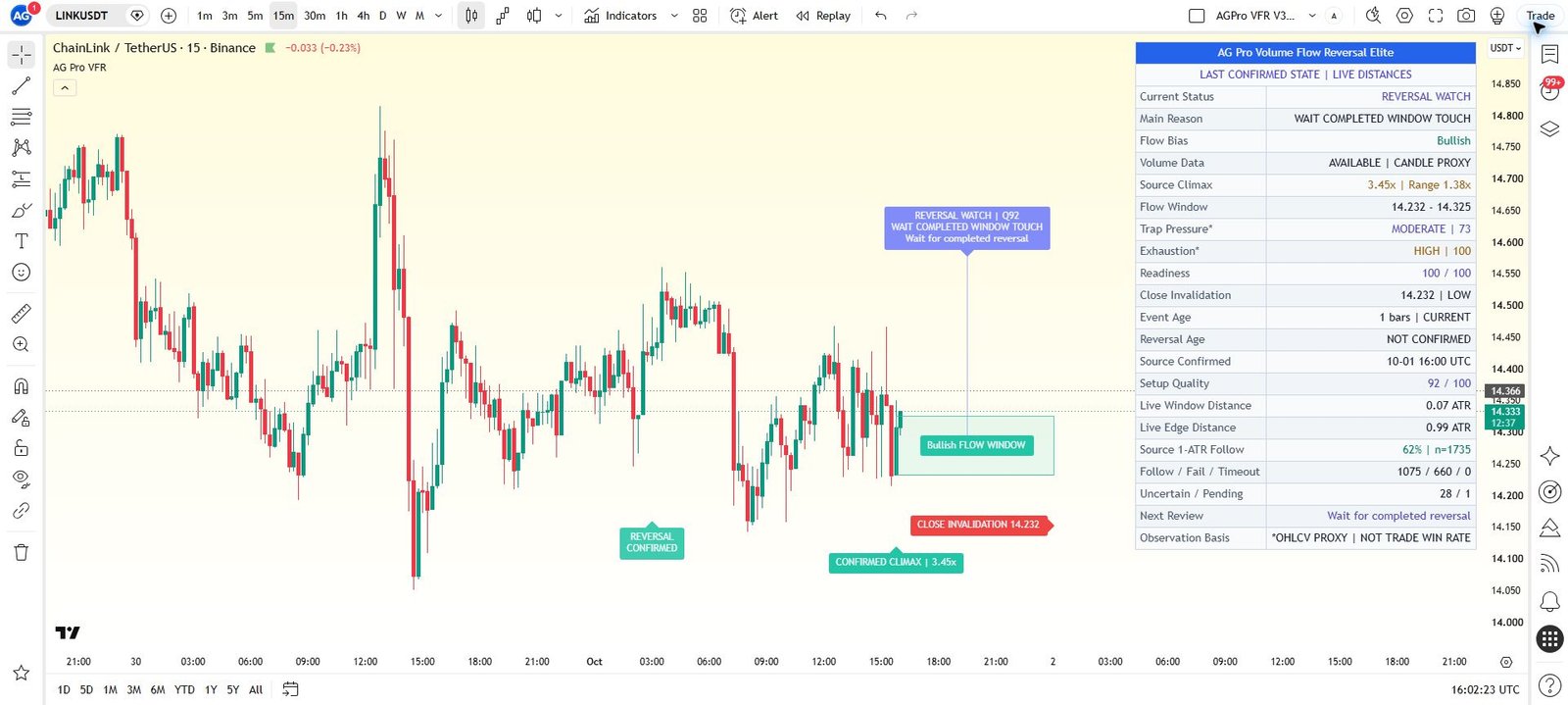
Optimizes the chart for clean publication screenshots by reducing repeated historical labels, consolidating the active state into one command card, and keeping the active flow window readable.
Effect on the script
This controls the visibility, placement, extent or retained history of the documented visual element. It is part of the chart presentation layer.
When to adjust it
Change it when the active reference is hard to inspect or when historical annotations compete with current price action.
Interpretation and limits
Reducing visible history or hiding an element does not improve the underlying observations. A visual projection is not a price forecast.
Original input tooltip
Optimizes the chart for clean publication screenshots by reducing repeated historical labels, consolidating the active state into one command card, and keeping the active flow window readable.
History Labels
- Input type
string- Source default
"Curated"- Available options
["Curated", "Minimal", "Rich"]- Minimum
Not specified in source- Maximum
Not specified in source- Step
Not specified in source
What it controls
Controls historical event labels. Curated keeps only selected context labels, Minimal hides them, and Rich shows more historical state changes.
Effect on the script
This controls the visibility, placement, extent or retained history of the documented visual element. It is part of the chart presentation layer.
When to adjust it
Change it when the active reference is hard to inspect or when historical annotations compete with current price action.
Interpretation and limits
Reducing visible history or hiding an element does not improve the underlying observations. A visual projection is not a price forecast.
Original input tooltip
Controls historical event labels. Curated keeps only selected context labels, Minimal hides them, and Rich shows more historical state changes.
State Label Cooldown
- Input type
int- Source default
55- Available options
Not specified in source- Minimum
50- Maximum
180- Step
Not specified in source
What it controls
Controls the minimum number of bars between historical state labels. Higher values keep repeated reversal-ready labels calmer.
Effect on the script
This controls the visibility, placement, extent or retained history of the documented visual element. It is part of the chart presentation layer.
When to adjust it
Change it when the active reference is hard to inspect or when historical annotations compete with current price action.
Interpretation and limits
Reducing visible history or hiding an element does not improve the underlying observations. A visual projection is not a price forecast.
Original input tooltip
Controls the minimum number of bars between historical state labels. Higher values keep repeated reversal-ready labels calmer.
Label Font Size
- Input type
string- Source default
"Normal"- Available options
["Small", "Normal", "Large"]- Minimum
Not specified in source- Maximum
Not specified in source- Step
Not specified in source
What it controls
Controls visible chart label size.
Effect on the script
This changes presentation and legibility of the relevant chart element, rather than the underlying analytical model.
When to adjust it
Change it when the chart background, screen size or other overlays make the current presentation difficult to read.
Interpretation and limits
A visual preference does not strengthen the measured setup or alter its uncertainty.
Original input tooltip
Controls visible chart label size.
Show Panel
- Input type
bool- Source default
true- Available options
Not specified in source- Minimum
Not specified in source- Maximum
Not specified in source- Step
Not specified in source
What it controls
Shows or hides the workflow panel: completed state, reason, source volume, OHLCV proxy scores, fixed invalidation, event and reversal ages, live distances and source-observation outcomes. Follow percentages are not trade win rates.
Effect on the script
This controls the visibility, placement, extent or retained history of the documented visual element. It is part of the chart presentation layer.
When to adjust it
Change it when the active reference is hard to inspect or when historical annotations compete with current price action.
Interpretation and limits
Reducing visible history or hiding an element does not improve the underlying observations. A visual projection is not a price forecast.
Original input tooltip
Shows or hides the workflow panel: completed state, reason, source volume, OHLCV proxy scores, fixed invalidation, event and reversal ages, live distances and source-observation outcomes. Follow percentages are not trade win rates.
Panel Location
- Input type
string- Source default
"Top Right"- Available options
["Top Right", "Top Left", "Bottom Right", "Bottom Left"]- Minimum
Not specified in source- Maximum
Not specified in source- Step
Not specified in source
What it controls
Sets panel location within the current controls.
Effect on the script
This changes presentation and legibility of the relevant chart element, rather than the underlying analytical model.
When to adjust it
Change it when the chart background, screen size or other overlays make the current presentation difficult to read.
Interpretation and limits
A visual preference does not strengthen the measured setup or alter its uncertainty.
Panel Theme
- Input type
string- Source default
"Dark"- Available options
["Dark", "Light"]- Minimum
Not specified in source- Maximum
Not specified in source- Step
Not specified in source
What it controls
Sets panel theme within the current controls.
Effect on the script
This changes presentation and legibility of the relevant chart element, rather than the underlying analytical model.
When to adjust it
Change it when the chart background, screen size or other overlays make the current presentation difficult to read.
Interpretation and limits
A visual preference does not strengthen the measured setup or alter its uncertainty.
Panel Font Size
- Input type
string- Source default
"Normal"- Available options
["Small", "Normal", "Large"]- Minimum
Not specified in source- Maximum
Not specified in source- Step
Not specified in source
What it controls
Sets panel font size within the current controls.
Effect on the script
This changes presentation and legibility of the relevant chart element, rather than the underlying analytical model.
When to adjust it
Change it when the chart background, screen size or other overlays make the current presentation difficult to read.
Interpretation and limits
A visual preference does not strengthen the measured setup or alter its uncertainty.
Keep the settings in context
Change one analytical assumption at a time and compare the same instrument, timeframe and history. A chart reference, score, observation rate or input default does not establish a trade fill, a forward probability or a guaranteed outcome.
Return to the product overview · View this script on TradingView