

Volume flow lifecycle
TradingView Pine Script Workflow
Volume Flow Reversal Elite [AGPro Series]
5-Year Access, one-time payment. Manual TradingView activation. TradingView and data fees are separate.
Get Access — $149$149.00
Follow what happens after a volume spike.
Track a high-volume event through failed continuation, exhaustion and later-candle reclaim evidence. Keep confirmation, freshness and invalidation in view as the flow develops.
- One focused workflow
- 5-Year Access · one-time
- Manual TradingView activation
Already paid through Whop? Get TradingView access help
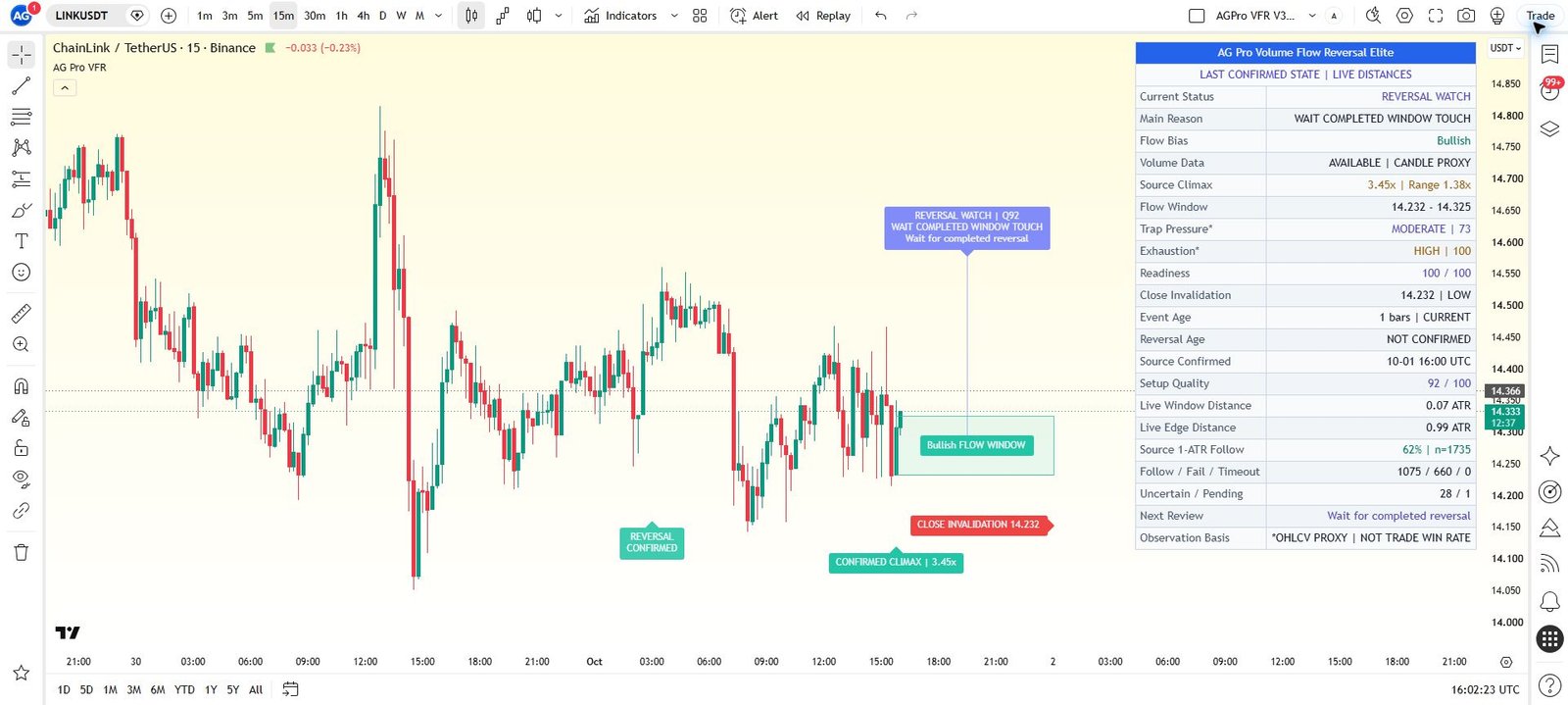
View actual chart & all settings First gallery image: historical TradingView interface. Second image: illustrative cover. Open the gallery to inspect details.
Manual TradingView activation
Submit the exact TradingView username at checkout. Manual review begins after verified payment; access confirmation follows when activation is complete.
One-time payment. No subscription. Available payment methods are shown before order placement.
Need help before purchase? Ask AGProLabs →
Inside Volume Flow Reversal Elite
Give an unusual volume event a structured follow-up, not an automatic reversal label.
Volume Flow Reversal Elite follows a high-volume event through the context that develops around it. It evaluates volume climax, trap pressure, exhaustion, recovery and invalidation context, combining them into a 0-100 reversal-readiness score. The active flow window, historical state labels and dashboard make the event's progression visible. This helps distinguish an unusual burst of participation from a broader reversal-review context, without assuming that every volume spike must mark a turning point.
Choose with a clear purpose
What this workflow helps you inspect.
For traders studying the price behavior after a volume spike who want a staged review of pressure, exhaustion and subsequent reclaim evidence.
- Identify the specific volume event relative to its recent baseline.
- Inspect failed continuation and effort-versus-progress as separate readings.
- Keep confirmation, freshness and flow invalidation distinct as the event develops.
Read the detailed workflow fit
- For traders studying high-volume reversal attempts, failed continuation and exhaustion on instruments with suitable volume feeds. The workflow is most useful when volume is meaningful and price structure is readable. It is not a source of verified participant positioning, a one-click buy/sell system or a reason to ignore a move that continues strongly after its volume spike.
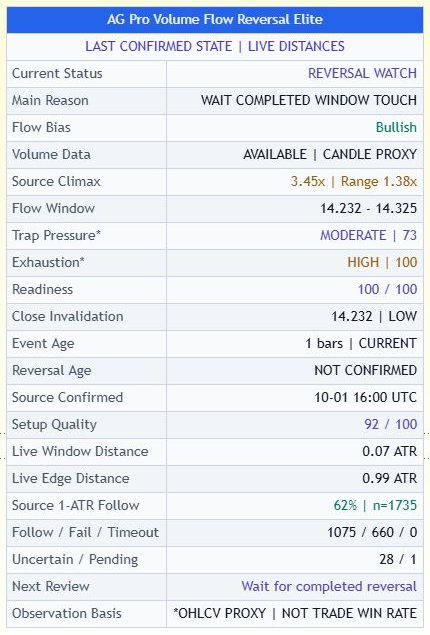 Inspect interface detail
Volume climax against a recent baseline
High absolute volume alone does not explain whether an event is unusual for the current chart.
Trap pressure and exhaustion as separate questions
A reversal narrative can be attached too quickly to a spike that still has efficient directional progress.
Readiness, invalidation and the active flow lifecycle
An earlier unusual event can keep influencing a decision after the current context has changed.
See what each layer contributes.
Open a module to explore its purpose, practical interpretation and boundaries. Examples describe a review process; they are not promises of a trading result.
01Volume climax against a recent baselineHigh absolute volume alone does not explain whether an event is unusual for the current chart.
The engine compares volume and candle expansion with recent baseline behavior. The panel identifies the active event and displays its relative volume, while the flow window locates the area being reviewed. This makes the point of attention explicit: a specific event relative to the recent sample, rather than every large-looking histogram bar being treated as equivalent.
A practical reading
On Climax Watch, inspect both the volume event and the candle's expansion before deciding whether the chart deserves a more detailed reversal review.
Keep in view: Exchange feeds and instrument types can report different or unreliable volume. A climax reading does not reveal who traded or why.
02Trap pressure and exhaustion as separate questionsA reversal narrative can be attached too quickly to a spike that still has efficient directional progress.
Trap pressure evaluates wick behavior, failed continuation and close recovery around the active window. Exhaustion reviews whether volume intensity remains high while price progress becomes less efficient. These are complementary observations: one concerns failure and recovery around an attempted move; the other concerns the relationship between effort and progress. The panel and state labels expose those readings before they are compressed into readiness.
A practical reading
A high-volume event can deserve Trap Review or Exhaustion Review without already qualifying as Reversal Ready.
Keep in view: Trap and exhaustion are descriptive model terms. Neither proves that trapped participants must exit or that a reversal will follow.
03Readiness, invalidation and the active flow lifecycleAn earlier unusual event can keep influencing a decision after the current context has changed.
Climax, trap pressure, exhaustion, recovery and boundary context contribute to the heuristic readiness reading. The active lifecycle distinguishes Climax Active, Trap Pressure, Exhaustion Building, Reversal Watch and Reversal Confirmed. Boundary pressure, terminal flow invalidation, freshness, distance and unavailable-data states remain separate. Default later-candle confirmation prevents the first completed touch from confirming its own reversal.
A practical reading
When the state moves toward Invalidation Review, re-examine the active window rather than relying on the original climax or readiness label.
Keep in view: Reversal Watch means confirmation is still missing; Reversal Confirmed records the configured completed-candle reclaim. Neither is a probability guarantee or execution instruction, and invalidation or freshness can change the active context.
Understand the controls before changing them.
Explore the main controls and control groups below. Read the current TradingView Inputs and tooltips for the available values; choose a consistent configuration before reviewing its results.
Flow Mode
Chooses Auto, Bullish Only or Bearish Only flow context.
When to adjust
When focusing on one side of an existing analytical thesis.
Watch for
Filtering direction does not validate the expected reversal.
Volume Sensitivity
Controls the strictness of volume-climax detection.
When to adjust
When specifying how unusual an event must be for review.
Watch for
A feed-quality problem cannot be fixed by selecting a different sensitivity.
Trap Sensitivity
Controls how strongly trap-pressure conditions must align.
When to adjust
When defining selectivity for failed-continuation and recovery behavior.
Watch for
A more permissive setting does not prove more actual participant trapping.
Exhaustion Sensitivity
Controls how quickly the exhaustion score responds.
When to adjust
When matching the review to the pace of the observed event.
Watch for
A quick response can also reflect short-lived inefficiency.
Minimum Label Score
Hides chart labels below the chosen score while the internal workflow, panel and alerts remain active.
When to adjust
When lowering visual clutter without removing the ongoing context review.
Watch for
Hidden labels do not mean the event or its alert logic has been disabled.
Visual Preset
Controls annotation density and presentation style.
When to adjust
When balancing event history with price readability.
Watch for
More visible labels are not evidence of a stronger reversal process.
Panel Settings
Control visibility, location, theme and text size.
When to adjust
When integrating the flow review into a multi-tool workspace.
Watch for
Keep invalidation context accessible beside the headline readiness score.
Complete settings reference
Open complete settings reference
Every setting, explained.
Explore each input, its source default, available choices and practical effect before changing your configuration.
The reference shows defaults in the verified source. A preset or saved chart can retain different input values. Chart captures illustrate the interface and are not a live signal or a performance record.
From first look to a documented observation.
- Start with an instrument whose volume feed is meaningful, and review the broader structure around the unusual event.
- Locate the active flow window and compare relative volume with candle expansion rather than using volume alone.
- Read trap pressure and exhaustion separately to understand why the event deserves attention.
- Review readiness alongside recovery and invalidation context, including states that remain under observation rather than ready.
- Use an alert to revisit the chart and apply independent execution and risk rules; do not assume a spike fixes the next direction.
Answers specific to this workflow.
Does high volume mean price must reverse?
No. A spike can accompany continuation, panic, absorption or a temporary reset. The workflow examines what develops around the event.
Can I hide lower-score labels without stopping the analysis?
The documented Minimum Label Score is a display filter. The internal workflow, panel and alerts remain active.
Does it use a private order-flow feed?
The published method compares chart volume and candle behavior with recent baselines. No private positioning or participant-identification feature is established.
How is this different from Volume Climax Trap Matrix?
Choose Volume Flow Reversal Elite for flow-window touch, default later-candle reclaim, freshness and close-based invalidation. Choose Volume Climax Trap Matrix for configured consecutive closes and a separate later retest.
Can the first completed touch confirm its own reversal?
With the default later-candle confirmation requirement, it cannot. A subsequent qualifying completed-candle reclaim supplies the confirmation evidence. The first touch remains distinct, and a confirmed state can still weaken or invalidate.
Product overview and access scope
Volume Flow Reversal Elite is an invite-only AGPro Series tool built to organize volume-flow reversal behavior into a structured workflow.
5-Year Access only. Manual activation for one TradingView username after verified payment.
Product-specific chart proof
Is the active volume event only a spike, or is it developing into trap pressure, exhaustion, reversal readiness, or invalidation review?
Is the active volume event only a spike, or is it developing into trap pressure, exhaustion, reversal readiness, or invalidation review? Volume Flow Reversal Elite turns that question into a repeatable TradingView review process.

What it organizes
Volume Flow Reversal Elite is an invite-only AGPro Series tool built to organize volume-flow reversal behavior into a structured workflow.
Analytical and educational use only. No auto-trading, broker execution, financial advice or guaranteed outcome.
Complete product intelligence
Understand the workflow before you activate it.
Purpose, methodology, chart language, operating conditions, controls and limitations are presented below so you can evaluate fit before purchase.
System, Purpose & Difference What the workflow exists to solve, what it produces and why its design differs from generic signal tools.
Core Idea
Is the active volume event only a spike, or is it developing into trap pressure, exhaustion, reversal readiness, or invalidation review?
What This Workflow Does
Volume Flow Reversal Elite is an invite-only AGPro Series tool built to organize volume-flow reversal behavior into a structured workflow.
Instead of only marking volume spikes, the script evaluates what happens around the active flow window: volume climax, trap pressure, exhaustion, reversal readiness, invalidation review, readiness score, and next-action context.
It does not try to predict price direction. It is designed to help traders review volume-flow behavior with more structure.
Purpose & Design Philosophy
Raw volume spikes can be noisy.
A high-volume candle may represent continuation, panic, absorption, trap behavior, exhaustion, or a temporary reset. Treating every spike the same way creates confusion.
Volume Flow Reversal Elite was built to separate those contexts into a clearer workflow.
The goal is not to create certainty. The goal is to make volume-flow reversal behavior easier to review.
Why It Is Different
Most tools focus on one isolated idea:
- volume spikes
- climax candles
- trap labels
- exhaustion readings
- reversal markers
This script does not present itself as a paid version of one public volume concept.
Instead, it combines the workflow into one planning system:
- volume climax
- trap pressure
- exhaustion
- reversal readiness
- invalidation review
- readiness score
- next action
The difference is not just more labels. The difference is the staged volume-flow reversal workflow.
Methodology & Chart Language How context is processed and how zones, labels, colors, panels and visual states should be read.
Methodology
- Volume Climax Detection
The script compares volume and candle expansion against recent baseline behavior.
- Trap Pressure
It evaluates wick pressure, failed continuation behavior, and close recovery around the active flow window.
- Exhaustion Review
It measures whether volume intensity remains high while price progress becomes less efficient.
- Reversal Readiness
It combines climax, trap pressure, exhaustion, recovery, and invalidation context into a 0-100 readiness score.
- Visual Output
It renders the active flow window, readiness label, trap / exhaustion context, historical state labels, alerts, and a compact AGPro dashboard.
Follow a volume event through touch, reclaim and invalidation
Imagine an active flow window that spans 100 to 105 after an unusually high-volume downward candle. The next completed candle touches the window and closes back inside. With the default later-candle confirmation, the first touch cannot confirm its own reversal.
Review what the following completed candle does. A later qualifying reclaim can advance the lifecycle when the other confirmation conditions hold. A close through the applicable invalidation boundary can end the active context. Use the panel to check which state actually registered, alongside relative volume, freshness and distance.
These levels are illustrative. The example shows how to read the sequence and does not imply that a reclaim predicts a reversal.
How to Read the Chart
Flow Window
The highlighted window shows the active volume-flow area being reviewed.
Volume Event
The panel shows whether the active event is a climax and displays active-event relative volume.
Trap Pressure
Trap Pressure shows whether the active move has failed-continuation or recovery characteristics.
Exhaustion
Exhaustion shows whether volume intensity is high while price progress becomes less efficient.
Readiness
Readiness summarizes the current reversal-planning context from 0 to 100.
Panel
The panel summarizes flow bias, volume event, trap pressure, exhaustion, readiness, invalidation, flow state, and next action.
Signals, States & Alerts What each visible state represents and when an alert marks a condition that deserves attention.
Signals & States
- FLOW WATCH → volume-flow context exists, but no stronger state is active
- CLIMAX ACTIVE → a qualified source event is active and later context remains under review
- TRAP PRESSURE → the candle-derived trap heuristic is elevated
- EXHAUSTION BUILDING → the candle-derived exhaustion heuristic is elevated
- REVERSAL WATCH → readiness is sufficient, but a completed reversal is not yet confirmed
- REVERSAL CONFIRMED → the configured completed-candle directional reclaim has qualified; INVALIDATION PRESSURE and FLOW INVALIDATED separately identify boundary pressure and terminal invalidation
Best Conditions & When to Step Back Where the workflow is most useful, which conditions weaken interpretation and how context changes the reading.
When to Use
Volume Flow Reversal Elite can be useful when reviewing:
- climax volume
- trap reversals
- exhaustion behavior
- failed continuation moves
- high-volume reversal attempts
- flow reset zones
- multi-timeframe volume-flow context
When Not to Use
This tool is weaker when volume data is unreliable or when the market is extremely noisy.
Avoid relying on it in isolation during:
- very low-liquidity conditions
- assets with unreliable volume feeds
- extreme news-driven volatility
- random low-timeframe chop
- situations where the user expects automatic trade decisions
Controls, Interface & Practical Workflow The main inputs, visual controls and a repeatable sequence for using the workflow without losing chart clarity.
Key Inputs
Flow Mode
Controls whether the script reviews Auto, Bullish Only, or Bearish Only flow context.
Volume Sensitivity
Controls how strict volume climax detection should be.
Trap Sensitivity
Controls how strongly trap pressure must align.
Exhaustion Sensitivity
Controls how quickly exhaustion score reacts.
Minimum Label Score
Hides chart labels below the selected score while keeping the internal workflow, panel, and alerts active.
Visual Preset
Controls chart density and presentation style.
Panel Settings
Control panel visibility, location, theme, and text size.
Boundaries, Limitations & Risk What the workflow does not do, where its outputs can weaken and the risk boundaries every buyer should understand.
What This Workflow Is Not
Volume Flow Reversal Elite is not:
- a prediction engine
- a financial advice tool
- an automated trading system
- a guaranteed signal system
- a one-click buy/sell indicator
- a direct paid clone of a public volume script
- a replacement for trader judgment
Limitations & Transparency
Market conditions matter.
Timeframe differences can change visual density and state behavior. Volume feed differences can affect climax readings. Low-liquidity assets can create noisy state shifts. Sensitivity settings can change how often events appear.
The script is rule-based. It organizes volume-flow information; it does not know future price movement.
Risk Disclosure
Trading involves risk.
All outputs from this script are for educational and analytical purposes only. They should not be interpreted as financial advice, investment advice, or guaranteed trading outcomes.
Users remain fully responsible for their own decisions, risk management, and execution.
5-Year Access & Delivery The access term, payment-to-activation sequence and the TradingView username required for manual delivery.
5-Year Access & Delivery
- New-purchase access: At least five years of access — 1,827 days from purchase. One-time payment; no automatic renewal.
- One TradingView username: submit the exact username during checkout.
- Manual activation: invite-only access is enabled after payment confirmation.
This is an analytical and educational TradingView workflow. It does not connect to a broker, place trades, manage an account, provide financial advice, or guarantee results. Trading involves risk, and every decision remains the user's responsibility.
Before you buy
Clear access. Clear purpose. No signal-shop promises.
Volume Flow Reversal Elite is delivered as a TradingView Pine Script workflow for structured analysis and chart review. Access is activated manually for the TradingView username submitted at checkout.
- TradingView accessInvite-only access is enabled after payment confirmation.
- Analysis workflowDesigned for context, structure, risk review and visual discipline.
- Not auto-tradingNo broker connection, no account management and no guaranteed outcome.
Product FAQ
Is this a TradingView Pine Script workflow?
Yes. This product is an invite-only AGPro Series workflow for use inside TradingView.
Does it trade automatically?
No. AGProLabs workflows are analytical tools. They do not connect to brokers, place trades or guarantee outcomes.
How is access activated?
Access is activated manually for the TradingView username submitted during checkout after payment confirmation.
Does access include TradingView or paid market data?
No. This purchase provides invite-only access to the selected AGProLabs workflow. It does not include a TradingView subscription or paid exchange data. Check your TradingView plan, available data, chart resources and alert capabilities for your intended workflow before ordering; contact support if unsure.
Related workflows
-

Volume Climax Trap Matrix [AGPro Series]
Review what happens after a qualified volume climax before assuming a reversal.
AccessSingle workflow 5-Year Access$149.00 View workflow One 5-Year Access option. View details on the product page.
Compare other premium products (40)
Open a product to review its methodology, interface and access details.
Confirmation & Playbook
- Adaptive Market Playbook [AGPro Series]
- CME Gap Magnet [AGPro Series]
- Confluence Alert Engine [AGPro Series]
- Crypto Rotation Opportunity Matrix [AGPro Series]
- Crypto Setup Planner [AGPro Series]
- Divergence Reversal Decision Matrix [AGPro Series]
- Dynamic Channels Elite [AGPro Series]
- Edge Confidence Gauge [AGPro Series]
- Edge Consistency Gauge [AGPro Series]
- Expected Move Cone [AGPro Series]
- Market Confirmation Engine [AGPro Series]
- Market Tradability Gate [AGPro Series]
- Rejection Block Execution Planner [AGPro Series]
- Seasonal Edge Clock [AGPro Series]
- Support Resistance Continuation Matrix [AGPro Series]
- Trade Edge Profiler [AGPro Series]
- VWAP Acceptance Execution Matrix [AGPro Series]
Defense & Management
Liquidity & Reclaim
Platform Access
Risk & Execution
- Position Scaling Engine [AGPro Series]
- R-Expectancy Surface [AGPro Series]
- Risk of Ruin Engine [AGPro Series]
- Risk Reward Execution Matrix [AGPro Series]
- Target Ladder Confluence Planner [AGPro Series]
- Trade Excursion Engine [AGPro Series]
- Trade Management Planner Elite [AGPro Series]
- Trade Outcome Simulator [AGPro Series]
SMC & Structure
- Auto Fib Structure Planner [AGPro Series]
- Breaker Block Transition Planner [AGPro Series]
- Harmonic Completion Engine [AGPro Series]
- Institutional Reaction Planner Elite [AGPro Series]
- Structure Failure Recovery Matrix [AGPro Series]
- Trade Conviction Engine [AGPro Series]
- Trendline Retest Execution Matrix [AGPro Series]