
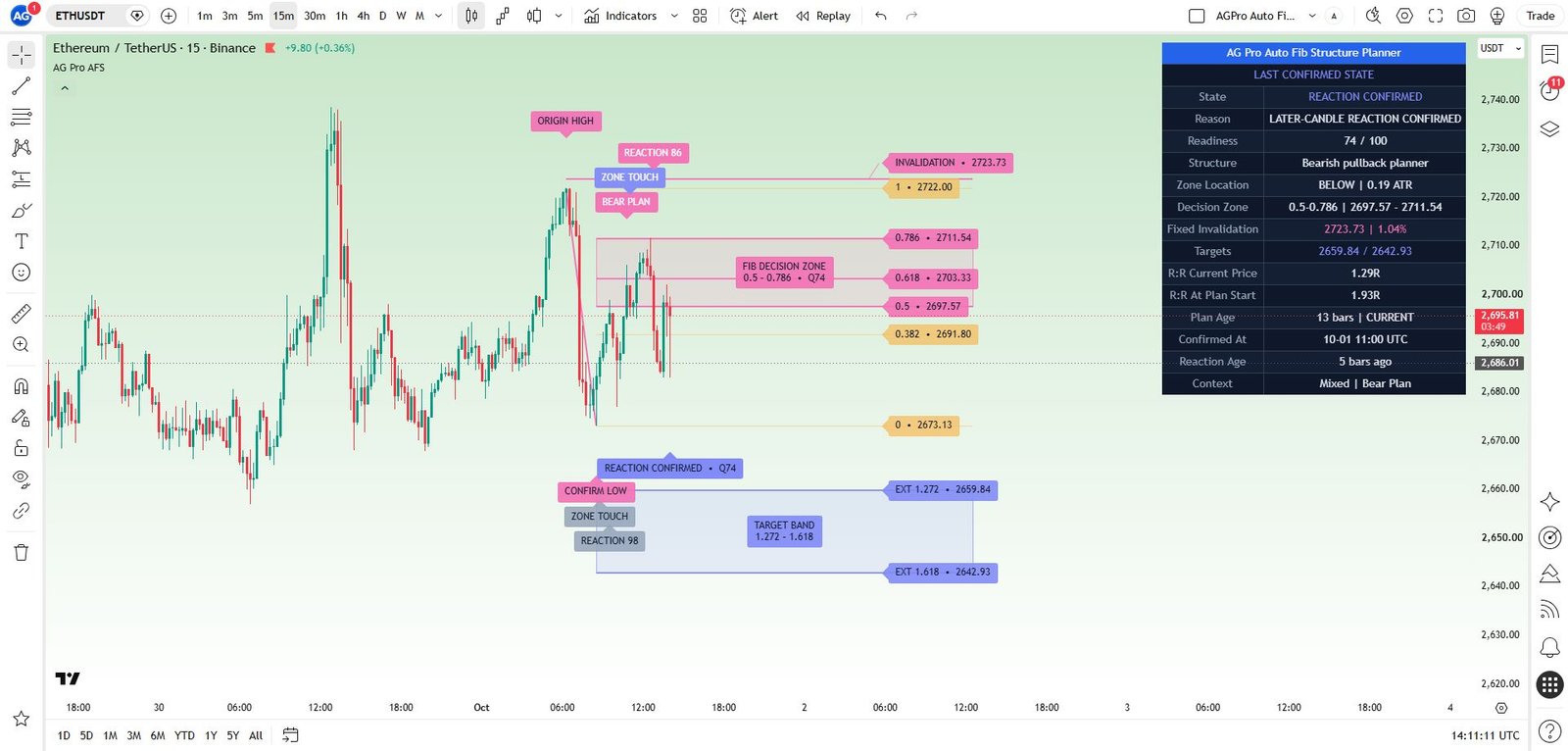
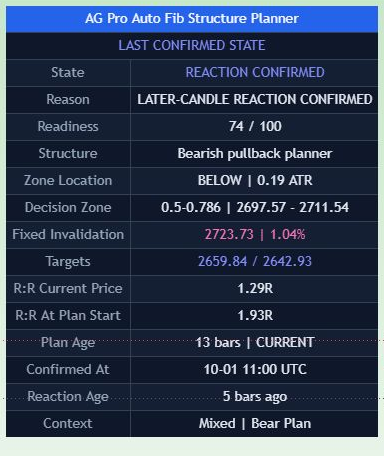
Fibonacci structure review
TradingView Pine Script Workflow
Auto Fib Structure Planner [AGPro Series]
5-Year Access, one-time payment. Manual TradingView activation. TradingView and data fees are separate.
Get Access — $149$149.00
Keep your Fibonacci levels tied to visible swing anchors.
A confirmed swing anchors the Fibonacci decision zone, continuation target band and invalidation reference. Review the visible anchors and distinguish Zone Ready context from a later confirmed price reaction.
- One focused workflow
- 5-Year Access · one-time
- Manual TradingView activation
Already paid through Whop? Get TradingView access help
View actual chart & all settings First gallery image: full historical TradingView chart. Second image: historical panel detail. Open the full chart for context; no live signal or performance record.
Manual TradingView activation
Submit the exact TradingView username at checkout. Manual review begins after verified payment; access confirmation follows when activation is complete.
One-time payment. No subscription. Available payment methods are shown before order placement.
Need help before purchase? Ask AGProLabs →
Inside Auto Fib Structure Planner
Turn a confirmed Fibonacci leg into a complete structure review.
Auto Fib Structure Planner organizes a confirmed swing leg into a Fibonacci planning framework. It maps retracement and extension references alongside a decision zone, target band, invalidation reference, reaction state, target progress and 0-100 readiness score. The useful distinction is between simply having Fibonacci lines on a chart and knowing which confirmed leg they belong to, where price is interacting with the framework and what still needs to happen before the plan deserves closer review.
Choose with a clear purpose
What this workflow helps you inspect.
For traders studying pullbacks within confirmed swing structure who want Fibonacci areas tied to visible anchors and a staged reaction review.
- See the origin and confirmation anchors behind the active Fibonacci framework.
- Review decision-zone interaction beside target room and invalidation geometry.
- Distinguish context-based Zone Ready from a later confirmed price reaction.
Read the detailed workflow fit
- For traders who already use Fibonacci retracements and extensions and want a repeatable, chart-based structure workflow. It is strongest when visible swings and sufficient history allow a meaningful confirmed leg to form. It is not a full harmonic-pattern suite, a stop-loss recommendation service or a tool that forces a plan onto every market.
Inspect interface detail Confirmed structure with visible origin and confirmation
A Fibonacci map is difficult to evaluate when its chosen anchors are unclear.
Decision zone, target band and invalidation geometry
Retracement levels alone leave the relationship between the review area, invalidation and available target room scattered.
Reaction and readiness through a staged workflow
A valid leg does not mean price is currently in a useful place to evaluate a plan.
See what each layer contributes.
Open a module to explore its purpose, practical interpretation and boundaries. Examples describe a review process; they are not promises of a trading result.
01Confirmed structure with visible origin and confirmationA Fibonacci map is difficult to evaluate when its chosen anchors are unclear.
Confirmed pivot logic identifies swing highs and lows. The active diagonal leg connects the origin swing with the confirmation swing, and labels identify both anchors. Pivot depth controls how many bars are required on each side before a swing joins the map. Wick or body references let the user choose full candle extremes or a body-based structure view. The deviation input filters small pivot changes. Minimum Leg Size ATR scales the structure-quality component of readiness; it does not independently reject an otherwise valid leg.
A practical reading
Begin at the origin and confirmation labels, then check whether that specific leg is the structure you intended to review.
Keep in view: Confirmed pivots appear after subsequent bars. A clean historical anchor should not be mistaken for a swing known at its extreme in real time.
02Decision zone, target band and invalidation geometryRetracement levels alone leave the relationship between the review area, invalidation and available target room scattered.
The active Fibonacci framework places the decision zone, continuation target band and invalidation reference around the confirmed leg. These references create a map for observing price interaction rather than a requirement to trade a particular ratio. The target-progress and target-room context help distinguish a pullback under review from a move that has already progressed toward its projected area.
A practical reading
When price approaches the decision zone, compare the invalidation distance with the remaining target room before interpreting readiness.
Keep in view: Projected Fibonacci areas can fail. A plotted target band is a structural reference, not a promised destination or executable payoff.
03Reaction and readiness through a staged workflowA valid leg does not mean price is currently in a useful place to evaluate a plan.
Wait Structure, Wait Pullback, Watch Reaction, Zone Ready and Reaction Confirmed distinguish separate stages. Zone Ready is a context-score qualification around the decision area; Reaction Confirmed requires its own completed-candle event. Target and invalidation context continue the frozen plan lifecycle, while freshness limits can prevent an old unfinished plan from upgrading to readiness.
A practical reading
Wait Pullback means the structure exists but price has not reached the relevant area. It is a reason to preserve context, not to invent an early entry.
Keep in view: Zone Ready is a context threshold, not confirmed price reaction or a trade instruction. Reaction confirmation is a separate later-candle event, and neither state guarantees continuation.
Understand the controls before changing them.
Explore the main controls and control groups below. Read the current TradingView Inputs and tooltips for the available values; choose a consistent configuration before reviewing its results.
Structure Pivot Depth
Sets the bars required on both sides of a confirmed swing point. Higher depth produces slower, broader structure; lower depth is more sensitive.
When to adjust
When the active swing map does not match the horizon you intend to study.
Watch for
Different depths create different legs, and confirmation always involves delay.
Use Wicks For Swings
Chooses full candle extremes when enabled or candle bodies when disabled.
When to adjust
When defining whether the framework should include wick extremes or emphasize body-based structure.
Watch for
Changing anchors can change every derived Fibonacci reference.
Minimum Swing Deviation %
Filters small pivot changes that do not materially alter the selected structure.
When to adjust
When tiny alternating swings clutter the intended map.
Watch for
Filtering also removes detail; it does not establish which future swing matters.
Minimum Leg Size ATR
Scales the structure-quality score using leg size relative to ATR. It is not a hard validity filter.
When to adjust
When defining how quickly the structure component reaches its maximum score.
Watch for
A large leg can still fail and may produce wide zones or distant projections.
Complete settings reference
Open complete settings reference
Every setting, explained.
Explore each input, its source default, available choices and practical effect before changing your configuration.
The reference shows defaults in the verified source. A preset or saved chart can retain different input values. Chart captures illustrate the interface and are not a live signal or a performance record.
From first look to a documented observation.
- Choose a chart with visible swing structure and enough history for the selected pivot depth.
- Verify the active leg's origin and confirmation, including whether wick or body references match your intended analysis.
- Read the decision zone, target band and invalidation reference as one geometry before focusing on an individual Fibonacci level.
- Distinguish waiting, reaction and readiness states. Inspect price behavior in the decision area rather than treating the score as a stand-alone instruction.
- Follow target progress or invalidation context and record the framework used in your review; retain independent risk and execution rules.
Answers specific to this workflow.
Why does a swing appear after its extreme?
The workflow uses confirmed pivots. Subsequent bars must establish the swing before it can enter the structure map.
Does every chart receive a ready plan?
No. Wait Structure and Wait Pullback are meaningful outputs. The tool is designed to organize a qualified framework rather than manufacture constant activity.
Does a target band predict the next move?
No. It is a Fibonacci projection tied to a specific confirmed leg. Price can fail to reach it or invalidate the framework.
Can swing references use candle bodies instead of wicks?
Yes. Use Wicks For Swings selects full candle extremes when enabled and body-based references when disabled. This changes the structural anchors and resulting framework, so keep the choice consistent when comparing charts or configurations.
Product overview and access scope
Auto Fib Structure Planner is a premium Fibonacci market structure planning engine for TradingView. It turns confirmed swing structure into a complete visual planning cockpit with an active Fibonacci framework, decision zone, target band, invalidation reference, readiness score, reaction state, and next-action context.
5-Year Access only. Manual activation for one TradingView username after verified payment.
Product-specific chart proof
Which confirmed Fibonacci structure leg has enough quality, reaction, risk geometry, and target room to deserve real planning attention?
Which confirmed Fibonacci structure leg has enough quality, reaction, risk geometry, and target room to deserve real planning attention? Auto Fib Structure Planner turns that question into a repeatable TradingView review process.
What it organizes
Auto Fib Structure Planner is a premium Fibonacci market structure planning engine for TradingView. It turns confirmed swing structure into a complete visual planning cockpit with an active Fibonacci framework, decision zone, target band, invalidation reference, readiness score, reaction state, and next-action context.
Analytical and educational use only. No auto-trading, broker execution, financial advice or guaranteed outcome.
Complete product intelligence
Understand the workflow before you activate it.
Purpose, methodology, chart language, operating conditions, controls and limitations are presented below so you can evaluate fit before purchase.
System, Purpose & Difference What the workflow exists to solve, what it produces and why its design differs from generic signal tools.
Core Idea
Which confirmed Fibonacci structure leg has enough quality, reaction, risk geometry, and target room to deserve real planning attention?
What This Workflow Does
Auto Fib Structure Planner is a premium Fibonacci market structure planning engine for TradingView. It turns confirmed swing structure into a complete visual planning cockpit with an active Fibonacci framework, decision zone, target band, invalidation reference, readiness score, reaction state, and next-action context.
The script is built for traders who use Fibonacci retracement and extension logic but want more than a set of static lines. It detects the active confirmed structure leg, maps the relevant retracement area, projects the continuation target band, evaluates invalidation distance, reads reaction behavior, and converts the full setup into a 0-100 planning score.
The purpose is not to predict price.
The purpose is to organize the chart.
Purpose & Design Philosophy
Most Fibonacci tools draw levels.
This workflow connects the confirmed structure leg with the decision zone, reaction state, invalidation reference, and target room.
Why It Is Different
Most Fibonacci indicators focus on drawing retracement levels from a selected high and low.
Most signal indicators ignore the structure leg and print directional labels without explaining the plan.
Auto Fib Structure Planner does something different.
It creates a complete Fibonacci structure workflow:
- confirmed swing leg
- active fib framework
- decision zone
- projected target band
- invalidation reference
- reaction state
- readiness score
- target progress
- panel summary
- alert-ready state logic
The script does not ask only: "Is price bullish or bearish?"
It evaluates the confirmed leg, reaction state, readiness score, invalidation distance, and target room.
Methodology & Chart Language How context is processed and how zones, labels, colors, panels and visual states should be read.
Methodology
- Confirmed Swing Detection
The script uses confirmed pivot logic to identify meaningful swing highs and lows. The pivot setting controls how many bars must appear on both sides of a swing point before it becomes part of the structure map.
Higher pivot depth creates slower but cleaner swings.
Lower pivot depth creates faster but more sensitive swing updates.
The default is designed for a balanced structure workflow.
- Wick / Body Swing Source
The script can use wick-based or body-based swing references.
Wick mode captures the full market extreme.
Body mode creates a cleaner close-based structure map.
This allows the user to choose between full-range structure and cleaner structural filtering.
- Deviation Filtering
Very small alternating pivots can create noisy Fibonacci legs. Minimum Swing Deviation % filters very small pivot changes that do not meaningfully change structure.
How to Read the Chart
Active Swing Leg:
The diagonal line connects the origin swing and the confirmation swing used by the current Fibonacci framework.
This is the structure leg that drives the script.
Origin Label:
The origin label marks the swing where the active leg began.
For bullish plans, this is usually an origin low.
For bearish plans, this is usually an origin high.
Confirmation Label:
The confirmation label marks the swing that completed the active leg.
This helps the user see why the current Fibonacci framework exists.
Fib Levels:
The horizontal fib labels identify key retracement and extension references.
Signals, States & Alerts What each visible state represents and when an alert marks a condition that deserves attention.
Signals & States
- WAIT STRUCTURE → no qualified confirmed swing framework is active yet
- WAIT PULLBACK → structure exists, but price has not yet reached the decision area
- WATCH REACTION → price is inside or near the decision zone and reaction behavior should be observed
- ZONE READY → the composite context score reached the selected threshold; a confirmed reaction is a separate later-candle event
- TARGET WATCH → price reacted or progressed enough for target-room monitoring
Best Conditions & When to Step Back Where the workflow is most useful, which conditions weaken interpretation and how context changes the reading.
When to Use
Auto Fib Structure Planner is most useful when:
- a market has visible swing structure
- price is pulling back within a confirmed leg
- higher-timeframe planning matters
- continuation structure is being reviewed
- invalidation and target room need to be visible
- a trader wants a repeatable Fibonacci workflow
- the chart has enough history for meaningful swing confirmation
When Not to Use
The script may be less useful during:
- extremely low liquidity
- chaotic news-driven candles
- very tight sideways chop
- markets with poor historical data
- instruments where Fibonacci structure has no visible relevance
- timeframes that are too low for the selected pivot depth
- conditions where spreads and execution risk dominate structure quality
The script is not designed to force a plan on every chart.
Sometimes the correct output is simply to wait.
Controls, Interface & Practical Workflow The main inputs, visual controls and a repeatable sequence for using the workflow without losing chart clarity.
Key Inputs
Structure Pivot Depth:
Controls how many bars are required on each side of a confirmed swing point.
Higher values create slower but cleaner structure.
Use Wicks For Swings:
When enabled, swing highs and lows use full candle wicks.
When disabled, the script uses candle bodies for a cleaner close-based structure map.
Minimum Swing Deviation %:
Filters very small pivot changes that do not meaningfully change structure.
Minimum Leg Size ATR:
Sets the ATR-relative scale used by the structure-quality component of the readiness score.
It does not independently reject a smaller otherwise valid leg.
Boundaries, Limitations & Risk What the workflow does not do, where its outputs can weaken and the risk boundaries every buyer should understand.
What This Workflow Is Not
Auto Fib Structure Planner is not:
- a prediction engine
- financial advice
- an auto-trading system
- a guaranteed signal generator
- a broker execution tool
- a stop-loss recommendation tool
- a full harmonic pattern suite
- a replacement for risk management
- a replacement for trader judgment
Limitations & Transparency
Confirmed pivots naturally arrive with delay.
Different pivot depths create different structure maps.
Different timeframes can produce different active legs.
Very large higher-timeframe swings can produce wide zones and distant projections.
Low liquidity can reduce structure reliability.
High volatility can change invalidation and target geometry quickly.
The script works best when the market has visible swing structure.
It is designed to organize analysis, not remove uncertainty.
Risk Disclosure
Trading involves risk.
Markets can move unexpectedly.
Past behavior does not guarantee future results.
Fibonacci levels can fail.
Confirmed structures can invalidate.
High volatility can change risk conditions quickly.
This script is provided for educational and analytical purposes only.
It does not provide financial advice.
Users remain fully responsible for their own decisions, risk management, and trading activity.
5-Year Access & Delivery The access term, payment-to-activation sequence and the TradingView username required for manual delivery.
5-Year Access & Delivery
- New-purchase access: At least five years of access — 1,827 days from purchase. One-time payment; no automatic renewal.
- One TradingView username: submit the exact username during checkout.
- Manual activation: invite-only access is enabled after payment confirmation.
This is an analytical and educational TradingView workflow. It does not connect to a broker, place trades, manage an account, provide financial advice, or guarantee results. Trading involves risk, and every decision remains the user's responsibility.
Before you buy
Clear access. Clear purpose. No signal-shop promises.
Auto Fib Structure Planner is delivered as a TradingView Pine Script workflow for structured analysis and chart review. Access is activated manually for the TradingView username submitted at checkout.
- TradingView accessInvite-only access is enabled after payment confirmation.
- Analysis workflowDesigned for context, structure, risk review and visual discipline.
- Not auto-tradingNo broker connection, no account management and no guaranteed outcome.
Product FAQ
Is this a TradingView Pine Script workflow?
Yes. This product is an invite-only AGPro Series workflow for use inside TradingView.
Does it trade automatically?
No. AGProLabs workflows are analytical tools. They do not connect to brokers, place trades or guarantee outcomes.
How is access activated?
Access is activated manually for the TradingView username submitted during checkout after payment confirmation.
Does access include TradingView or paid market data?
No. This purchase provides invite-only access to the selected AGProLabs workflow. It does not include a TradingView subscription or paid exchange data. Check your TradingView plan, available data, chart resources and alert capabilities for your intended workflow before ordering; contact support if unsure.
Related workflows
-
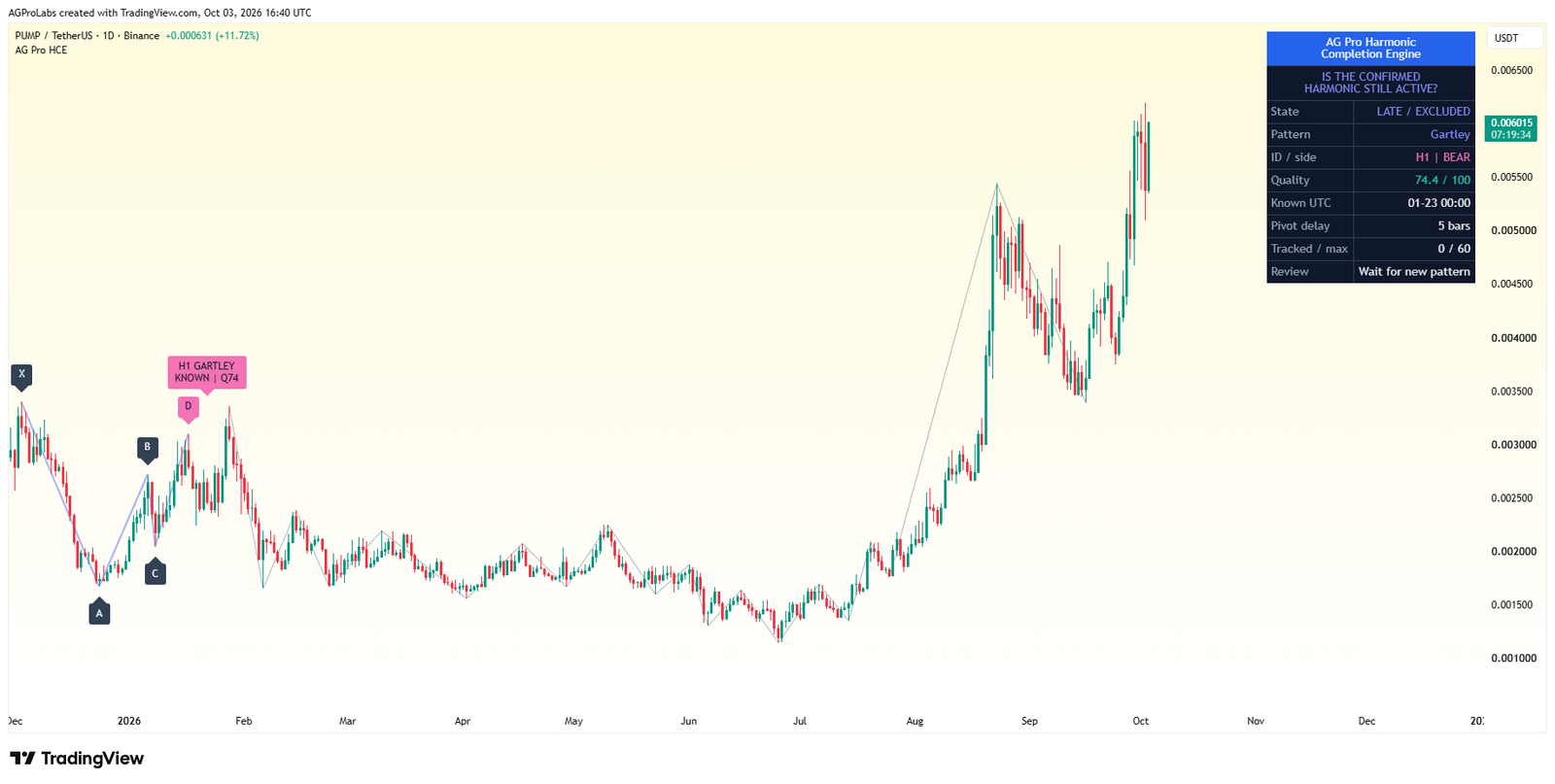
Harmonic Completion Engine [AGPro Series]
Review harmonic ratios, the potential reversal zone and current timing together.
AccessSingle workflow 5-Year Access$149.00 View workflow One 5-Year Access option. View details on the product page. -

Structure Failure Recovery Matrix [AGPro Series]
Follow failed structure through recovery, retest and failure acceptance states.
AccessSingle workflow 5-Year Access$149.00 View workflow One 5-Year Access option. View details on the product page. -
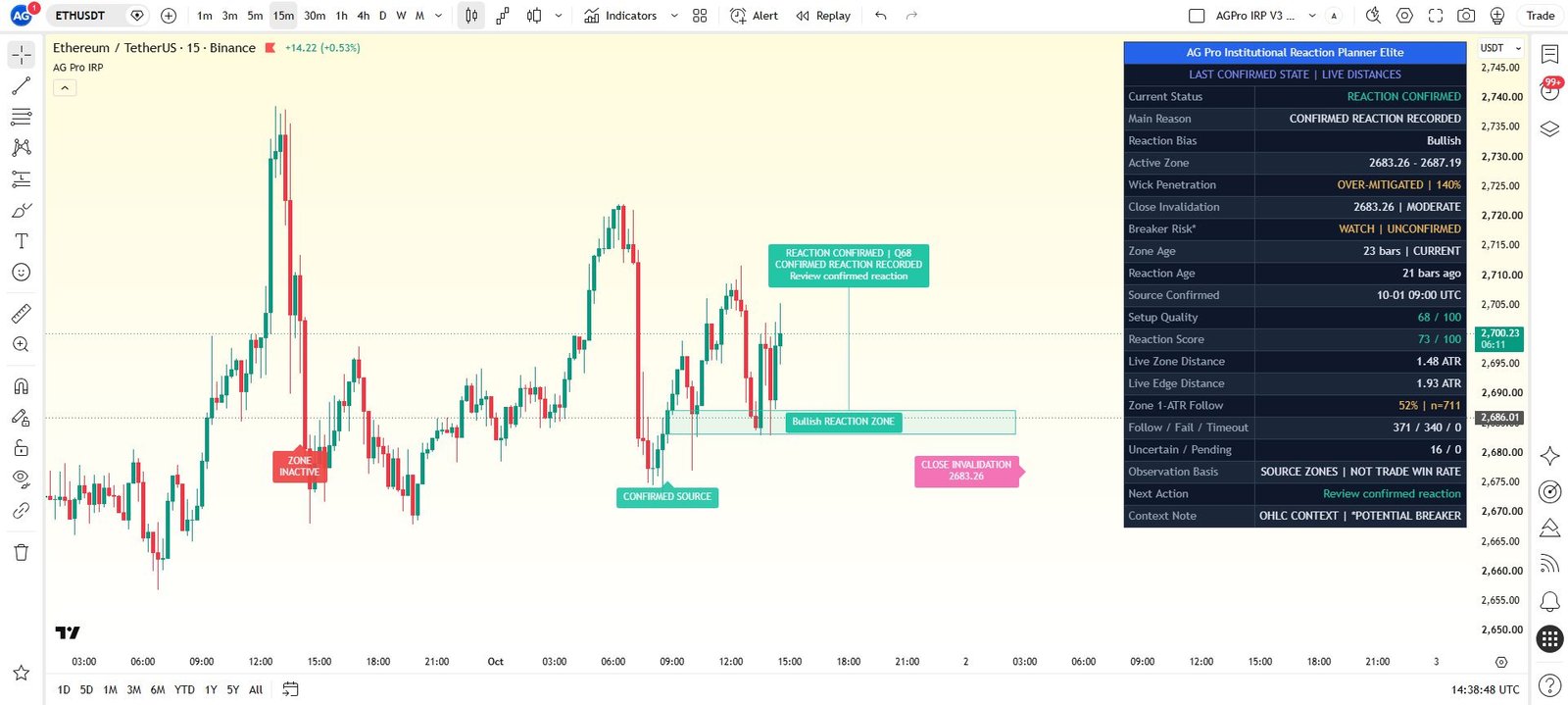
Institutional Reaction Planner Elite [AGPro Series]
Track retest depth, developing reaction and invalidation in a mapped zone.
AccessSingle workflow 5-Year Access$149.00 View workflow One 5-Year Access option. View details on the product page. -

Trade Conviction Engine [AGPro Series]
Compare six market checks before judging a setup.
AccessSingle workflow 5-Year Access$149.00 View workflow One 5-Year Access option. View details on the product page.
Compare other premium products (40)
Open a product to review its methodology, interface and access details.
Confirmation & Playbook
- Adaptive Market Playbook [AGPro Series]
- CME Gap Magnet [AGPro Series]
- Confluence Alert Engine [AGPro Series]
- Crypto Rotation Opportunity Matrix [AGPro Series]
- Crypto Setup Planner [AGPro Series]
- Divergence Reversal Decision Matrix [AGPro Series]
- Dynamic Channels Elite [AGPro Series]
- Edge Confidence Gauge [AGPro Series]
- Edge Consistency Gauge [AGPro Series]
- Expected Move Cone [AGPro Series]
- Market Confirmation Engine [AGPro Series]
- Market Tradability Gate [AGPro Series]
- Rejection Block Execution Planner [AGPro Series]
- Seasonal Edge Clock [AGPro Series]
- Support Resistance Continuation Matrix [AGPro Series]
- Trade Edge Profiler [AGPro Series]
- VWAP Acceptance Execution Matrix [AGPro Series]
Defense & Management
Liquidity & Reclaim
Platform Access
Risk & Execution
- Position Scaling Engine [AGPro Series]
- R-Expectancy Surface [AGPro Series]
- Risk of Ruin Engine [AGPro Series]
- Risk Reward Execution Matrix [AGPro Series]
- Target Ladder Confluence Planner [AGPro Series]
- Trade Excursion Engine [AGPro Series]
- Trade Management Planner Elite [AGPro Series]
- Trade Outcome Simulator [AGPro Series]