
![Crypto Setup Planner [AGPro Series] — code-verified multi-symbol planning dashboard](https://www.agprolabs.com/wp-content/uploads/2026/08/agprolabs_crypto_setup_planner_product_web.png)
Confirmation & Playbook
TradingView Pine Script Workflow
Crypto Setup Planner [AGPro Series]
$149.00
Turn a crowded crypto watchlist into a focused shortlist. Explore 394 crypto symbols across 11 groups, scanning up to 39 at a time. Compare readiness, eligibility and risk with nine workflow profiles inside TradingView.
Lifetime Access · one-time payment. Manual activation for one TradingView username after verified payment.
- One focused workflow
- Lifetime Access · one-time
- Manual TradingView activation
Manual TradingView activation
Submit the exact TradingView username at checkout. Manual review begins after verified payment; access confirmation follows when activation is complete.
One-time payment. No subscription. Available payment methods are shown before order placement.
Need help before purchase? Ask AGProLabs →
See the setup. Understand the constraints.
A real TradingView view of the 39-symbol scan, with the top 10 candidates displayed. Compare readiness, eligibility, stop distance, targets and risk flags in one panel.
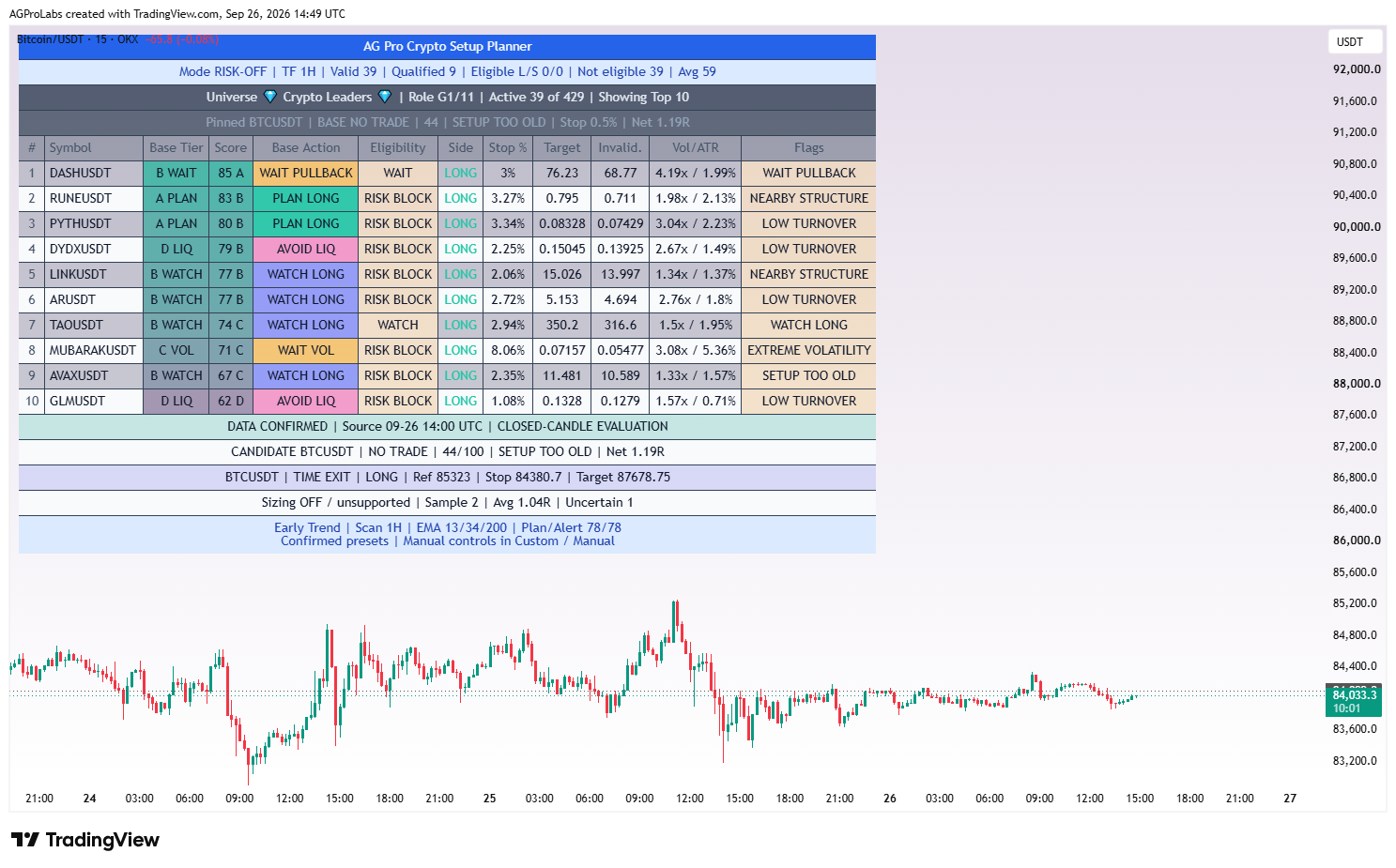
Product-specific chart proof
Which crypto setups deserve your attention—and which carry a reason to wait?
Which crypto setups deserve your attention—and which carry a reason to wait? Crypto Setup Planner turns that question into a repeatable TradingView review process.
![Crypto Setup Planner [AGPro Series] — code-verified multi-symbol planning dashboard](https://www.agprolabs.com/wp-content/uploads/2026/08/agprolabs_crypto_setup_planner_product_web-600x600.png)
What it organizes
Turn a crowded crypto watchlist into a structured shortlist. Crypto Setup Planner brings multi-symbol screening, readiness ranking and risk-aware planning together inside TradingView.
Analytical and educational use only. No auto-trading, broker execution, financial advice or guaranteed outcome.
Complete product intelligence
Understand the workflow before you activate it.
Purpose, methodology, chart language, operating conditions, controls and limitations are presented below so you can evaluate fit before purchase.
System, Purpose & Difference What the workflow exists to solve, what it produces and why its design differs from generic signal tools.
Core Idea
Which crypto setups deserve your attention—and which carry a reason to wait?
What This Workflow Does
Turn a crowded crypto watchlist into a structured shortlist. Crypto Setup Planner brings multi-symbol screening, readiness ranking and risk-aware planning together inside TradingView.
V1.7 includes 394 unique crypto symbols across 11 selectable groups. Each script instance scans one selected group of up to 39 symbols and ranks its candidates in one dashboard. Switch groups to explore the wider universe; the script does not scan all 394 simultaneously or rotate groups automatically.
Compare directional context, readiness, eligibility, stop distance, projected targets, invalidation, relative volume and ATR without opening every chart first. Eight additional non-crypto market groups remain available.
Purpose & Design Philosophy
Spend your review time on a manageable shortlist. The planner separates an interesting analytical setup from a candidate that passes its risk and data checks, helping you see both the opportunity and the reason to stand aside.
A closer look at every planning feature
Build your shortlist, understand each candidate and keep the original plan visible as the market develops. These tools work together inside the same TradingView workspace.
01 · Broader crypto coverage, organized into manageable groups
Explore 394 unique Binance USDT spot symbols in 11 crypto groups. The original 39-symbol Group 1 remains intact. Ranked groups extend coverage using a fixed TradingView Rank snapshot, with duplicate membership removed. Each instance evaluates the selected group only: up to 39 symbols, with four in the final group. Membership rank organizes the universe; live readiness determines the table order.
02 · Eight additional market universes
The selector also retains Borsa Istanbul, US Stocks, India NSE, US ETFs, Germany XETRA, Hong Kong / China H-Shares, Japan TSE and UK LSE groups. Review different markets through the same analytical framework, while accounting for their own sessions, quote currencies and data availability.
03 · Editable symbol lists
Keep the supplied universe or customize it. Ranked crypto groups use compact comma-separated symbol lists with a maximum of 39 entries. Select the group you want to evaluate; group changes do not start a background scan of the entire catalog.
04 · Multi-factor readiness scoring
Fast, slow and macro EMA context is combined with structure, momentum, participation, risk and freshness. Scores organize attention consistently across the active group. A higher score expresses stronger alignment with the selected rules, not a measured probability of profit.
05 · A separate eligibility decision
Professional mode keeps the analytical Base Action separate from data and risk eligibility. A candidate can display PLAN LONG while its Eligibility remains RISK BLOCK. This distinction helps prevent an attractive score from hiding a practical constraint.
06 · Explainable blockers
Flags explain conditions such as low turnover, weak participation, excessive stop distance, nearby structure, stale setups, insufficient history and directional conflict. Read the reason before opening a trade idea. Hiding Flags preserves the checks; the Eligibility tooltip remains available in Professional mode.
07 · Flexible filtering and sorting
Choose Planner View, Show All, Long Bias, Short Bias, High Readiness or Risk Alerts. Sort by Readiness, Risk Control, Relative Volume, ATR% or Change%, in ascending or descending order. Display between 3 and 39 recommendation rows and optionally hide unavailable symbols. Showing fewer rows keeps the panel compact without reducing the selected group's scan.
08 · An independent pinned-symbol focus
Pin a symbol to keep its state, score and planning references in view even when it is outside the active group. Enable or disable pinned-symbol alerts separately. Chart drawings and planner labels appear only when the pinned symbol matches the chart, helping keep one instrument's levels off another instrument's price scale.
09 · Stop, target and invalidation references
Compare the price distance to invalidation with a projected reward reference. In Custom / Manual, choose Classic, Structure or Hybrid invalidation. Structure uses a reference swing with an ATR buffer. Hybrid uses the farther structural or ATR distance instead of tightening the stop merely to produce a smaller risk number.
10 · Cost-adjusted risk/reward
Enter estimated fees and adverse slippage per side. The professional model evaluates projected net reward relative to estimated loss including those assumptions. This helps expose setups whose apparent reward is weakened by costs. Net R is arithmetic, not an expected-return estimate; funding, taxes and actual spread are not modeled.
11 · Room to opposing structure
The planner checks whether a mapped boundary lies too close in the candidate's path. A setup can be blocked when available room is insufficient relative to its risk distance. An absence of a mapped obstacle does not mean the market is obstacle-free.
12 · Liquidity and participation screening
Relative volume compares participation with its average. Professional liquidity checks use approximate quote turnover, with Quote / Bar or Quote / Hour controls in manual mode. Thresholds use the instrument's quote currency, not an automatic USD conversion. Auto, Base, Quote and Unknown volume-unit controls support feed interpretation; unknown units can block liquidity-checked plans.
13 · Volatility and data-health controls
ATR context helps distinguish ordinary movement from extreme volatility. Professional checks also assess source-candle confirmation, history and data age. Session-market gaps are identified as session/feed gaps because a closed exchange and a delayed feed cannot always be distinguished.
14 · Setup age and directional clarity
First-trigger age counts source bars since the breakout episode or EMA cross began. Continuing expansion does not continually reset the clock. A minimum gap between long and short readiness helps identify conflicting directional evidence.
15 · Qualified breakout assessment
Early Trend, Early Trend Adaptive, Intraday Early Warning and Leveraged Momentum use Qualified Breakout rules. Freshness, distance from the original breakout boundary in ATR units, relative volume and directional candle-close location are checked together. A qualifying fresh breakout can pass the range-edge extension test; other risk gates and extreme RSI/change blocking still apply. Legacy Pullback remains available through the relevant profiles or manual settings.
16 · Nine coordinated workflow profiles
Profiles set the analysis, risk filters, plan rules and alert thresholds together. Position supports slower daily review; Swing uses 4H; Intraday and the default Early Trend use 1H. Early Trend Adaptive follows the chart, while Intraday Early Warning works on completed 5m candles. Leveraged Momentum is more aggressive; Legacy preserves earlier defaults, and Custom / Manual exposes individual controls. Full timeframe requirements are listed in Key Inputs below.
17 · Two levels of early-warning attention
Intraday Early Warning separates EARLY WATCH from CONFIRMED SETUP. The first identifies a qualified watch candidate that passes professional risk gates; the second requires a qualified plan and alert threshold. Both use completed 5m data, not a separate hourly confirmation layer. Neither is an instruction to enter a trade.
18 · Configurable group and pinned alerts
Enable long alerts, short alerts and pinned-symbol alerts according to your workflow. Custom / Manual exposes the minimum alert score and cooldown. Alerts use the group, code and settings saved at creation, so recreate them after changes. Monitoring several groups requires separately configured alerts; the indicator does not silently cycle through groups.
19 · Frozen pinned-plan tracking
When an eligible pinned plan qualifies, the tracker freezes its references so later price changes do not rewrite the original hypothesis. The plan card distinguishes its lifecycle from the current candidate state. A new eligibility episode is required after a completed plan. This is a hypothetical ledger, not a broker position or fill report.
20 · Explicit plan-trigger and expiry rules
Manual controls offer Retest Zone or Next Source Open. Retest requires a later source candle to overlap the frozen zone; Next Source Open checks the next available opening price against it. Outside-zone gaps are not assumed filled. Pending plans expire, active plans can reach a time exit, and uncertain same-bar entry/exit touches are marked ambiguous rather than credited as wins.
21 · Optional trailing reference
In Custom / Manual, enable a separate ATR trailing reference after a completed candle reaches 1R. It applies to subsequent source candles while the initial invalidation stays fixed. It is a visual planning reference and does not move an exchange stop order.
22 · Optional linear position-sizing illustration
Enter equity in the pinned instrument's quote currency, a risk budget and an unlevered allocation cap. Sizing requires explicit confirmation of linear spot/share mechanics; zero equity disables it. It is unsuitable for futures, perpetuals, options or inverse contracts and is disabled under Leveraged Momentum. The output is an illustration, not an allocation recommendation or order.
23 · A dashboard tailored to your workspace
Choose AGPro Dark, Light or Slate, six panel positions and Tiny through Large text. Independently toggle Stop Distance, Target, Invalidation, Relative Volume / ATR and Flags. Show or hide the panel, professional plan card, frozen entry zone and pinned target/invalidation references as needed.
24 · Controlled chart-label density
Choose Action Changes, Strong Setups or All Qualified label modes. Set font size, cooldown, a maximum of 1–20 visible labels and an ATR offset to move labels away from candles. Labels focus on the pinned symbol when it matches the chart, keeping the ranked scanner and chart annotations connected.
Why It Is Different
- Selection plus context: rank the active group using trend, structure, momentum and participation rather than percentage change alone.
- Readiness plus eligibility: a high score can still carry a risk block. The dashboard makes that distinction visible.
- Planning references together: inspect stop distance, target and invalidation alongside volatility and risk flags.
- A workflow for your pace: nine profile choices span slower position review, intraday screening, chart-adaptive analysis and manual control.
Methodology & Chart Language How context is processed and how zones, labels, colors, panels and visual states should be read.
Methodology
- Select your universe: the original Group 1 is preserved. Crypto Groups 2 onward use a fixed TradingView Rank snapshot matched to active Binance USDT spot pairs when the release was prepared. Groups 1–10 contain 39 symbols each; Crypto Group 11 contains four.
- Evaluate context: EMA alignment, recent structure, momentum, relative volume and ATR contribute to the analytical assessment.
- Apply eligibility checks: data history, liquidity, participation, volatility, setup age, directional conflict, stop width and nearby structure can prevent promotion.
- Rank and review: the active group's candidates are displayed with their states and planning references. Open the individual chart before making a decision.
Ranked-group membership is a release snapshot, not a live market-cap ranking. Editable symbol lists allow customization within the 39-symbol group limit. Listings and data availability can change.
How to Read the Chart
- Score and Base Action: summarize analytical readiness and the candidate's directional state. A score is not a win probability.
- Eligibility and Flags: show whether the candidate passes the applicable checks or why it is waiting or blocked. PLAN LONG or PLAN SHORT alone is not enough.
- Stop, Target and Invalidation: provide planning references. Stop % is price distance, not account risk; targets are not forecasts or guaranteed fills.
- Relative Volume / ATR: compare participation and volatility. The pinned-symbol plan card is separate from the group's ranked shortlist.
Signals, States & Alerts What each visible state represents and when an alert marks a condition that deserves attention.
Signals & States
- PLAN LONG / PLAN SHORT: base setup conditions reach the planning threshold; always inspect Eligibility.
- WATCH LONG / WATCH SHORT: a candidate deserves monitoring but is not a fully eligible plan.
- WAIT PULLBACK / WAIT VOL: conditions require further development.
- RISK BLOCK / DATA BLOCK: risk or data requirements are not satisfied; the flag explains the reason.
- NO TRADE / AVOID LIQ: the current analytical or liquidity conditions do not support a planning candidate.
Alerts Logic
Create a TradingView alert using Any alert() function call with the intended profile, group and supported interval. Alerts mark qualifying conditions under the selected settings; they are not automatic orders or trade instructions.
Intraday Early Warning evaluates completed 5-minute candles across the selected group. EARLY WATCH identifies risk-screened watch candidates; CONFIRMED SETUP requires a qualified plan. It requires a 5-minute chart and 5-minute alert interval.
Other profiles also support alerts when their conditions are met. Each alert monitors the saved group and settings. Recreate affected alerts after updating the script or changing the configuration; existing alerts do not inherit later chart changes.
Best Conditions & When to Step Back Where the workflow is most useful, which conditions weaken interpretation and how context changes the reading.
When to Use
- Compare candidates during sector rotation and broad market movement.
- Build a repeatable shortlist before reviewing individual charts.
- Separate directional interest from liquidity, volatility and risk constraints.
- Use a consistent planning framework across your chosen groups and timeframes.
When Not to Use
- Thin liquidity, missing history or unreliable exchange data can weaken the analysis.
- Fast news moves, gaps and extreme volatility can invalidate planning references quickly.
- Short timeframes can produce more noise and higher trading costs.
- A high score or green row should never replace an independent chart and risk review.
Controls, Interface & Practical Workflow The main inputs, visual controls and a repeatable sequence for using the workflow without losing chart clarity.
Key Inputs
Nine workflow choices: presets coordinate analytical settings, risk filters, planning rules and alert thresholds. Symbols, display preferences, costs, account inputs and alert switches remain under your control.
- Position: fixed 1D analysis; use a 1D or smaller chart.
- Swing: fixed 4H analysis; use a 4H or smaller chart.
- Intraday: fixed 1H analysis for daily review; use a 1H or smaller chart.
- Early Trend — default: fixed 1H analysis for early-trend candidates; use a 1H or smaller chart.
- Early Trend Adaptive: Early Trend settings with analysis following the chart timeframe.
- Intraday Early Warning: completed 5m analysis; chart and alert interval must both be 5m.
- Leveraged Momentum: aggressive 1H analysis for experienced users; use a 1H or smaller chart. It does not select leverage or model liquidation.
- Legacy V1.4: previous default parameters with analysis following the chart.
- Custom / Manual: configure individual settings and Scan Timeframe; a blank scan timeframe follows the chart. The chart must be at or below the selected scan timeframe.
A smaller chart timeframe does not accelerate a fixed profile: Early Trend on a 5m chart still analyzes completed 1H candles. Unsupported timeframe combinations block scanning and alerts. Presets are starting points, not evidence of optimized returns.
Interface & Visual Design
Choose the panel location, theme and font size. Show or hide Stop Distance, Target, Invalidation, Relative Volume / ATR and Flags to suit your workspace. Hiding a column does not disable its underlying risk checks. Pinned planner labels have adjustable visibility and sizing.
Practical Usage Workflow
- Select a crypto group and a profile that matches your review horizon.
- Use a supported chart timeframe and check the source-candle confirmation status.
- Read Eligibility and Flags alongside the score; review the individual candidate chart.
- Assess costs, stop distance, invalidation and your own position risk before acting.
- Create a separate alert for each group you want monitored, using the appropriate saved settings.
Boundaries, Limitations & Risk What the workflow does not do, where its outputs can weaken and the risk boundaries every buyer should understand.
What This Workflow Is Not
This is an invite-only TradingView analytical tool, not a prediction engine, managed account or auto-trading service. It does not connect to a broker or place trades. The default crypto universe uses spot symbols; it does not establish futures availability, funding costs or liquidation safety. Access to a separate website screener is not included in this product.
Limitations & Transparency
Results depend on timeframe, market conditions and data quality. One instance evaluates one selected group, up to 39 symbols. Group membership does not automatically rerank with the market. Historical plan tracking is model output, not a record of executed trades. Planning levels and alerts can become outdated as conditions change.
Risk Disclosure
Trading involves risk. This product is for educational and analytical purposes only; it does not provide financial advice or guaranteed outcomes. Users remain responsible for independent analysis, costs, position sizing and trading decisions.
Lifetime Access & Delivery The access term, payment-to-activation sequence and the TradingView username required for manual delivery.
Lifetime Access & Delivery
- One-time Lifetime Access: no recurring subscription for this product.
- One TradingView username: submit your exact username during checkout.
- Manual activation: invite-only access is enabled after verified payment.
Review the Refund Policy and Risk Disclosure before purchase. For a genuine technical issue, use the technical support guide.
Before you buy
Clear access. Clear purpose. No signal-shop promises.
Crypto Setup Planner is delivered as a TradingView Pine Script workflow for structured analysis and chart review. Access is activated manually for the TradingView username submitted at checkout.
- TradingView accessInvite-only access is enabled after payment confirmation.
- Analysis workflowDesigned for context, structure, risk review and visual discipline.
- Not auto-tradingNo broker connection, no account management and no guaranteed outcome.
Product FAQ
Is this a TradingView Pine Script workflow?
Yes. This product is an invite-only AGPro Series workflow for use inside TradingView.
Does it trade automatically?
No. AGProLabs workflows are analytical tools. They do not connect to brokers, place trades or guarantee outcomes.
How is access activated?
Access is activated manually for the TradingView username submitted during checkout after payment confirmation.
Related workflows
-
![Edge Consistency Gauge [AGPro Series]](https://www.agprolabs.com/wp-content/uploads/2026/08/agprolabs_edge_consistency_gauge_product_web.png)
Edge Consistency Gauge [AGPro Series]
Built for confirmation, playbook discipline and context checks.
AccessSingle workflow Lifetime Access$149.00 View workflow This product has multiple variants. The options may be chosen on the product page -
![Rejection Block Execution Planner [AGPro Series]](https://www.agprolabs.com/wp-content/uploads/2026/08/agprolabs_rejection_block_execution_planner_product_web.png)
Rejection Block Execution Planner [AGPro Series]
Built for confirmation, playbook discipline and context checks.
AccessSingle workflow Lifetime Access$149.00 View workflow This product has multiple variants. The options may be chosen on the product page -
![Adaptive Market Playbook [AGPro Series]](https://www.agprolabs.com/wp-content/uploads/2026/08/agprolabs_adaptive_market_playbook_product_web.png)
Adaptive Market Playbook [AGPro Series]
Built for confirmation, playbook discipline and context checks.
AccessSingle workflow Lifetime Access$149.00 View workflow This product has multiple variants. The options may be chosen on the product page -
![Seasonal Edge Clock [AGPro Series]](https://www.agprolabs.com/wp-content/uploads/2026/08/agprolabs_seasonal_edge_clock_product_web.png)
Seasonal Edge Clock [AGPro Series]
Built for confirmation, playbook discipline and context checks.
AccessSingle workflow Lifetime Access$149.00 View workflow This product has multiple variants. The options may be chosen on the product page