
TradingView Indicators & Screeners: Choose Your AGProLabs Tool
Compare candidate discovery, integrated chart analysis and dynamic channel mapping. Choose an AGProLabs tool by its job, market scope, limitations and one-time access price.
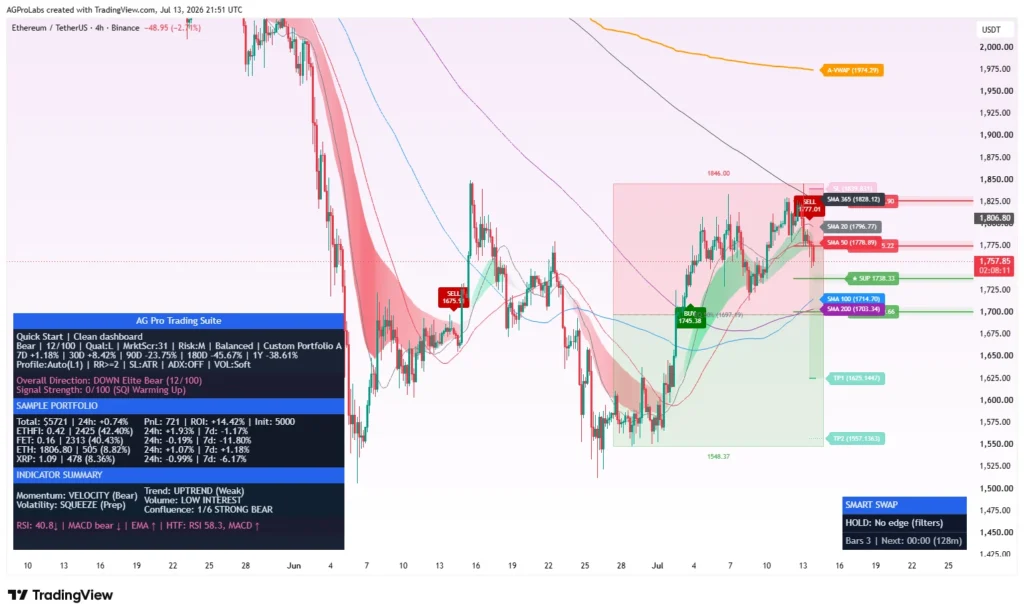
A screener, a chart-analysis workspace and a channel indicator solve different problems. Choosing between them starts with the step that consumes your time: finding charts to inspect, interpreting one chart, or mapping its channel structure. This guide compares the three AGProLabs signature tools by that job, their scope and their limits.
Quick choice: use Crypto Setup Planner for a ranked multi-symbol shortlist, Trading Suite for integrated chart and scenario review, or Dynamic Channels Elite for focused channel geometry. Combining tools can connect those stages, but one focused tool may be sufficient for your workflow.
Compare the three TradingView tools
On smaller screens, swipe the table sideways to compare all four columns.
| Tool | Main question | What you review | Lifetime Access |
|---|---|---|---|
| Crypto Setup Planner | Which symbols deserve closer inspection? | One selected group of up to 39 symbols; ranked candidates, setup families and quality blockers. | $149 one-time |
| Trading Suite | How do this chart’s context, confirmation and scenario risk fit together? | An integrated workspace for multi-timeframe context, structure, participation, scenario geometry and portfolio review. | $599 one-time |
| Dynamic Channels Elite | Which channel families and nearby rails describe current structure? | Major, minor, external and internal channels; nearest support/resistance rails, quality and ATR distance. | $149 one-time |
These are the current listed Lifetime prices at this guide’s review. Check the pricing page and selected product before purchasing. Product access and TradingView or exchange-data charges are separate considerations.
Crypto Setup Planner: candidate discovery across markets
Choose the planner when opening every watchlist chart takes too long. It applies the selected analytical profile to a controlled symbol group, ranks observations and makes quality blockers visible. The score summarizes rule alignment; it is not the probability of a profitable trade.
Despite its name, Crypto Setup Planner supports crypto, global stocks, ETFs and suitable commodity feeds available on TradingView. Its supplied universe includes 394 crypto symbols in 11 groups and eight stock/ETF baskets covering BIST, the US, India, Germany, Hong Kong, Japan, the UK and US ETFs. Editable slots allow other supported exchange-prefixed tickers, including suitable commodity feeds. A ready-made commodity basket is not included.
One instance evaluates one selected group of up to 39 symbols, with a separate pinned-symbol view. The full collection is not scanned simultaneously, and selecting a stock basket does not scan every listing on that exchange. Feed availability, history, sessions and volume quality can change which rows are usable.
- Inspect: Side, Score, Base Action, Setup, Quality and Flags.
- Keep distinct: QUALIFIED, WATCH, WAIT, BELOW SCORE and BLOCKED.
- Review next: open the exact ticker and exchange feed, check current structure and assess execution risk independently.
The current discovery interface does not produce entry prices, stops, targets or position sizes. Read the crypto exchange monitoring guide for group selection, feed comparison and alert configuration, then inspect the planner’s current dashboard and full methodology.
Read a real candidate dashboard: the five-step Crypto Setup Planner visual guide explains Score, Base Action, Quality and Flags using qualified, waiting and blocked rows from an actual screenshot.
Trading Suite: integrated analysis of the chart in front of you
Choose Trading Suite when your main problem is connecting several layers of chart evidence. Its workspace combines market state, multi-timeframe context, support and resistance, structure, value references, participation, confirmed transitions and scenario risk. Portfolio and SmartSwap views add relative review where configured.
This serves a different stage from broad candidate discovery. A promising shortlist still needs chart validation; a clear chart still needs account-level risk rules. The suite’s scenario references support that review, while HOLD and conflicting states preserve uncertainty.
Start with the TradingView technical analysis workflow. On the product page, use the real chart evidence gallery to see the interface in context. An illustration or sample portfolio is not an independently verified live performance record.
Review Trading Suite features, chart examples and access.
Dynamic Channels Elite: focused channel and rail review
Choose Dynamic Channels Elite when channel structure is the question you need to answer. It organizes pivot-based major, minor, external and internal channel families in both directions, identifies nearby structural rails and expresses distance relative to ATR.
A projected rail describes an extension of the model’s geometry. It does not predict that price will reach or respect it. Channel quality is a rule-based assessment, not a win-rate estimate. Changes in pivots, volatility and timeframe can change the active structure.
This focused view can complement a wider workspace, or stand alone when your review is specifically about channel location and breaks. Read the dynamic price channel guide and the channel tool’s methodology and screenshots.
A practical selection workflow
- Name the missing step: shortlist discovery, integrated chart interpretation or channel structure.
- Check your exact market: symbol, exchange, instrument type, available history and source timeframe.
- Read the interface and limitations: understand a blocked row or neutral state before focusing on a high score.
- Review the product evidence: match the displayed features to the current description rather than assuming every AGProLabs tool has the same functions.
- Confirm delivery: select the access option and submit the correct TradingView username.
Discover a candidate, inspect its chart, then assess whether any scenario fits your own risk constraints. A qualified scanner row does not authorize a trade, and combining indicators does not establish a statistical edge.
Lifetime Access and the Complete Platform option
Each standalone product listed above provides one-time Lifetime Access for one TradingView username. Invite-only access is activated manually after verified payment. Read How Access Works for the purchase and activation sequence and use Support to resolve a feature or delivery question before ordering.
The AGPro Complete Platform is listed at $1,499 and includes Trading Suite plus 39 focused workflows. Consider it when several distinct analytical jobs matter to your process; a larger collection is not automatically the better choice for a narrowly defined need.
Common selection questions
Does the planner automatically scan every global exchange?
No. It evaluates the selected symbol group. Global coverage comes from the supplied baskets and editable TradingView symbols, within the active-group limit and data requirements.
Does QUALIFIED mean a buy or sell instruction?
No. It means the current candidate meets the selected discovery rules. Check direction, feed, context, liquidity and your own risk rules before making any decision.
Does purchasing an indicator include TradingView or market-data fees?
The listed purchase is AGProLabs indicator access. Check your separate TradingView plan and any data requirements for the market and features you intend to use.
Can these tools trade or manage an exchange account?
No. These products provide analytical and visual information. They do not execute orders, manage an account or guarantee results.
Check the current product details before choosing
Use the three product pages for current features, screenshots and purchase options. For the broad workflow, start with the technical analysis guide; for feed selection, start with crypto exchange monitoring. Choose a tool for the question it answers, then test how its outputs behave on your intended market and timeframe.
Educational and risk disclosure
This guide is educational and analytical. It is not financial advice, a recommendation, a prediction, or a promise of results. Markets involve risk, including loss of capital. Verify information independently and remain responsible for your own decisions, execution and risk limits.
See the systems behind the framework.
Review the real interfaces, methodology, limitations and access terms before deciding whether an AGProLabs workflow fits your process.