

Multi-factor conviction
TradingView Pine Script Workflow
Trade Conviction Engine [AGPro Series]
5-Year Access, one-time payment. Manual TradingView activation. TradingView and data fees are separate.
Get Access — $149$149.00
See where your chart evidence agrees and conflicts.
Bring six market checks into one dashboard. Inspect agreement, disagreement and risk location before interpreting the candle-close conviction score.
- One focused workflow
- 5-Year Access · one-time
- Manual TradingView activation
Already paid through Whop? Get TradingView access help
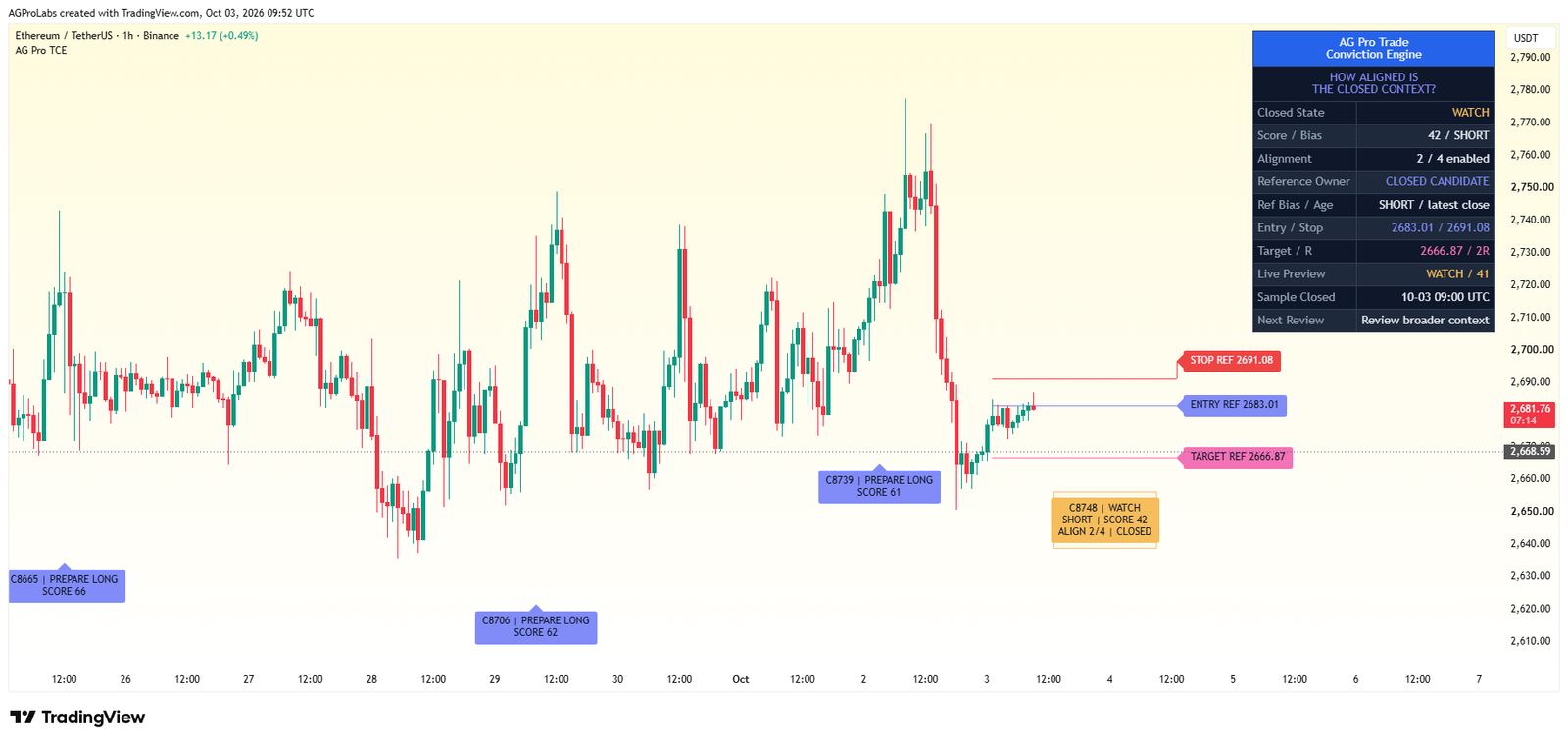
View actual chart & all settings First gallery image: historical TradingView interface. Second image: illustrative cover. Open the gallery to inspect details.
Manual TradingView activation
Submit the exact TradingView username at checkout. Manual review begins after verified payment; access confirmation follows when activation is complete.
One-time payment. No subscription. Available payment methods are shown before order placement.
Need help before purchase? Ask AGProLabs →
Inside Trade Conviction Engine
See the agreement and the conflict behind a conviction score.
Trade Conviction Engine brings six configurable components into one analytical workflow. Review the confirmed score, directional bias and context at candle close. Use Modules to see how enabled components contribute and Evidence to inspect how selected reference observations resolved.
Choose with a clear purpose
What this workflow helps you inspect.
For traders combining several chart conditions who want to explain both the agreement behind a bias and the suitability of its surrounding context.
- Inspect each module instead of relying on the blended conviction number alone.
- Separate directional votes from volatility and risk-location suitability checks.
- Read entry, risk and target references beside alignment and current state.
Read the detailed workflow fit
- For discretionary traders who already compare several market dimensions and want to inspect their agreement consistently. It is most relevant on liquid, structured charts where trend, swing and volume information are meaningful. It is not a broker connection, an automatic decision service or a replacement for evaluating whether the underlying modules fit the current market.
 Inspect interface detail
Six dimensions with different roles
Treating every indicator as another directional vote can blur the difference between direction and execution suitability.
Weighted conviction with a conflict penalty
A high average score can look persuasive even when the directional components disagree.
Risk-location references and readable state transitions
Confluence is difficult to apply when the price references and the current stage of review are unclear.
See what each layer contributes.
Open a module to explore its purpose, practical interpretation and boundaries. Examples describe a review process; they are not promises of a trading result.
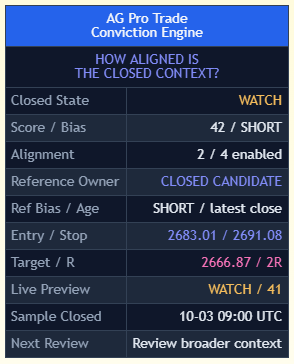
Archived TradingView panel. At the October 3, 2026, 09:00 UTC close, the panel read WATCH with a score of 42, SHORT bias, and two of four enabled directional checks aligned. Open the archived panel image. This is an interface example for interpreting the score and agreement.
01Six dimensions with different rolesTreating every indicator as another directional vote can blur the difference between direction and execution suitability.
Trend, Momentum, Structure and Volume can contribute to directional bias. Volatility contributes context without a directional vote. Risk Location also casts no vote and evaluates the reference geometry for the selected bias. Zero-weight components are excluded from the blend and directional alignment.
A practical reading
A bullish set of directional modules can still require caution if the volatility or risk-location component is weak.
Keep in view: The module scores are rule-based scales. They are not individually calibrated probabilities, and their values do not establish future performance.
02Weighted conviction with a conflict penaltyA high average score can look persuasive even when the directional components disagree.
User-adjustable weights shape the conviction score and the enabled directional vote. Disagreement reduces conviction. Overview shows the confirmed state, score, bias and alignment separately from the developing preview. Modules exposes the component readings behind the score.
A practical reading
If the score weakens while some modules remain strong, examine whether their directions conflict instead of assuming that all strength supports the same thesis.
Keep in view: Changing weights changes the model's priorities. It does not make the underlying market more aligned or validate a preferred bias.
03Risk-location references and readable state transitionsConfluence is difficult to apply when the price references and the current stage of review are unclear.
Solid entry, stop and target reference lines carry labeled price badges. They show the latest closed candidate when valid directional references are available. While a qualified Ready observation is open, its original references stay fixed even if the current bias changes.
A practical reading
In Evidence, compare target touches, resolution coverage, ambiguity and expiry before interpreting the sample. A reference touch is an observation, not a trade fill.
Keep in view: These are analytical levels and descriptive states. They do not submit orders, guarantee fills or ensure that the mapped risk reference will hold.
Understand the controls before changing them.
Explore the main controls and control groups below. Read the current TradingView Inputs and tooltips for the available values; choose a consistent configuration before reviewing its results.
Module Weights
Control the contribution of each of the six dimensions to the blended reading.
When to adjust
When defining the priorities of a documented confluence process.
Watch for
Reweighting to fit a desired conclusion changes the question rather than confirming it.
EMA lengths
Tune the trend component's observation horizon.
When to adjust
When matching trend context to the setup being reviewed.
Watch for
Different horizons can disagree without either being predictive.
RSI and ROC lengths
Set momentum-module sensitivity.
When to adjust
When specifying the pace of momentum review.
Watch for
Responsive momentum can also fluctuate more in noisy conditions.
Swing bars
Define the structural pivots used by the module.
When to adjust
When aligning structure with the intended swing scale.
Watch for
Confirmed swing detection introduces delay.
ATR lengths and volume averages
Tune volatility and volume context.
When to adjust
When defining the baseline for current market conditions.
Watch for
Feed quality and exceptional candles can affect these readings.
State Thresholds and bias decisiveness
Set where Watch, Prepare and Ready begin and how strong bias must be.
When to adjust
When specifying qualification strictness.
Watch for
More Ready states do not establish a better trading process.
Risk Location stop buffer and target R multiple
Define the structure-related risk and target reference geometry.
When to adjust
When reviewing a different planning assumption.
Watch for
The lines remain references, not managed orders or realized reward.
On-Chart Labels and spacing
Choose Ready Only, Key States Only, All Active States, or Off, and set the minimum spacing between labels.
When to adjust
When balancing state history with chart readability.
Watch for
Hidden transitions do not change the module calculations.
Panel controls
Choose Overview, Modules or Evidence. Set visibility, theme, location and font size.
When to adjust
When preserving readable factor detail in your layout.
Watch for
Do not reduce the review to the headline score alone.
Complete settings reference
Open complete settings reference
Every setting, explained.
Explore each input, its source default, available choices and practical effect before changing your configuration.
The reference shows defaults in the verified source. A preset or saved chart can retain different input values. Chart captures illustrate the interface and are not a live signal or a performance record.
From first look to a documented observation.
- Choose a chart with sufficient liquidity and meaningful structure, then inspect the six module readings individually.
- Set weights as an explicit definition of your review process rather than increasing the influence of whichever module currently agrees.
- Read directional alignment and conflict together with the headline conviction score.
- Distinguish Watch, Prepare and Ready transitions, then inspect entry, stop and target geometry before applying a separate setup plan.
- Record the model and market context for later review; keep personal execution and risk management outside the score.
Answers specific to this workflow.
Why can strong modules still produce lower conviction?
Directional disagreement incurs a conflict penalty, and direction-neutral suitability modules can also weaken the blended context.
Is the score a win probability?
No. It summarizes the configured module strengths and alignment. It does not provide a calibrated probability of a profitable trade.
Can I change which modules carry more weight?
Yes. Module Weights control each dimension's contribution to the blended reading. Record the configuration when comparing results: changing a weight changes the model's priorities, while the underlying market disagreement remains available for inspection.
Product overview and access scope
Trade Conviction Engine combines six configurable dimensions of market context into a 0–100 conviction score. Review the candle-close state and bias in Overview, enabled components in Modules, and selected reference observations in Evidence.
5-Year Access only. Manual activation for one TradingView username after verified payment.
Product-specific chart proof
How much do all your signals actually agree right now - and is this setup worth acting on? This script turns six separate market dimensions into one clear conviction score.
How much do all your signals actually agree right now - and is this setup worth acting on? This script turns six separate market dimensions into one clear conviction score. Trade Conviction Engine turns that question into a repeatable TradingView review process.

What it organizes
Trade Conviction Engine is a multi-factor confluence and decision dashboard. Instead of adding one more isolated signal to your chart, it evaluates six configurable dimensions of market context - trend, momentum, market structure, volatility, volume and risk location - and blends them into a single 0-100 conviction score.
Analytical and educational use only. No auto-trading, broker execution, financial advice or guaranteed outcome.
Complete product intelligence
Understand the workflow before you activate it.
Purpose, methodology, chart language, operating conditions, controls and limitations are presented below so you can evaluate fit before purchase.
System, Purpose & Difference What the workflow exists to solve, what it produces and why its design differs from generic signal tools.
Core Idea
How much do all your signals actually agree right now - and is this setup worth acting on? This script turns six separate market dimensions into one clear conviction score.
What This Workflow Does
Trade Conviction Engine is a multi-factor confluence and decision dashboard. Instead of adding one more isolated signal to your chart, it evaluates six configurable dimensions of market context - trend, momentum, market structure, volatility, volume and risk location - and blends them into a single 0-100 conviction score.
Alongside that score it shows a directional bias (Long, Short or Neutral), a confirmed context state, and built-in entry, stop and target reference levels derived from recent structure and your chosen reward-to-risk multiple.
It does NOT predict price, generate buy or sell orders, or automate anything. It is a structured way to read how aligned the current context is, so a discretionary trader can make a faster, more consistent assessment of setup quality and execution readiness.
Purpose & Design Philosophy
Most traders watch many indicators at once and end up making scattered, inconsistent decisions - one tool says go, another says wait, and there is no shared language between them.
Why It Is Different
Most tools focus on a single concept - one oscillator, one zone type, one structure model - and leave the trader to mentally combine everything.
This script does NOT add another standalone signal, and it does NOT hide its logic in a black box.
Methodology & Chart Language How context is processed and how zones, labels, colors, panels and visual states should be read.
Methodology
1. Six-Module Evaluation The engine evaluates enabled components and records the confirmed snapshot at chart-candle close. A zero weight excludes a component.
2. Independent Scoring Enabled components are evaluated on a 0–100 scale. Trend, Momentum, Structure and Volume can contribute to directional bias. Volatility contributes context without a directional vote. Risk Location also casts no vote and evaluates the reference geometry for the selected bias.
3. Weighted Blend Module scores are combined using user-adjustable weights into a base conviction value.
4. Conflict Penalty & Bias The net directional vote sets the bias. The more the directional modules agree with that bias, the more the base conviction is preserved; when they conflict, conviction is reduced.
How to Read the Chart
- Overview shows the closed score, bias, state, alignment and reference ownership alongside a separate live preview. Modules shows enabled component readings. Evidence summarizes selected chart observations.
- On-chart labels mark selected confirmed state transitions. The default Key States Only mode shows Prepare and Ready labels.
- Solid entry, stop and target reference lines carry labeled price badges. They show the latest closed candidate when valid directional references are available. While a qualified Ready observation is open, its original references stay fixed even if the current bias changes.
- Colors: green tones indicate bullish, pink tones bearish, amber neutral. Module values are colored by their own direction.
Signals, States & Alerts What each visible state represents and when an alert marks a condition that deserves attention.
Signals & States
- Stand Aside -> conviction is low; conditions are not aligned.
- Watch -> conviction is building; conditions are developing.
- Prepare -> alignment is strengthening; a setup may be forming.
- Ready means the closed context has reached the configured threshold with a directional bias. Opening an observation also requires valid references and an available observation slot.
- Long, Short or Neutral bias reflects the weighted vote of the enabled directional modules.
These describe the current state of the measured conditions. They are not directives to enter or exit.
Closed Observations & Evidence
A qualified Ready transition can open one observation at a time. Only later closed bars can resolve it. A bar that touches both references is counted as ambiguous, and an untouched observation can expire at the configured horizon. Evidence separates these cases from resolved target and stop touches. Reference R describes the model under those rules. It does not report trade fills or profit and loss.
Alerts Logic
Available conditions are Conviction Ready - Long, Conviction Ready - Short, Bias Flip, Enabled Module Alignment, Ready Observation Opened, and Observation Closed. The script evaluates all six at candle close. Enabled Module Alignment requires agreement across all enabled directional modules. A Ready alert marks a qualifying context change. Ready Observation Opened separately confirms that an observation was registered.
Choose the relevant condition in TradingView. Recreate an existing alert if you update the script or change its inputs. Alerts mark chart events for review and do not place orders.
Best Conditions & When to Step Back Where the workflow is most useful, which conditions weaken interpretation and how context changes the reading.
When to Use
- Clearly trending markets with defined structure.
- Markets showing healthy volatility expansion.
- Liquid instruments where structure and volume are meaningful.
- As a pre-trade confluence check before applying your own analysis.
When Not to Use
- Low-liquidity or thinly traded instruments.
- Choppy, high-noise conditions with no clear structure.
- Extreme volatility events where levels can be unreliable.
- As a standalone reason to enter or exit a position.
Controls, Interface & Practical Workflow The main inputs, visual controls and a repeatable sequence for using the workflow without losing chart clarity.
Key Inputs
- Module Weights -> change how much each dimension contributes to the blended score.
- Module Settings -> EMA lengths, RSI / ROC lengths, swing bars, ATR lengths, volume averages tune each module's sensitivity.
- State Thresholds -> set where Watch, Prepare and Ready begin, and how decisive a bias must be.
- Risk Location -> stop buffer in ATR and the target reward-to-risk multiple.
- On-Chart Labels -> Choose Ready Only, Key States Only, All Active States, or Off, and set the minimum spacing between labels.
- Panel view (Overview, Modules or Evidence), theme, location, font size and visibility.
Boundaries, Limitations & Risk What the workflow does not do, where its outputs can weaken and the risk boundaries every buyer should understand.
What This Workflow Is Not
- It is NOT a prediction engine.
- It is NOT financial advice.
- It is NOT an automated trading system.
- It does NOT generate guaranteed signals or outcomes.
Limitations & Transparency
Module behavior can vary across timeframes and instruments. Structure detection relies on confirmed swing pivots, which introduces a natural delay. Volatility and liquidity conditions affect how levels and scores appear, and changing market regimes can shift how the modules interact. Outputs should always be read in context.
Risk Disclosure
Trading involves substantial risk. This script is provided for educational and analytical purposes only and does not constitute financial advice. All trading decisions and their outcomes are the sole responsibility of the user. Past behavior of any indicator does not guarantee future results.
5-Year Access & Delivery The access term, payment-to-activation sequence and the TradingView username required for manual delivery.
5-Year Access & Delivery
- New-purchase access: At least five years of access — 1,827 days from purchase. One-time payment; no automatic renewal.
- One TradingView username: submit the exact username during checkout.
- Manual activation: invite-only access is enabled after payment confirmation.
This is an analytical and educational TradingView workflow. It does not connect to a broker, place trades, manage an account, provide financial advice, or guarantee results. Trading involves risk, and every decision remains the user's responsibility.
Before you buy
Clear access. Clear purpose. No signal-shop promises.
Trade Conviction Engine is delivered as a TradingView Pine Script workflow for structured analysis and chart review. Access is activated manually for the TradingView username submitted at checkout.
- TradingView accessInvite-only access is enabled after payment confirmation.
- Analysis workflowDesigned for context, structure, risk review and visual discipline.
- Not auto-tradingNo broker connection, no account management and no guaranteed outcome.
Product FAQ
Is this a TradingView Pine Script workflow?
Yes. This product is an invite-only AGPro Series workflow for use inside TradingView.
Does it trade automatically?
No. AGProLabs workflows are analytical tools. They do not connect to brokers, place trades or guarantee outcomes.
How is access activated?
Access is activated manually for the TradingView username submitted during checkout after payment confirmation.
Does access include TradingView or paid market data?
No. This purchase provides invite-only access to the selected AGProLabs workflow. It does not include a TradingView subscription or paid exchange data. Check your TradingView plan, available data, chart resources and alert capabilities for your intended workflow before ordering; contact support if unsure.
Related workflows
-
Trendline Retest Execution Matrix [AGPro Series]
Follow a trendline break through the retest, later holding and failure boundary.
AccessSingle workflow 5-Year Access$149.00 View workflow One 5-Year Access option. View details on the product page. -

Breaker Block Transition Planner [AGPro Series]
Follow a registered block through its qualified breaker transition and later retest.
AccessSingle workflow 5-Year Access$149.00 View workflow One 5-Year Access option. View details on the product page. -
Institutional Reaction Planner Elite [AGPro Series]
Track retest depth, developing reaction and invalidation in a mapped zone.
AccessSingle workflow 5-Year Access$149.00 View workflow One 5-Year Access option. View details on the product page. -
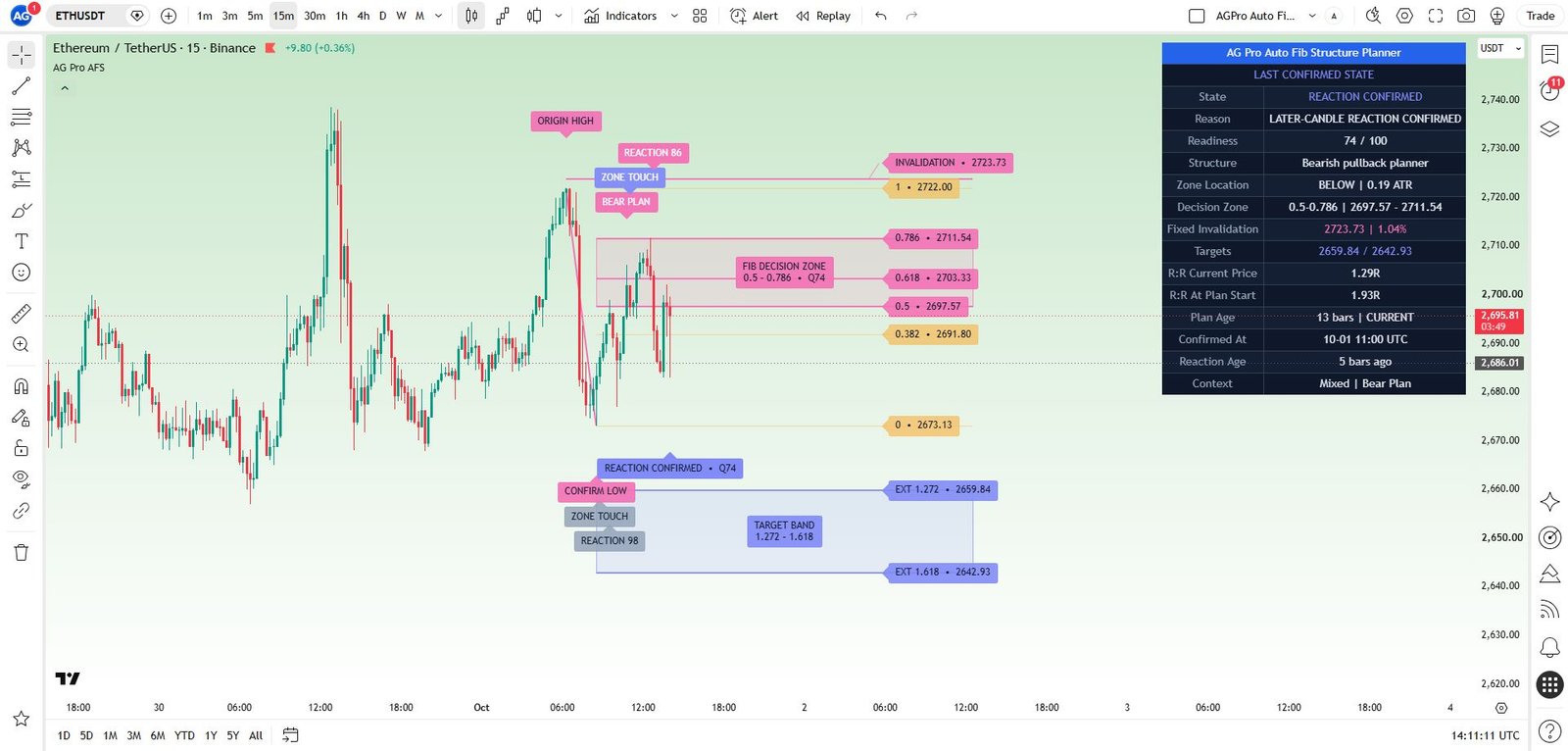
Auto Fib Structure Planner [AGPro Series]
Review pullback areas, targets and invalidation around a confirmed swing.
AccessSingle workflow 5-Year Access$149.00 View workflow One 5-Year Access option. View details on the product page.
Compare other premium products (40)
Open a product to review its methodology, interface and access details.
Confirmation & Playbook
- Adaptive Market Playbook [AGPro Series]
- CME Gap Magnet [AGPro Series]
- Confluence Alert Engine [AGPro Series]
- Crypto Rotation Opportunity Matrix [AGPro Series]
- Crypto Setup Planner [AGPro Series]
- Divergence Reversal Decision Matrix [AGPro Series]
- Dynamic Channels Elite [AGPro Series]
- Edge Confidence Gauge [AGPro Series]
- Edge Consistency Gauge [AGPro Series]
- Expected Move Cone [AGPro Series]
- Market Confirmation Engine [AGPro Series]
- Market Tradability Gate [AGPro Series]
- Rejection Block Execution Planner [AGPro Series]
- Seasonal Edge Clock [AGPro Series]
- Support Resistance Continuation Matrix [AGPro Series]
- Trade Edge Profiler [AGPro Series]
- VWAP Acceptance Execution Matrix [AGPro Series]
Defense & Management
Liquidity & Reclaim
Platform Access
Risk & Execution
- Position Scaling Engine [AGPro Series]
- R-Expectancy Surface [AGPro Series]
- Risk of Ruin Engine [AGPro Series]
- Risk Reward Execution Matrix [AGPro Series]
- Target Ladder Confluence Planner [AGPro Series]
- Trade Excursion Engine [AGPro Series]
- Trade Management Planner Elite [AGPro Series]
- Trade Outcome Simulator [AGPro Series]