
AGProLabs: Structured TradingView Analysis for Serious Traders
A transparent guide to the AGProLabs philosophy, 40 invite-only workflows and the three signature systems at the center of the product library.
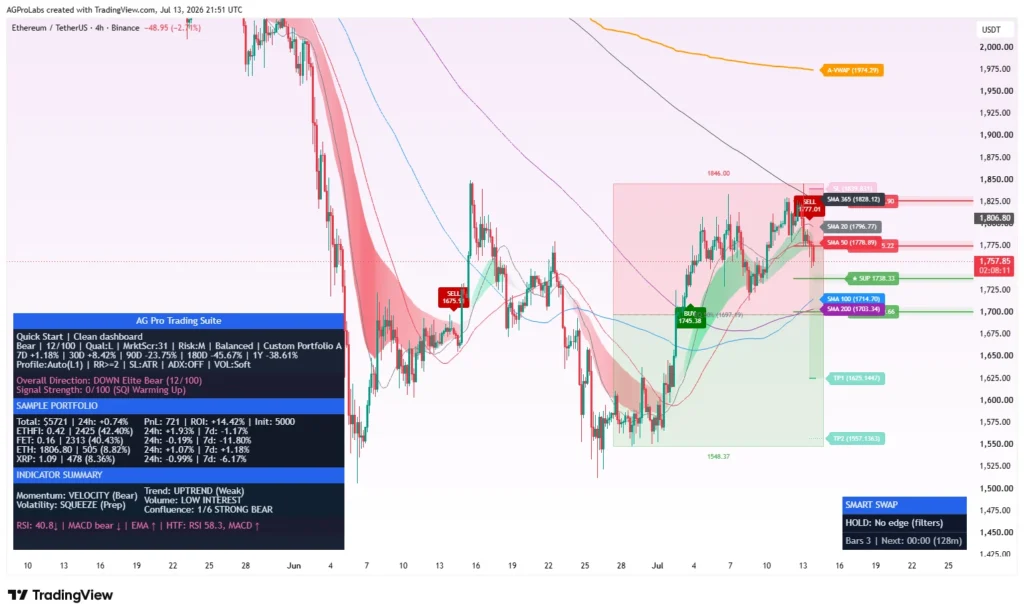
AGProLabs creates rules-based TradingView Pine Script workflows for traders who want a more organized way to read market context, structure, liquidity, participation and risk. The library is built around a simple principle: a professional chart should make relevant evidence easier to compare without pretending that uncertainty has disappeared.
What is AGProLabs?
AGProLabs is an independent TradingView script publisher with 323 published tools, including 40 invite-only premium workflows. The catalog covers focused analytical jobs such as liquidity review, market structure, confirmation, volume behavior, risk planning, trade management and portfolio comparison.
The tools are not broker connections, managed accounts or automated execution systems. They run inside TradingView and support manual analysis. Their role is to improve information organization: show what the active rules detect, show where evidence agrees or conflicts, and keep invalidation or risk context visible.
The design goal is disciplined interpretation—not manufactured certainty.
The three signature AGProLabs systems
1. Trading Suite [AGPro Series]: the flagship integrated workspace
Trading Suite [AGPro Series] connects market state, multi-timeframe context, trend references, liquidity and structure events, confirmed directional transitions, risk geometry and portfolio rotation inside one modular TradingView workspace.
Its value is not that every module always agrees. The value is that agreement and conflict are presented within one hierarchy. A local directional condition may look constructive while the broader timeframe, participation or nearby liquidity remains unsupportive. Trading Suite keeps those tensions visible and preserves WAIT, HOLD and defensive states when conditions are not coherent.
2. Crypto Setup Planner: broad opportunity review before deep analysis
Crypto Setup Planner [AGPro Series] is a multi-symbol planning dashboard. It reviews an active 39-symbol universe and ranks symbols using trend, structure, momentum, participation, volatility, liquidity and risk context. The dashboard can organize listings drawn from multiple exchanges, subject to TradingView data availability and the selected symbol group.
This solves a different problem from Trading Suite. It does not attempt to make the final decision for the trader. It helps decide which charts deserve attention first. PLAN, WATCH, WAIT and risk states are retained so the table does not become a list of forced trade ideas.
3. Dynamic Channels Elite: layered structure instead of one generic channel
Dynamic Channels Elite [AGPro Series] maps pivot-based channel families and separates major from minor, external from internal, and active from less relevant geometry. It also presents nearest rails, ATR-normalized distance and a rule-based quality context.
This is useful when the challenge is not drawing a line but deciding which of several overlapping structures matters. Projected rails remain planning references; they are not forecasts that price must respect.
How the 40-workflow library is organized
Most premium workflows are available individually with one-time Lifetime Access. Trading Suite is sold separately and is also included with all 39 focused workflows in AGPro Complete Platform. The distinction is stated throughout the site so a buyer can compare scope before checkout.
Why rules-based does not mean certain
A rules-based script applies defined calculations consistently. That can reduce discretionary inconsistency, but it cannot remove market risk. Inputs, timeframes, exchange feeds and current volatility influence output. Relationships that held during one regime may weaken in another.
- A confirmed state describes what the active rules found; it does not guarantee the next price movement.
- A support, resistance, VWAP or channel rail is a reference; it can fail.
- A target or invalidation level frames a scenario; it is not personalized position sizing.
- A ranking score compares candidates inside the selected framework; it is not an instruction to buy or sell.
How invite-only access works
Customers select a workflow, complete a supported checkout and submit the exact TradingView username that will receive access. After payment verification, AGProLabs manually activates the invite-only script for that username. This process is explained in the access guide and the product-specific purchase section.
Manual activation matters because TradingView invite-only access is tied to the submitted account. It does not create ownership of the script source, permit redistribution or allow access sharing.
Who these tools may fit—and who they may not
AGProLabs workflows may fit discretionary traders who already understand that a tool is one part of a broader process. They are most useful when the user wants repeatable review, visible risk context and a structured interface.
They are not suitable for anyone expecting guaranteed profitability, personalized advice, automated order placement, a substitute for risk management or certainty from a dashboard score. The product pages explicitly describe methodology, ideal conditions, weak conditions and limitations so expectations can be evaluated before purchase.
Sources and further reading
- TradingView: What is Pine Script?
- Official AGProLabs TradingView publication library
- AGProLabs risk disclosure
- AGProLabs product scope and pricing
Educational and risk disclosure
This guide is educational and analytical. It is not financial advice, a recommendation, a prediction, or a promise of results. Markets involve risk, including loss of capital. Verify information independently and remain responsible for your own decisions, execution and risk limits.
See the systems behind the framework.
Review the real interfaces, methodology, limitations and access terms before deciding whether an AGProLabs workflow fits your process.